Click here to buy secure, speedy, and reliable Web hosting, Cloud hosting, Agency hosting, VPS hosting, Website builder, Business email, Reach email marketing at 20% discount from our Gold Partner Hostinger You can also read 12 Top Reasons to Choose Hostinger’s Best Web Hosting
While websites may allow us to choose from certain available themes, visitors to a site do not have the liberty to change the site’s color scheme. This is disadvantageous for the visitor in case the site’s existing color scheme makes it difficult for the visitor to read text.
Whether you want to change a site’s color scheme because of this problem or because you want to have fun, you can do so via Webpage Decorator.

Webpage Decorator is a browser extension for Google Chrome. The extension provides its users with a unique feature: it lets us create our own color scheme for any website. Let me demonstrate.
Here is what the homepage for Smashingapps.com looks like by default:

Webpage Decorator’s icon is the jigsaw piece like icon in the address bar. Clicking on it presents the following:
(Ad)

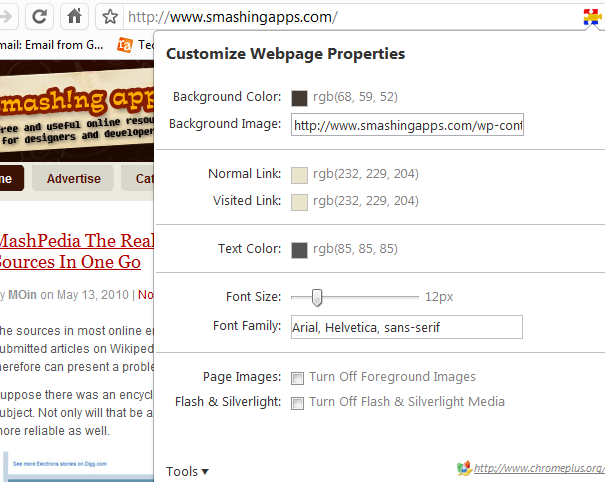
This is a window that pops and lets us choose a color scheme for the present webpage which in this case is SmashingApps.com. I changed the settings according to the image below:

As Result SmashingApps looked like this:

Given the options of colors and the ability to choose our own background images as well as disabling Flash content, gives us limitless customizations.
Like mentioned earlier, according to our use Webpage Decorator can help us read text on webpages better or simply have some fun with the color scheme. Either way, the extension serves its purpose perfectly.
Now loading...