Click here to buy secure, speedy, and reliable Web hosting, Cloud hosting, Agency hosting, VPS hosting, Website builder, Business email, Reach email marketing at 20% discount from our Gold Partner Hostinger You can also read 12 Top Reasons to Choose Hostinger’s Best Web Hosting
In the polished world of modern IT infrastructure, we are used to slick HTML5 dashboards, drag-and-drop interfaces, and dark-mode toggles. Tools like the vSphere Client (vCenter) do an excellent job of abstracting the complexity of virtualization into something manageable.
But what happens when the dashboard lies? What happens when a virtual machine is “stuck” in a state that the GUI can’t resolve? Or when you are writing an automation script and need to know the exact internal ID of a datastore?
3 VPNs That Pass All Tests (2025)
- NordVPN: Zero leaks in tests, RAM-only servers, and Threat Protection to block malware.
- Surfshark: Unlimited devices, Camouflage Mode for bypassing VPN blocks, and CleanWeb ad-blocker.
- ExpressVPN: Trusted Server tech (data wiped on reboot) and consistent streaming access.
Enter the Managed Object Browser (MOB).
For the uninitiated, the MOB is just an error message waiting to happen. For the seasoned VMware architect, it is the “Red Pill”—a way to see the Matrix of vSphere exactly as it exists in the code. This is not just a troubleshooting tool; it is the raw nervous system of your data center.
In this deep dive, we are moving beyond simple “how-to” steps. We are breaking down everything you need to know about the MOB—from its architecture to its security implications in 2026.
(Ad)

How Can I Upgrade Safari? The Guide to Fixing “Browser Not Supported” Errors
What is a Managed Object Browser?
To understand the MOB, you have to stop thinking about “Servers” and “Switches” and start thinking about Objects.
VMware vSphere is built on a massive, hierarchical object database. Every single entity in your environment—from the root folder of your datacenter down to the virtual network card on a specific Linux VM—is a “Managed Object.”
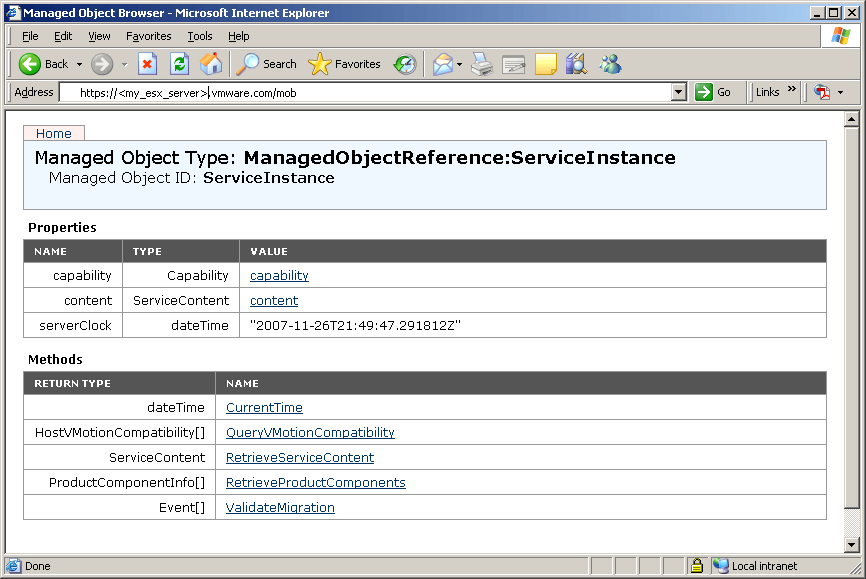
The Managed Object Browser is a server-side reflection utility embedded directly into the VMkernel. It is an HTML interface that visualizes the vSphere API.
It is not a GUI wrapper: The standard vSphere Client takes API data and makes it pretty. The MOB shows you the raw data structure.
It is actionable: You don’t just look at objects; you can execute methods. If you click
RebootGuestin the MOB, it sends the exact same API command as clicking “Restart” in the Client.
In 2026, with the rise of Infrastructure as Code (IaC) tools like Terraform, understanding the MOB is more relevant than ever. It remains the best documentation for how vSphere actually “thinks.”
What is a Server and Its Types
The “Download” Myth: Why You Can’t Find It
One of the highest volume search queries in the virtualization niche is:
“Managed object browser download”
If you are searching for this, stop immediately.
Here’s the truth: The Managed Object Browser is not software you install.
It is a built-in service that already exists inside every ESXi host and vCenter appliance.
The Risk: Many malicious sites host fake
.exefiles pretending to be “MOB installers.” These are almost always malware.The Reality: The MOB is simply a lightweight web interface. It lives at:
https://<your-esxi-or-vcenter-ip>/mob
If the page doesn’t load, you don’t need to download anything.
It’s just disabled.
The Access Protocol: Solving the “Disabled” Error
On vSphere 6.x, 7.x, and 8.x, trying to open the MOB often shows:
“The Managed Object Browser on this Server is currently disabled.”
This is not a bug. It is a security control.
But there are valid reasons to enable it temporarily.
7 Best HTML5 Animation Software to Help You Design an Elegant Website
ESXi Hosts (Local Debugging)
If you need to inspect a single ESXi host—especially when it’s disconnected from vCenter—you enable the MOB directly on the host.
The Key Setting:
Config.HostAgent.plugins.solo.enableMobHow to Enable:
ESXi Host Client → Advanced Settings → Toggle to
trueOr via SSH:
vim-cmdcommand
No Reboot: Changes apply instantly.
vCenter Server Appliance (VCSA)
Enabling the MOB on vCenter is more complex and more dangerous.
You must edit the vpxd.cfg file.
Why?
vCenter manages thousands of objects. Exposing the raw API browser on this level increases security and performance risks.
Most VMware architects recommend enabling the MOB only on ESXi hosts unless you’re debugging the vCenter service itself.
9 Free Windows Server Administration Tools
The Security Debate: Should You Disable the MOB?
Here is the uncomfortable truth:
Leaving the MOB enabled is a serious security risk.
Ransomware operators scan networks for open administrative endpoints. The MOB provides:
Full Infrastructure Mapping
Even without write access, an attacker can inventory every VM, disk, network, and cluster.Direct Action Execution
With valid credentials, an attacker can destroy VMs, modify networks, or remove storage.
This is why VMware disables the MOB by default.
How to Disable the MOB
After you finish troubleshooting:
Set
Config.HostAgent.plugins.solo.enableMobback tofalseVerify the change by revisiting the MOB URL
You should see the disabled message again
If you don’t see it, your host or vCenter is still exposed.
7 Free Server Monitoring Tools
The Hidden vSAN Layer (Advanced Insight)
A lesser-known fact: the standard MOB struggles with vSAN-specific objects.
vSAN uses its own object model: DOM objects, disk groups, components, witnesses, and more. The regular MOB often fails to display these properly.
The Solution: VMware includes a dedicated “vSAN MOB.”
Usually found at:https://<vcenter>/vsan/mobRequirement: This interface often requires RVC (Ruby vSphere Console) to initialize and show data.
This makes it a niche but valuable tool for storage architects.
Key Takeaways
Built-In, Not Downloadable: The MOB already exists inside ESXi and vCenter.
Disabled by Default: The 503 error is a safety feature.
To Enable: Toggle
Config.HostAgent.plugins.solo.enableMobon ESXi.To Disable: Turn it back off immediately after use.
Security First: The MOB exposes sensitive internal details—avoid leaving it enabled.
For vSAN: Use the dedicated vSAN MOB for storage-level object mapping.
Free Managed WordPress Hosting vs. Hostinger: The Real Cost of $0 (2026 Review)
Conclusion
The Managed Object Browser is a paradox.
It is the most transparent and honest view of your virtualization stack, revealing the exact object structure behind every operation. For architects and automation engineers, it is invaluable.
But it is also outdated, exposed, and inherently risky.
Final Verdict:
Use the MOB like a surgical tool—
enable it briefly, fix the issue, and shut it down immediately.
Don’t look for a download.
Look for the setting.
And above all, respect the API.
Now loading...