21 Free Apps For Mac OS X That Are Absolutely Useful
Smashing Apps Has Been Featured At Wordpress Showcase. If you like Smashing Apps and would like to share your love with us so you can click here to rate us.
This is the post where we are listing out few great free tools for Mac Operating System, this is an exclusive post for our those readers who are the Mac users. But our other readers will also enjoy this post. Don’t forget to bookmark this post for your future reference as it has few most useful and free application that will be helpful for you when you are on your Mac system. This is absolutely a great list of 21 Free Apps For Mac OS X That Are Absolutely Useful.
You are welcome to share if you know more free mac apps that are really useful and our readers/viewers may like. Do you want to be the first one to know the latest happenings at SmashingApps.com just subscribe to our rss feed and you can follow us on twitter as well.
You may be interested in these older posts
15 Free Tools For Mac OS X You Should Bookmark
11 Free Windows Programs Alternatives For Linux
19 Most Essential Open Source Applications That You Probably Want To Know
17 Wonderful Free Tools To Make Designers Lives Easier!
17 Online Free Web Based Applications That You Probably Would Love To Use!
17 Online Free Web Based Applications That You Probably Love To Use!
21 Online Free Web Based Applications That You Probably Would Love To Use Every Day!
23 Free And Online Web Based Applications Specially If You Are Designer Or Developer
6 Free Tools To Help You Run Windows Applications On Linux
Name Mangler is a batch file renamer that supports all common renaming tasks: Find and Replace (including support for regular expressions); Number Sequentially; Change Case; Set Extension; Add Prefix/Suffix; Remove/Insert Characters.
Backdrop is a simple utility to fill your screen with a giant blank window. Fill the window with a solid color or a custom image, your choice.
With Service Scrubber, you can restructure the services menu, change service keyboard shortcuts, disable and re-enable services.
iClockr is focused to show you a simple way to track your time.
EverSave is a clever tool which allows you to save all of your documents – if possible – in a specific time interval or by changing the frontmost application.
SyncMate FREE Edition is a perfect solution for information management. It is easy-to-use synchronizer for Mac and Pocket PC, that will help you keep all your documents, text messages, contacts, calendar entries and events and other stuff well organized.
Paparazzi is a small utility for Mac OS X that makes screenshots of webpages. This will help you to temporary access to the WebView for username/password info, so capture of pages behind a required login is now possible.
AppFresh helps you to keep all applications, widgets, preference panes and application plugins installed on your Mac up to date. All from one place, easy to use and fully integrated into Mac OS X.
NetNewsWire has a familiar three-paned interface and can fetch and display news from thousands of different websites and weblogs.
Pref Setter is an application used to edit plist (Property LIST) files, geared towards viewing / editing Mac OS X’s preference files. Very useful for setting those “hidden†preference settings that aren’t available directly in an application.
Skim is a PDF reader and note-taker for OS X. It is designed to help you read and annotate scientific papers in PDF, but is also great for viewing any PDF file.
OnyX allows you to verify the Startup Disk and the structure of its System files, run miscellaneous tasks of system maintenance, configure some hidden parameters of the Finder, Dock, Dashboard, Exposé, Safari, Login window and some of Apple’s own applications.
Witch lets you access all of your windows by pressing a shortcut and choosing from a clearly arranged list of window titles.
Cyberduck is an open source FTP, SFTP, WebDAV and Amazon S3 browser for the Mac. It features an easy to use interface that allows to toggle between bookmarks and the browser outline view.
Syrinx is a fully customizable twitter client designed for Leopard. Syrinx is built from two ideals efficient workflow and customization.
Visual NetTools is a set of network scanning, security, and administrator tools for Apple Mac useful in diagnosing networks and monitoring your computer’s network connections.
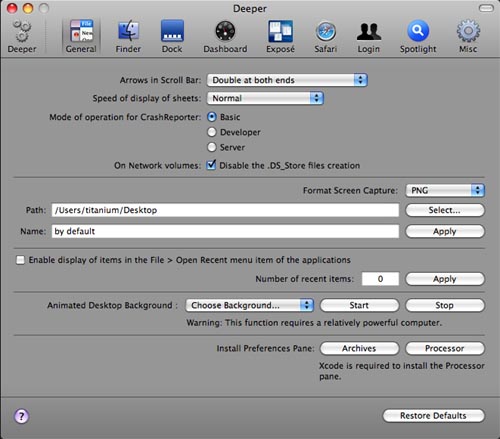
Deeper allows you to enable and disable the hidden functions of Finder, Dock, Dashboard, Exposé, Safari, Login window and many Apple’s applications.
Namely is possibly the fastest way to open applications. And unlike some other launchers, it doesn’t require any learning.
Punakea is a little app trying to help you cope with the day-to-day struggle of managing your files. Designed to complement Spotlight, it allows you to tag your files and bookmarks.
| Download free stock photos on Dreamstime. Free registration |
If you enjoyed this post, please consider to leavea comment or subscribeto the feed and get future articles delivered to your feed reader.
You May be Interested In More Interesting Free Resources
- MyFontbook, A Browser-Based Free Font Viewer
- Most Easiest & Simplest Way To Make Your Websites Mobile-Friendly
- The Best Ajax Scripts Collection
- Come Up With A Kicking Slogan For Templates.com And Win $100 In Cash And Prizes!
- jobberBase Is A Great Open-Source Job Board Software
- Easy & Secure Group Collaboration Over Email
- 7 Twitter Tools That Are Not Essential But Would Be Useful
- Krunch Multiple URLs Into One Short URL
- Timetonote, A Simple And Free CRM To Track Communications With Customers
- Free! Convert Any Media File Format (Documents, Images, Audio, Video & Archives) Without Buying Or Installing Anything On Your PC
Comments
I currently use Cyberduck, but iClock and Paparazzi sound promising. I wonder what is the difference between the current Mac screenshot function and Paparazzi is though? Is it more like PC’s SnagIt?
@shevonne
I think Paparazzi takes a picture of the whole page, not just what’s viewable on the screen at the time. if you used the built in screen cap util, all you’d get is the visible part of the page, you’d have to scroll down and take another picture to get it all (not sure if SnagIt works the same way).
actually it made the pick of the week at macosxhints:
http://www.macosxhints.com/article.php?story=20060712064929281
Elegant compilation! Thanks for sharing this. For taking screenshots of webpages, I generally like the Firefox add-on called Abduction. Alas, it chokes on really big pages, so LittleSnapper and Skitch have been coming in handy.
Does anyone know an app that does what Sizer does on Windows? That is, it allows a window to be resized to specific (pixel) dimensions? And it shows a window’s dimensions live as you grab the resize handle and move it around? I haven’t found anything like this for Mac yet, but it seems like it’d be terribly useful. BIG thanks if you can help me! =D
You left out my favorite – SnapNDrag. I use it to take screenshots of documents to paste into presentations.
Very nice list, only application I was using off this list was Cyberduck and I like it a lot. Going to try out some of these apps you mentioned, I am new to mac so this was a nice post. Thanks
Thanks to your color-scheme, I can’t read your fucking text. I’m only mildly colorblind too. Way to go.
What no quicksilver???? thats the best mac app I have found to date! http://www.blacktree.com/
[...] has a great collection of 21 Mac Apps. These really are some useful little utilities and some I haven’t heard of before. In fact, [...]
iSyncit is a useful little application to sync your devices over bluetooth without having to launch iSync and enable bluetooth etc. – http://digitalpardoe.co.uk/software/show/1
Personally I prefer Skitch for screen shots. It also does an excellent job cropping specific sections of pages. Yes, it’s free.
just fyi: this page is very buggy/hard to read in chrome. some useful apps here, but a lot of them seem like they don’t add a whole lot of value for having an entire app just for that function. worth reading though.
[...] Via Google Mac y ALT1040… ¿querés probar otras cosas para mac? Mirá esta lista de 21 aplicaciones gratis para Mac OSX de Smashing Apps [...]
I think Paparazzi takes a picture of the whole page, not just what’s viewable on the screen at the time. if you used the built in screen cap util, all you’d get is the visible part of the page, you’d have to scroll down and take another picture to get it all (not sure if SnagIt works the same way).
[...] you have been using your Mac for a while, you may want to add some more sophisticated programs. Smashing Apps has a list of free apps that can help you do things that you didn’t even know you wanted to [...]
[...] Via Google Mac y ALT1040… ¿quieres probar otras cosas para mac? Mira esta lista de 21 aplicaciones gratis para Mac OSX de Smashing Apps [...]
Are you REALLY going to leave out Quicksilver? Your comment about Namely that “it doesn’t require any learning” not only shows your dislike towards QS, but it would also get your knuckle’s slapped with a metal ruler by my 4rd grade English teacher.
I’m sorry that you weren’t able to master Quicksilver’s complicated “press two buttons at the same time” command.
NetNewsWire is pretty good though. In the future you should stick to top 10 lists.
[...] 21 Free Apps For Mac OS X That Are Absolutely Useful @ SmashingApps This is the post where we are listing out few great free tools for Mac Operating System, this is an exclusive post for our those readers who are the Mac users. But our other readers will also enjoy this post. Don’t forget to bookmark this post for your future reference as it has few most useful and free application that will be helpful for you when you are on your Mac system. This is absolutely a great list of 21 Free Apps For Mac OS X That Are Absolutely Useful. (tags: mac osx software tools free utilities apps macosx) [...]


[...] visit article [...]