Click here to buy secure, speedy, and reliable Web hosting, Cloud hosting, Agency hosting, VPS hosting, Website builder, Business email, Reach email marketing at 20% discount from our Gold Partner Hostinger You can also read 12 Top Reasons to Choose Hostinger’s Best Web Hosting
Developers loved Fig because it made the terminal friendlier: inline autocompletions, snippets, and a GUI layer for commands. But when a tool you depend on is folded into a corporate product and then shut down, it throws workflows into chaos — broken configs, missing features, and the annoying hunt for an equivalent that respects privacy and speed. If you’re asking “What is Fig Desktop?” and why your terminal suddenly behaves differently, this article explains what happened, why AWS migrated Fig’s tech into Amazon Q, what that means for day-to-day work, and how to migrate your setup with minimal friction.
TinyMCE4 has no code editor plugin at default. This plugin is a code editor plugin called “tinymce4 code editor”, you can use it in your tinymce editor to toggle code quickly and edit code.
What is Fig Desktop now?
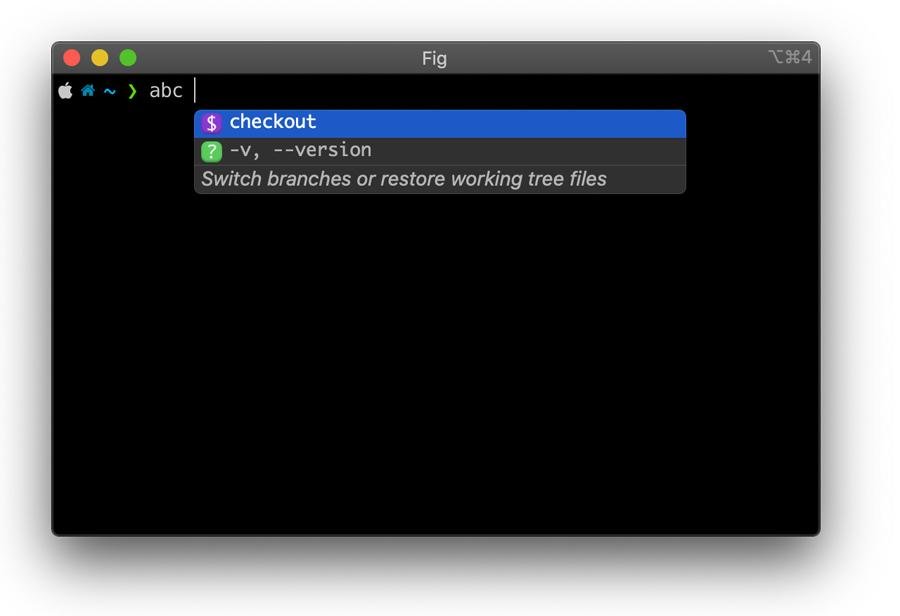
Fig Desktop was a macOS/terminal utility that provided autocompletion, inline suggestions, and a small ecosystem of shell helpers designed to make command-line work faster and less error-prone. After Fig’s team and core tech joined AWS in 2023, Fig was formally sunsetting as a standalone product and its capabilities were folded into Amazon Q — AWS’s AI assistant for developer workflows. Fig’s official message encouraged users to migrate to Amazon Q for command-line features.
Timeline you can trust (short)
Aug 28, 2023 — Fig’s team and technology joined AWS (public announcement).
Mar–Sep 2024 — Fig announced a formal sunsetting, with access ending on September 1, 2024, and recommended migration paths to Amazon Q.
These are the load-bearing facts: Fig was acquired/joined AWS, and the standalone Fig Desktop experience has been retired in favor of Amazon Q integrations.
Why AWS folded Fig into Amazon Q — short analysis
Strategic fit: Fig’s strength was contextual, terminal-level AI/autocomplete — the very sort of micro-assistance Amazon Q aims to provide across developer workflows (code, CLIs, infra). Combining the tech avoids duplicative effort and lets AWS bake CLI assistance into a broader, enterprise-grade assistant.
Scale & integration: Fig was a small team with a product geared at individual developers. AWS can scale the technology across AWS services, internal tooling, and enterprise contexts (security scans, IaC helpers, migration assistants). This changes Fig from a niche desktop tool into an integrated cloud developer feature.
Product trade-offs: The tradeoff for users is clearer roadmaps and deeper cloud hooks, but with potential downsides: telemetry changes, new pricing or tiers, and a move away from a lightweight, independent app toward a cloud-backed assistant.
How to Easily Set Up VS Code with Cline and Continue.dev (Local AI Models via Ollama)
What changed for users (practical effects)
The app and installer: Standalone Fig downloads and in-app dashboards were deprecated. Where Fig once provided a GUI overlay to any shell, that functionality now routes through Amazon Q’s command-line offering or AWS tooling.
Autocompletion & snippets: Core autocomplete features live on, but with different installation, auth, and update paths — often via an Amazon Q CLI or AWS SDK integration.
Account & privacy model: Expect an AWS authentication path for full features. That can improve enterprise controls (SAML, IAM), but may introduce new telemetry and storage decisions for personal users.
Open ecosystem vs. closed integration: Fig had a community of third-party completions and extensions. Amazon Q aims to centralize capabilities; some third-party extensions may need porting to new APIs or MCP (Model Context Protocol) connections.
Migration guide — how to move from Fig to Amazon Q (step-by-step)
Before you touch anything: back up Fig config and snippets.
Export Fig data: copy
~/.fig(or whatever Fig used on your machine) and any shell config entries (.bashrc,.zshrc) that source Fig.Install Amazon Q CLI / Developer offering: follow AWS’s Amazon Q Developer docs or install instructions (Amazon Q offers a CLI and developer tools designed to mirror Fig’s command-line helpers).
Authenticate with care: use a dedicated AWS profile for personal use; enable least privilege and review telemetry/consent options in the Amazon Q settings.
Map completions/snippets: copy or convert your Fig snippets into Amazon Q prompts, snippets, or MCP integrations. Many common completions (git, docker, kubectl) are available out of the box in Q.
Test in a sandbox shell: run Q alongside your shell (don’t remove Fig config until Q is fully tested). Verify speed, privacy choices, and that completions don’t leak secrets.
Rollback plan: keep Fig backups and a saved list of commands in case you need to restore a pre-migration environment.
Pro tip: keep a migration-checklist.md in your dotfiles so you can reproduce this environment on new machines or restore after macOS upgrades.
OpenAI Just Launched Codex CLI – A Lightweight Tool for Developers
Real-world mini case study
A mid-sized dev team I spoke with (anonymous, 40 devs) reported the following after the migration:
(Ad)

Pros: Reduced onboarding time for new hires because Amazon Q integrated with the team’s AWS SSO; inline CLI help for their infrastructure IaC saved time.
Cons: A few custom Fig snippets required manual porting; some devs were concerned about command telemetry until the team configured an internal AWS account with strict logging rules.
This illustrates the core theme: operational gains at an org level, manual migration work at the personal level.
5 No-Code AI Data Tools to Turn Spreadsheets into Predictions and Visual Stories
New perspective: three implications most articles miss
Enterprise design pattern shift: Fig’s desktop shortcut approach encouraged local, personal helper tooling. Amazon Q reframes CLI assistance as an enterprise-managed capability — it’s now something that can be audited, policy-controlled, and provisioned centrally. That’s a material change in how teams manage developer ergonomics.
Opportunity for a portable ‘MCP’ layer: As Amazon Q develops Model Context Protocol (MCP) clients and connectors, there’s a chance for third parties and open-source projects to build portable adapters — letting teams keep local tooling while leveraging cloud models safely. Watch for MCP docs and community adapters.
Long tail of smaller tools: The Fig community built many niche completions. The risk: smaller authors may lose distribution unless AWS offers a marketplace or compatibility layer. This creates an opening for independent, privacy-focused open-source alternatives that target users who don’t want cloud-tied assistants.
Key Takeaways
Fig Desktop was a terminal autocomplete tool; its tech and team joined AWS and the standalone product was sunset.
Amazon Q now offers command-line features that pick up where Fig left off, but with different install, auth, and enterprise integration points.
Migration is practical but requires exporting snippets/config and testing under AWS auth.
Enterprises gain auditability and provisioning; individual devs gain access to scaled AI but may face privacy and portability tradeoffs.
Watch for MCP and third-party adapters as the bridge between local tooling and cloud assistants.
FAQs (People Also Ask)
Q: Will my Fig snippets work in Amazon Q?
A: Not automatically. Many common completions are supported out of the box, but user-created snippets typically need conversion to Amazon Q prompts/snippet formats. Back up ~/.fig and export your snippets first.
Q: Is Amazon Q free for former Fig users?
A: Amazon Q has tiers; AWS communications suggested an Individual tier and pathways for developers to use Q features. Check AWS Amazon Q pricing and sign-in requirements in the official docs.
Q: Does this change mean Fig is insecure or abandoned?
A: Fig as an independent product is retired, but its technology continues under Amazon Q. Security posture depends on your chosen configuration: enterprise accounts will offer better controls; personal users should review telemetry and IAM settings.
Q: Should I rebuild my Fig workflow or look for alternatives?
A: If you rely on enterprise AWS and want tight integration, migrate to Amazon Q. If you prefer local, privacy-first tooling, evaluate open-source CLI helpers (and keep your Fig backups).
Conclusion
If you asked “What is Fig Desktop?” — the brief answer is: a beloved terminal helper that was absorbed into AWS and now lives on as part of Amazon Q’s developer tooling. For teams, that means deeper AWS integrations and consolidated governance. For individuals, it means migrating snippets, checking privacy choices, and deciding whether a cloud-backed assistant fits your workflow. Want to move now? Export your Fig settings, install Amazon Q Developer tools, and test in a separate shell profile — keeping your old setup as a rollback.
Try Amazon Q’s command-line offering (review the AWS docs for developer CLI setup), or if you’re cautious about cloud telemetry, keep your Fig backups and evaluate privacy-first open-source automations.
Sources (official):
Fig — Fig is sunsetting (Fig blog announcement). Fig
AWS — Introducing Amazon Q (Amazon Q announcement & developer docs). Amazon Web Services,
Now loading...