Click here to buy secure, speedy, and reliable Web hosting, Cloud hosting, Agency hosting, VPS hosting, Website builder, Business email, Reach email marketing at 20% discount from our Gold Partner Hostinger You can also read 12 Top Reasons to Choose Hostinger’s Best Web Hosting
Confused between LinkedIn Sales Navigator vs LinkedIn Premium Business? This in-depth guide explains what each product does, pricing (2026), exact feature differences, who should buy which plan, ROI tips and how to decide fast.
LinkedIn powers both products, but they’re built for different jobs: Premium is a heavy boost to your personal profile and visibility; Sales Navigator is a dedicated B2B prospecting platform with deeper search, lead tracking and CRM integrations. Read on — I’ll show exact feature and price differences, the practical use cases, and how to choose the right plan for your budget and goals.
LinkedIn: The 5-Minute Drill for Executive Networking Success
Quick TL;DR
If you need better profile visibility, insights on who viewed you, and casual outreach: choose Premium Business (cheaper, simpler).
If your job is prospecting, pipeline building, or account-based sales at scale: choose Sales Navigator — it gives advanced filters, lead lists, CRM sync, Sales AI and account insights that Premium doesn’t.
Price check (2026): Sales Navigator Core starts around $100–$120/month per user (annual billing cheaper); Premium Business commonly listed at ~$59.99/month. Confirm localized pricing on LinkedIn.
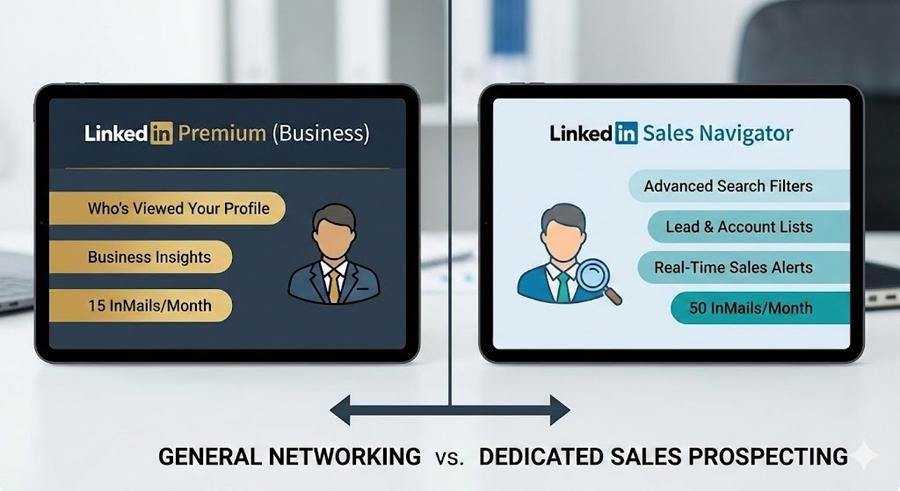
What is LinkedIn Sales Navigator?
LinkedIn Sales Navigator is a B2B sales product fundamentally built for prospecting and relationship management. It layers advanced search filters, lead and account recommendations, saved lead lists, real-time alerts (when a prospect changes jobs or posts), and native CRM sync to help sellers find and track decision-makers at scale. Think of it as a lightweight, LinkedIn-native sales engagement platform — not just a profile booster.
How to Use LinkedIn AI Job Search Tool: Step-by-Step Guide
Core capabilities (short):
Advanced lead & account search (firmographics, seniority, company size)
Save leads/accounts + custom lists and alerts
InMail credits and messaging templates optimized for outreach
CRM integrations and export/sync features for pipeline hygiene
Team features (Advanced/Enterprise tiers): reporting, seat management, shared lists.
What is LinkedIn Premium (Business)?
LinkedIn Premium (specifically Premium Business) upgrades a personal LinkedIn account. It provides increased profile visibility, more detailed “Who viewed your profile” analytics, industry/company insights, more InMail credits, and access to LinkedIn Learning. It’s aimed at professionals who want to network, recruit, or manage a personal brand and get deeper insights into people and companies beyond their 1st-degree network.
(Ad)

Typical Premium Business features:
Unlimited profile views beyond your network (expanded visibility)
Company insights and growth trends for research
Monthly InMail credits (fewer than Sales Navigator)
LinkedIn Learning access and profile competitive insights.
LinkedIn Sales Navigator Pricing
LinkedIn’s public Sales Navigator pricing is tiered and region-dependent, but the main lines are:
Sales Navigator Core (individual / Professional) — ~$99–$120 / month (annual billing lowers the effective monthly).
Sales Navigator Advanced (teams) — higher ($140–$180 / month range) with team features and CRM sync/reporting.
Sales Navigator Advanced Plus / Enterprise — custom pricing for large orgs (starts in the low thousands/year per seat depending on options).
Always check LinkedIn’s official pricing page for the exact number in your currency and any promotional or enterprise discounts.
LinkedIn Premium Pricing
Premium Business is typically listed around $59.99 / month (annual discounts available). Other Premium tiers (Career, Recruiter Lite, etc.) have different pricing and feature sets. Premium is priced for individuals or small-business professionals who want expanded personal visibility and a moderate number of InMail messages.
How to Use LinkedIn AI Job Search Tool: Step-by-Step Guide
What is the difference between Sales Navigator and Premium Business?
Below are the practical, search-and-use differences that matter day-to-day.
1) Primary job
Premium Business: personal visibility and insights (who viewed you, company data, learning). Good for networking and research.
Sales Navigator: active prospecting and pipeline building — designed to find leads, create lists, get alerts, and push those leads into a sales workflow/CRM.
2) Search & filters
Premium: improved search vs free members but limited advanced filters.
Sales Navigator: many more filters (company size, company headcount growth, function, seniority, years at company, technologies used, custom boolean filters) — this is the single biggest functional gap.
3) Lead management
Premium: no proper lead lists or saved lead workflows.
Sales Navigator: save leads/accounts, get alerts on activity, create lists and notes, and assign leads to team seats. Essential for ongoing outreach.
4) CRM & team features
Premium: no CRM sync or team admin.
Sales Navigator (Advanced, Enterprise): native CRM integrations (Salesforce, MS Dynamics), team reporting, shared lists and seat management — built for teams.
5) InMail & outreach
Premium: fewer InMail credits and primarily one-off outreach.
Sales Navigator: more InMails and outreach tooling (templates, response insights) oriented to prospecting volumes.
Bottom line: Premium = better personal profile & insights. Sales Navigator = sales prospecting platform.
LinkedIn Connects 100 Million Professionals Worldwide (And Counting) To Make Them More Successful (Infographic)
Who is Sales Navigator for?
Sales Navigator is aimed at people and teams whose core responsibility is finding and converting B2B prospects — SDRs, account executives, business development reps, rev ops teams, and agencies that provide outbound prospecting. If you spend hours per day building lists, researching accounts, or cold-messaging prospects, Sales Navigator typically pays for itself in time saved and pipeline acceleration.
Use cases that justify Sales Navigator:
Account-based sales (targeting named accounts and buying committees)
Scaling outbound outreach (shared lists, sequences, CRM sync)
Market intelligence (alerts when contacts change jobs, company growth signals)
Team reporting & leaderboards for sales performance.
Who is Premium Business for?
Premium Business fits professionals who want to be discovered, do occasional outreach, or research companies: consultants, founders, small-business owners, and managers building a personal brand. It’s also useful for in-house marketers and recruiters who need company insights and some messaging power but don’t require deep prospecting workflows.
What is Yelp Spam Comments Removal Job and How to Launch Your Career and Boost Your Earnings With This
Which one gives better ROI?
Short sales cycles + many outbound touches → Sales Navigator (clear ROI via pipeline).
Occasional networking, recruiting, job search or brand building → Premium Business (lower cost, faster visibility wins).
ROI comes down to two variables: time saved (prospecting hours reclaimed) and pipeline influence (how many qualified leads originate from the tool). Teams should estimate cost per closed-won deal uplift vs subscription cost. Many sellers run a 30-60 day trial of Sales Navigator and track leads sourced via its saved lead lists to measure incremental pipeline.
Practical tips to choose & test
Map the job to the tool. If you need lists, alerts and CRM sync — pick Sales Navigator. If you want better discoverability and company insights — start with Premium.
Run a time-cost experiment. Time how long it takes to create an actionable lead list with Premium vs Sales Navigator. Multiply hourly rate by time saved.
Use trials. LinkedIn often provides trials — use them to export sample lists and test CRM sync on a team pilot.
Avoid duplicate seats. Don’t buy Sales Navigator for everyone — allocate to roles that actually prospect.
Train users. Sales Navigator is powerful but underused without playbooks (search templates, outreach templates, and cadence guidance).
Alternatives & add-ons
Specialized prospecting tools (Kaspr, Skrapp, Apollo) can complement or rival Sales Navigator for email enrichment and automated outreach — but none replace Navigator’s live LinkedIn signals.
LinkedIn Recruiter / Recruiter Lite if your primary use is hiring (different pricing & targeted for recruiters).
Short decision checklist (copy/paste)
Do you prospect >5 hours/week? → Sales Navigator.
Do you need CRM sync and team reporting? → Sales Navigator Advanced.
Do you want more profile views, company insights, and occasional InMails? → Premium Business.
Budget constrained but want to test? → start with Premium trial; pilot Sales Navigator on 1–2 seats.
FAQs (short)
Q: Can I use Premium and Sales Navigator at the same time?
A: Yes — they are separate LinkedIn subscriptions. But Sales Navigator includes many of the prospecting capabilities you’d buy Premium for; most heavy sellers just run Sales Navigator.
Q: How many InMails do I get?
A: InMail credits differ by plan and change over time — Sales Navigator typically grants more credits than Premium Business. Check your plan details on LinkedIn.
Q: Which plan integrates with CRMs?
A: Sales Navigator (Advanced / Enterprise) supports CRM sync (Salesforce, MS Dynamics) — Premium does not.
How to Create an Eye-Catching and Easy-to-Read Resume in 2025
Final recommendation
If your role’s success metric is pipeline and closed deals, run a 30–60 day Sales Navigator pilot for a small team and measure leads generated, qualified opportunities, and time saved. If you’re an individual who needs better visibility, company insights, and a few InMails a month, Premium Business is a lower-cost, effective starting point.
Sources
LinkedIn Sales Navigator official page & compare plans.
LinkedIn Premium Business pages and compare plans.
Now loading...