Click here to buy secure, speedy, and reliable Web hosting, Cloud hosting, Agency hosting, VPS hosting, Website builder, Business email, Reach email marketing at 20% discount from our Gold Partner Hostinger You can also read 12 Top Reasons to Choose Hostinger’s Best Web Hosting
How to use Claude AI for free in 2026 — what you actually get, the real usage limits explained in plain English, 7 smart tips to stretch your free quota, and exactly when it’s worth upgrading.
Let’s get the most important thing out of the way immediately: yes, Claude AI is genuinely free. Not a 7-day trial. Not a “free forever” plan that gives you three messages and then locks everything behind a paywall. A real, permanent, no-credit-card-needed free tier that a lot of people are seriously underusing.
But — and this matters — the free plan has real limitations that nobody explains properly. Most articles about using Claude for free are either outdated, glossing over the important stuff, or written by people who haven’t actually hit the limits in normal daily use.
This guide is different. I’ll walk you through exactly what you get, how the limits actually work (the “5-hour window” thing confuses everyone), what changed with the February 2026 free tier expansion, smart ways to stretch your free quota further, and when it genuinely makes sense to pay.
Let’s go.
3 VPNs That Pass All Tests (2025)
- NordVPN: Zero leaks in tests, RAM-only servers, and Threat Protection to block malware.
- Surfshark: Unlimited devices, Camouflage Mode for bypassing VPN blocks, and CleanWeb ad-blocker.
- ExpressVPN: Trusted Server tech (data wiped on reboot) and consistent streaming access.
What Is Claude AI, and Who Makes It?
Claude is an AI assistant made by Anthropic, a safety-focused AI company founded in 2021 by former members of OpenAI. The name “Claude” is a nod to Claude Shannon, the mathematician who founded information theory — which feels appropriately nerdy for a company this serious about the technical side of things.
(Ad)

In terms of what it actually does: Claude is a large language model (LLM) you talk to through a chat interface at claude.ai. You can ask it questions, have it write things, analyze documents, read images, write and explain code, summarize research, help you think through decisions, and a lot more. Think of it as a highly capable AI assistant that’s particularly good at being honest about what it knows and doesn’t know, and genuinely thoughtful in how it engages with complex topics.
Perplexity Masterclass — How to Use Perplexity AI for Faster, Source-Backed Research
In 2026, Claude sits alongside ChatGPT and Google Gemini as one of the three most widely used AI assistants. Its edge is generally considered to be long-form reasoning, document analysis, and writing quality. Its weakness compared to ChatGPT is that it still can’t generate images.
Now, on to the actual free plan.
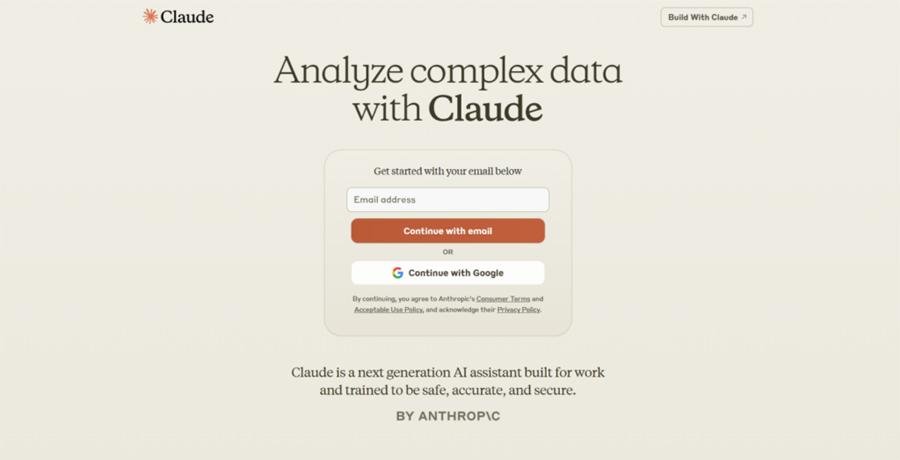
Step 1: How to Sign Up for Claude AI (Free, Takes 2 Minutes)
Getting started is as straightforward as any web app:
1. Go to claude.ai in any browser (Chrome, Safari, Firefox, Edge — all work fine). You can also download the Claude iOS or Android app from your device’s app store.
2. Click “Sign up” — you’ll see options to continue with Google, sign up with an email address, or sign in if you already have an account.
3. If you choose email, type your address and click continue. You’ll receive a verification code. Enter it and you’re in.
4. You may be asked a couple of quick onboarding questions (what you plan to use Claude for, your role). Answer these honestly or skip — they help Anthropic understand their users but don’t restrict what you can do.
5. That’s it. You’re now on the free plan and you can start chatting immediately.
No credit card. No trial period. No “free for 14 days then $29.99” trap. The free plan is free indefinitely.
What You Actually Get on the Claude Free Plan
Here’s what the free plan genuinely includes in February 2026 — and this list has gotten better recently, which most articles haven’t caught up with.
The Model You Get Access To
On the free plan, you get access to Claude Sonnet — Anthropic’s flagship everyday model. This isn’t a stripped-down, lobotomized version of Claude. This is the same Sonnet model that paid users access for their standard tasks. It’s genuinely capable for writing, analysis, coding help, summarization, Q&A, and complex reasoning.
What you don’t get on the free plan is the ability to choose your model. Paid plan users (Pro and above) can switch between Sonnet and Opus — Claude’s most powerful model for the hardest tasks. On free, you’re locked to Sonnet, which handles the vast majority of everyday use cases perfectly well.
A 200,000-Token Context Window
One of Claude’s genuine advantages is its context window — essentially, how much text it can “remember” and work with within a single conversation. The free plan gives you 200,000 tokens, which is roughly equivalent to 150,000 words or about a 500-page book. In practice, this means you can paste in an entire long document, have an extended back-and-forth conversation, or work through a complex multi-part project within a single session without Claude losing track of the earlier parts.
For comparison, most AI tools at the free tier give you much less context. This is a real, meaningful advantage that Claude’s free users often don’t realize they have.
Document and File Uploads
You can upload files on the free plan. PDFs, Word documents, text files, CSVs, spreadsheets — Claude can read them, summarize them, extract data from them, and answer questions about them. You can also upload images: photos, charts, screenshots, diagrams, handwritten notes. Claude can describe, analyze, and extract information from anything you show it.
This is genuinely useful and not restricted to paid users.
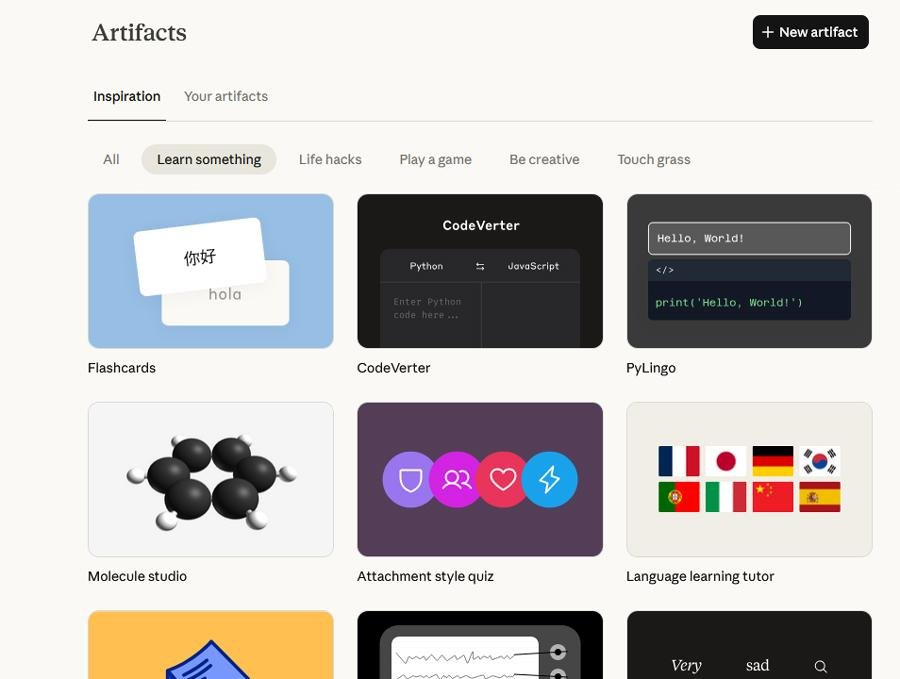
Artifacts
When Claude writes code, creates an HTML page, builds a visualization, or drafts a formatted document, it opens a side panel called Artifacts that shows you the rendered output alongside the conversation. This was previously a Pro-only feature. It’s now available on the free plan.
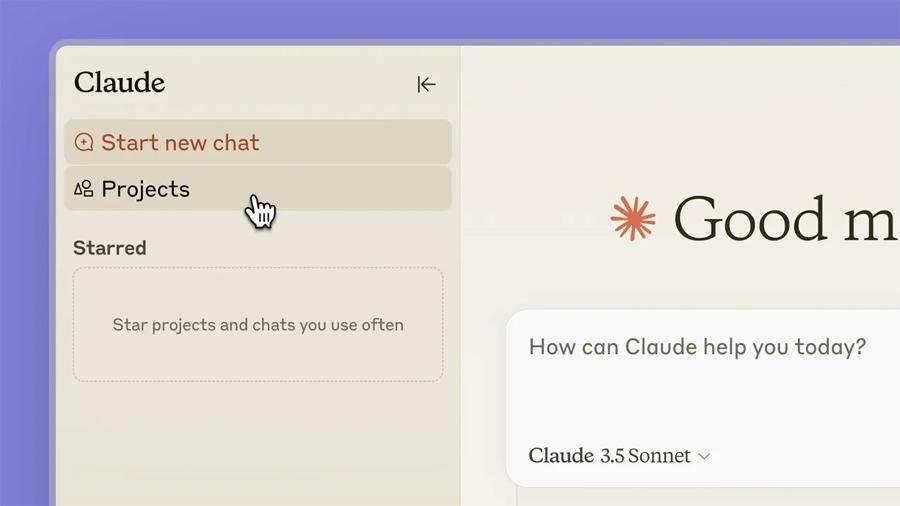
Projects
This is big, and most articles haven’t mentioned it yet. In February 2026, Anthropic expanded the free tier to include Projects — one of Claude’s most useful organizational features. A Project lets you create a persistent workspace where Claude remembers context across multiple conversations. Instead of re-explaining your context every time you start a new chat, you set it once in a Project (your role, what you’re working on, your preferences, relevant documents) and Claude carries it forward.
Before February 2026, Projects were Pro-only. Now they’re free. This is a meaningful upgrade to what the free plan can do for longer-term work.
App Connectors (Basic)
Free users now also get basic app connectors — integrations that let Claude access information from external tools like Notion, Google Drive, Gmail, and Slack. This is limited compared to full MCP (Model Context Protocol) support that paid users get, but for basic use cases, it’s a useful addition.
Web Search
Claude on the free plan can search the web for current information. If you ask about something recent — today’s news, a specific current price, a recent event — Claude can pull in real-time information rather than being limited to its training data cutoff. This works on the free plan.
Anthropic Released Cowork — “Claude Code” for the Rest of Us
The Part Everyone Gets Wrong: How the Claude AI free limits Actually Work
This is where most guides either get it wrong or skip the explanation entirely. So let me be really clear.
Claude’s free plan does NOT have a fixed daily message limit. There is no “you get 20 messages per day” counter ticking down. The limits work differently, and understanding this changes how you use the tool.
Mastering ChatGPT Deep Research Mode: A Step-by-Step Guide for In-Depth AI-Powered Research
The 5-Hour Rolling Window
Free users get a session-based usage allowance that resets every 5 hours. Not every 24 hours — every 5 hours. So if you use up your free quota at 9 AM, it resets at 2 PM, not the next morning.
This means:
- Heavy morning use: You might hit the limit at 10 AM, but you’re back online by 3 PM the same day.
- Spread-out use: If you use Claude for 20 minutes in the morning, 20 minutes at lunch, and 20 minutes in the evening, you’re unlikely to hit the limit on most days.
- Burst research sessions: If you’re in the middle of deep research and throwing a lot at Claude quickly, you’ll hit the limit faster than someone having a light back-and-forth conversation.
How Many Messages Is That, Exactly?
This is where it gets frustrating, because Anthropic deliberately doesn’t publish a fixed number. The honest answer is: it varies. A lot.
Based on what’s been consistently reported by users and independently tested, the free tier typically allows:
- Under light load (evenings, weekends): 50–80+ messages per 5-hour window
- Under normal load (business hours): 30–50 messages per 5-hour window
- Under heavy load (peak usage): As few as 10–25 messages before you hit the limit
Why the range? Because Anthropic uses dynamic capacity allocation — when lots of people are using Claude at once, free users get de-prioritized compared to paid subscribers. It’s not a fixed cap; it’s a shared resource pool that tightens under demand.
The other factor is message length. Short, simple questions consume very little of your quota. Long, complex conversations with big documents attached consume much more. A single conversation where you paste in a 100-page PDF and ask 15 detailed questions about it will eat into your quota faster than 50 short back-and-forths.
What Happens When You Hit the Limit?
Claude tells you. It doesn’t just stop responding mid-sentence or give you a cryptic error. You get a clear message that says you’ve reached your usage limit and when your quota resets (i.e., when the 5-hour window ends). You can see the reset time and plan accordingly.
Adobe Express vs Canva – Which Design Tool is Actually Worth Your Time and Money in 2026?
7 Smart Ways to Get More Out of the Free Plan
Most people use Claude in ways that waste their quota. These habits make a real difference.
1. Start fresh conversations for new topics. Long conversation threads accumulate context — which means every new message in that thread is “heavier” than it would be in a fresh chat, because Claude is re-processing the full history. When you’re done with a topic, start a new conversation instead of continuing the old one.
2. Use Projects with concise setup. Set up a Project for ongoing work so you don’t have to re-explain your context every session. But keep the Project instructions tight — a 500-word instruction document loaded into every conversation adds real token weight. Say what you need Claude to know in as few words as possible.
3. Turn off extended thinking when you don’t need it. If you have access to Claude’s extended thinking mode (more visible reasoning), it uses significantly more of your quota per message. Save it for genuinely hard problems. For everyday tasks, standard responses are more efficient.
4. Be specific in your first message. The most common way to waste Claude interactions is vague initial prompts that require a lot of back-and-forth to clarify. “Write me a 400-word product description for this Bluetooth speaker [paste specs here], targeting first-time buyers who value simplicity, in a friendly but professional tone” is going to get you a usable output in one shot. “Write something about this speaker” is going to take three rounds of refinement.
5. Use the free plan during off-peak hours for heavy work. Evenings and early mornings (US time) tend to give you a more generous quota window because fewer people are using the platform. If you have a big document analysis job or a multi-step writing project, scheduling it for off-peak hours means you’re less likely to hit limits mid-task.
6. Don’t re-upload large files every conversation. If you’re working on a long document repeatedly, put it in a Project once. That way Claude has access to it without you consuming quota on the upload every time.
7. Know when to start a new chat vs. continue. Claude’s context window is generous (200K tokens), but once a conversation gets very long, each new message costs more quota because of the accumulated context. For projects that span many hours or days, consider starting fresh chats and pasting only the relevant summary of where you left off, rather than continuing a single thread indefinitely.
12 INSANE Things You Can Do with Google Gemini (Most People Don’t Know #7)
What You Can Actually Do with Claude for Free: Real Examples
Forget the abstract feature list. Here’s what the free plan genuinely handles well, based on real use:
Writing and editing: First drafts, editing passes, proofreading, restructuring arguments, writing in a specific tone or style. A 3,000-word blog post draft, refined twice, in one session — no problem on the free plan.
Document analysis: Upload a 40-page research paper and ask Claude to summarize the key findings, identify the methodology, flag any limitations, and compare it to a second paper you also uploaded. The free plan handles this well.
Code help: Explaining what a piece of code does, finding bugs, writing functions, translating code between languages, writing tests. If you’re a beginner learning to code or an experienced developer who wants a second opinion, the free plan is useful without restriction on this.
Research and learning: Ask Claude to explain a complex topic at different levels of depth, compare different perspectives on a debate, synthesize what’s known about a subject. It’s a genuinely good research assistant for learning new things.
Brainstorming: Claude is unusually good at generating genuinely varied ideas rather than just superficially different versions of the same idea. The free plan doesn’t restrict this at all.
Email and professional communication: Drafting emails, making them more concise, making them more polite, adapting tone for different audiences — all on the free plan.
Spreadsheet and data help: Upload a CSV and ask Claude to identify patterns, suggest analysis approaches, or write formulas. It’s not Excel or a full data tool, but for a first pass at understanding your data, it’s very capable.
What You’re Missing on the Free Plan (And Whether It Actually Matters)
Being honest about the gaps:
You can’t choose Opus. Claude Opus 4.6 (released February 5, 2026) is Anthropic’s most powerful model — it’s significantly better than Sonnet for hard reasoning, complex analysis, and the most demanding coding tasks. If you’re doing graduate-level research, building complex software architecture, or working through highly nuanced problems, Opus is meaningfully better. For everyday use? Sonnet is excellent.
No priority access. During peak usage hours (typically weekday business hours in US time zones), paid users get priority. Free users may see their effective quota shrink by 30–40% during high-demand periods. If your work depends on reliable, consistent Claude access during the 9–5 workday, this is a real consideration.
No extended thinking control. Extended thinking (Claude’s ability to reason through problems more deeply before responding, essentially showing its work) is available but limited on the free plan. Paid plans give you more control over when and how deeply this feature runs.
No Claude Code. Claude Code — Anthropic’s terminal-based AI coding agent for professional developers — requires a Pro plan or above. If you want to use Claude to autonomously write, test, and run code across your codebase, not just chat about it, you need to pay.
No Cowork. Cowork, the agentic research preview on Claude Desktop that lets Claude autonomously complete multi-step tasks with your local files, is a Max plan feature. For most users, this isn’t something they’d miss — it’s a power feature for people who want Claude to handle complex autonomous workflows.
Memory is rolling out to Pro. Claude’s memory feature — which lets it remember things across conversations without you needing to tell it again — is currently available on Max plans and rolling out to Pro. The free plan doesn’t have it.
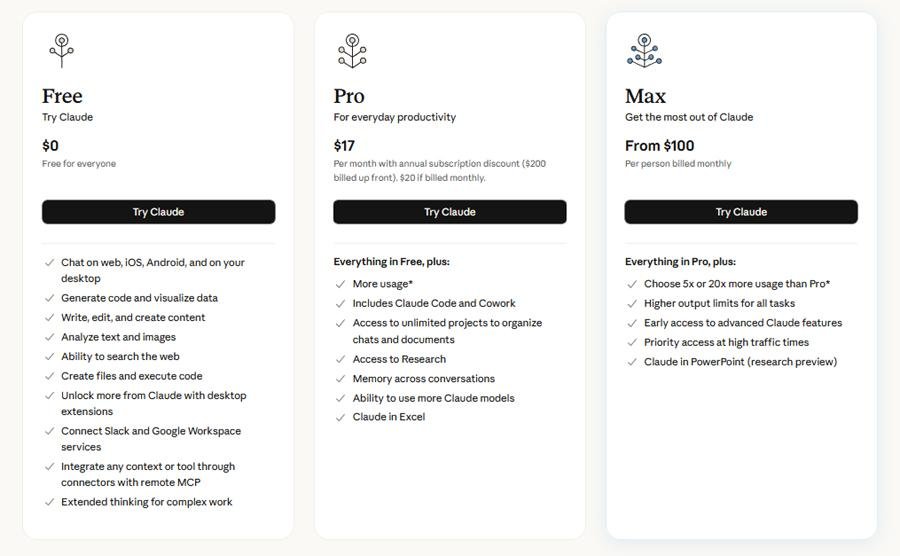
Claude Free vs Pro vs Max: Which Plan Is Right for You?
Here’s an honest breakdown based on actual use cases, not just feature tables:
Stick with Free If…
You use Claude occasionally — a few times a week, mostly for individual tasks like writing help, quick research, document summaries, or code explanations. The free plan’s 5-hour reset window means that even moderately heavy users can go days without hitting the limit if their use is spread out. Start here, use it for a couple of weeks, and only upgrade if you’re genuinely running into the walls.
Consider Pro ($20/month) If…
You use Claude daily for work. You’re hitting the free limit more than once or twice a week. You need access to Opus for harder tasks. You rely on Claude during business hours when the free tier gets throttled. You want to use Claude Code for development work. For anyone who has made Claude a genuine part of their professional workflow, the 5x usage increase and priority access alone justify the cost of a cup of coffee a day.
Consider Max ($100–$200/month) If…
You’re a professional developer doing extended coding sessions, a power user who regularly hits Pro limits mid-project, or someone running Claude for multi-hour autonomous tasks through Cowork. Most people — even daily Claude users — won’t need this. If you hit Pro limits consistently, though, Max 5x is worth it for the headache alone.
Quick Comparison Table (is Claude AI free)
| Feature | Free | Pro ($20/mo) | Max ($100–200/mo) |
|---|---|---|---|
| Model access | Sonnet | Sonnet + Opus | Sonnet + Opus (priority) |
| Usage limit | Session-based, varies | ~5x Free, resets every 5hrs | 5x–20x Pro |
| Priority access | ❌ | ✅ | ✅ Maximum priority |
| Projects | ✅ (Feb 2026 addition) | ✅ | ✅ |
| Artifacts | ✅ | ✅ | ✅ |
| Web search | ✅ | ✅ | ✅ |
| Document/image upload | ✅ | ✅ | ✅ |
| Claude Code | ❌ | ✅ | ✅ |
| Extended thinking | Limited | ✅ | ✅ |
| Memory | ❌ | Rolling out | ✅ |
| Cowork (agentic tasks) | ❌ | ❌ | ✅ (Mac only, preview) |
| Model selector | ❌ | ✅ | ✅ |
Frequently Asked Questions
Is Claude AI actually free, or is it a trial? It’s genuinely free with no time limit. The free plan at claude.ai doesn’t require a credit card and doesn’t expire. You have access indefinitely. The limitation is usage quantity (session-based limits), not time.
How many messages can I send on Claude’s free plan? Anthropic doesn’t publish a fixed number because it’s dynamic. In practice, most users can send roughly 30–80 messages per 5-hour window depending on the time of day, current server load, and message complexity. Short messages use less quota than long, document-heavy conversations.
How does the 5-hour reset work? Your usage allowance resets on a rolling 5-hour window from when you started using it — not from midnight or any fixed daily time. If you hit your limit at 2 PM, your quota resets at 7 PM the same day.
Can I use Claude AI free plan on my phone? Yes. The Claude iOS and Android apps are free to download and your free plan works across all platforms. The same account and same usage limits apply whether you’re on mobile, desktop, or the web app.
What’s the difference between Claude Sonnet and Claude Opus? Both are part of the Claude 4 family. Sonnet is Anthropic’s fast, capable everyday model — excellent for writing, analysis, coding help, and most tasks. Opus is Anthropic’s most powerful model, designed for the hardest reasoning tasks, complex coding, and demanding analysis. Free users get Sonnet; Opus requires Pro or higher.
Does the free plan include web search? Yes. Claude can search the web for current information on the free plan. This means you’re not limited to its training data cutoff for questions about recent events or current information.
Can I upload documents on the free plan? Yes. You can upload PDFs, Word documents, text files, CSVs, images, and more on the free plan. Claude will read and analyze them. There are file size limits, but for standard documents they’re generous enough that most users won’t hit them.
Is Claude better than ChatGPT for free users? It depends entirely on what you’re doing. Claude’s free plan gives you access to a model that’s genuinely competitive with paid offerings on other platforms. For writing quality, document analysis, and long-context work, many people prefer Claude. For image generation, you need ChatGPT (Claude doesn’t generate images). The best approach is to try both for your specific use case.
When does it make sense to upgrade to Claude Pro? When you’re hitting the free limit more than once or twice a week during normal use, when you need reliable access during business hours without throttling, or when you want Opus for harder tasks. Give the free plan a genuine 2-week trial before deciding — many users find it more than sufficient.
The Bottom Line
Claude’s free plan in 2026 is genuinely one of the best free AI tiers available. The February 2026 expansion added Projects and Artifacts to the free plan —Claude free features that used to be paid-only — and the 200,000-token context window puts it ahead of most competitors at the free tier.
The limits are real, but they’re manageable if you understand how they work. The 5-hour rolling reset is actually more forgiving than a strict daily cap for most people. And the model you get access to for free — Claude Sonnet — is excellent for the vast majority of everyday tasks.
Start free. Use it properly for a couple of weeks. If you’re hitting limits consistently and Claude has become genuinely useful to your work — then Pro at $20/month is a reasonable investment. But don’t assume you need to pay before you’ve found out what you actually need.
Now loading...