Click here to buy secure, speedy, and reliable Web hosting, Cloud hosting, Agency hosting, VPS hosting, Website builder, Business email, Reach email marketing at 20% discount from our Gold Partner Hostinger You can also read 12 Top Reasons to Choose Hostinger’s Best Web Hosting
Knowing how to protect your SEO tools from phishing has never been more urgent. Ahrefs published a security alert this week warning users about an active phishing campaign targeting Ahrefs account holders — fake login pages, convincing branding, urgency-driven copy — with the goal of stealing credentials that give access to backlink data, site audits, competitor research, and billing information. This is not an isolated incident. It is part of a documented and accelerating pattern targeting the exact tools freelancers, designers, and small businesses rely on every day.
3 VPNs That Pass All Tests (2025)
- NordVPN: Zero leaks in tests, RAM-only servers, and Threat Protection to block malware.
- Surfshark: Unlimited devices, Camouflage Mode for bypassing VPN blocks, and CleanWeb ad-blocker.
- ExpressVPN: Trusted Server tech (data wiped on reboot) and consistent streaming access.
In 2025, 82.6% of phishing emails analyzed between September 2024 and February 2025 contained AI-generated content — meaning the grammar is perfect, the branding is convincing, and the old “just look for spelling mistakes” advice is now dangerously outdated. Phishing-as-a-Service platforms have more than doubled in the last year, allowing low-skill attackers to rent professional-grade phishing campaigns targeting specific tools and audiences for a monthly fee.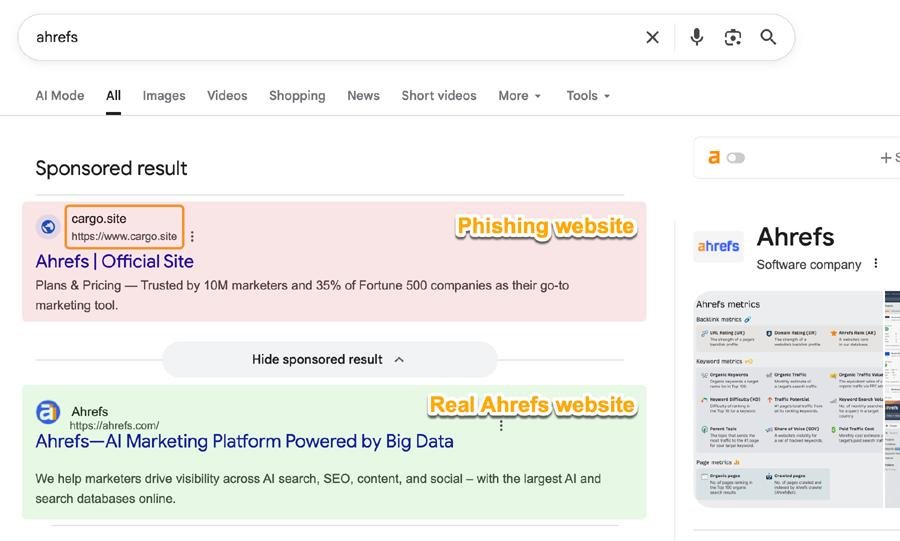
SEO tools, design platforms, project management apps, and web hosting accounts are specifically targeted because they sit at the intersection of everything attackers want: client data, billing credentials, API access to websites, and in many cases the ability to redirect traffic or inject malicious code through compromised hosting accounts. Knowing how to secure SaaS accounts in 2026 is no longer optional — it is a basic business requirement.
This guide is the practical phishing protection resource for freelancers, designers, developers, and small business owners who use these tools daily — not for enterprise IT teams with dedicated security staff. If you run your business on tools like Ahrefs, Canva, Notion, or Hostinger, this checklist is written specifically for you.
Why Your Tools Are Specifically Targeted
Before the practical protection steps, it is worth understanding why this category of attack has grown so dramatically. The answer is straightforward once you see it.
(Ad)

A compromised Ahrefs account gives an attacker your client list, your site audit data for every domain you monitor, your competitor research, and your billing information. A compromised Hostinger or Cloudways account gives them FTP access to every website you host — meaning they can inject malware, redirect visitors to phishing pages, or quietly install backdoors that persist for months without detection. A compromised Canva Business account gives them your brand assets and team member email addresses, which they can use for follow-on attacks against your clients.
Your tools are not side targets. They are the target.
The second reason is practical: smaller businesses and freelancers are significantly less likely to have strong security hygiene than enterprise accounts. Enterprise accounts have SSO, mandatory MFA policies, and security teams watching for anomalies. Your individual Ahrefs account has whatever you set up when you first created it — which for most people is a password and nothing else.
The third reason is that phishing tools have become dramatically cheaper and more effective. Phishing-as-a-service kits have more than doubled in the last year alone, turning what used to be a specialized skill into a subscription-based commodity — dynamic, AI-enhanced platforms that can mirror your software’s branding, tone, and user interface with precision. Phishing attacks targeting small business tools have risen sharply as a direct result, because attackers now get professional results without professional skills.
1Password vs Bitwarden : Honest Comparison of 2026 – Plus the Price Hike Nobody Warned You About
What a Real Phishing Email Targeting Your Tools Looks Like in 2026
The “Nigerian prince” era of phishing is long dead. Here is what a modern phishing email targeting Ahrefs, SEMrush, or Canva actually looks like — and why it is so effective.
The anatomy of a modern tool-targeting phishing email:
The email arrives from an address like notifications@ahrefs-security.com or alerts@ahrefs-account.net — not ahrefs.com, but close enough that most people don’t notice the difference on a quick scan.
The subject line creates urgency without panic: “Action required: Unusual login detected on your account” or “Your Ahrefs subscription requires verification” or “Important: Your account access will be restricted in 24 hours.”
The email body is perfectly written — no spelling errors, correct logo, correct colours, correct footer, correct font. It reads exactly like a real notification from the platform. It references specific details that make it feel personalised: your account email address, sometimes your name pulled from public sources.
The call to action is a single button: “Verify Your Account” or “Secure Your Account Now.” Clicking it takes you to a page that looks exactly like the Ahrefs login page — same design, same URL structure at a glance — but the domain is fake. You enter your credentials. The page thanks you for verifying. The attacker now has your login.
The old rules for spotting a scam are largely gone. AI-generated messages pass spell-check, use the correct jargon, and come from seemingly familiar domains or accounts.
The five warning signs that still work in 2026:
First, check the sender domain character by character. notifications@ahrefs.com is real. notifications@ahrefs-security.com, notifications@ahrefs.net, notifications@ahref5.com are all fake. The hyphen, the extra word, the different TLD, a number substituted for a letter — these are what you are looking for.
Second, hover over every link before clicking. On desktop, hovering over a link shows the destination URL in the bottom of your browser. If the button says “Verify Your Account” but the URL shows ahrefs-account-verify.com instead of ahrefs.com, do not click it.
Third, treat urgency as a red flag. Legitimate platforms do not require you to act within 24 hours or lose access. Urgency language — “immediate action required,” “your account will be suspended,” “act within 24 hours” — is a manipulation tactic, not a legitimate notification pattern.
Fourth, go directly to the tool rather than clicking the email link. If you receive a security alert from Ahrefs, close the email, open a new browser tab, type ahrefs.com directly, and log in normally. If there is actually an issue with your account, you will see it there. If there is no issue visible in your account, the email was fake.
Fifth, check whether the platform supports in-app notifications. Most serious SaaS tools surface important account alerts inside the app dashboard, not only by email. If the “urgent” notification is not also visible when you log in directly, that is a strong signal the email was not legitimate.
How to Safely Unblock Any Website Without VPN (Works on PC & Mobile)
How to Secure Marketing Accounts and SEO Tools: The 30-Minute Checklist
This is the practical part. Work through this list once — it takes 25 to 30 minutes — and your accounts will be significantly more secure than 90% of small business accounts using the same tools.
How to Protect Ahrefs Account from Phishing — and SEMrush, Moz Too
Ahrefs: Log in at ahrefs.com → click your profile icon → Security. Enable two-factor authentication using an authenticator app (Google Authenticator, Authy, or the Bitwarden authenticator — not SMS). Review “Active Sessions” and log out any sessions you don’t recognise. Check that your account email address is current — an attacker who gains access to your email account can use password reset to access Ahrefs. 13 Best Ahrefs Alternatives to Supercharge Your SEO
SEMrush: Log in → Profile → Account Security. Enable two-factor authentication. Under “Authorized Applications,” review and revoke any third-party app connections you don’t actively use. SEMrush also allows you to set up login notifications by email — enable this so you know immediately if someone accesses your account from a new device. What is Semrush? — A Practical Guide for Marketers
Moz: Log in → Account Settings → Security. Enable MFA. Review your API keys under “API Access” — unused API keys should be deleted. If you’ve ever shared your Moz credentials with a contractor or employee who no longer works with you, change your password now.
Design Tools — Canva, Figma, Adobe Express
Canva: Log in → Account Settings → Security. Enable two-step verification. Under “Connected Apps,” review every third-party integration and remove anything you don’t recognise. If you have a Canva for Teams account, review team member access and remove anyone who should no longer have it — former employees and contractors are a common overlooked access point.
Figma: Log in → Settings → Security. Enable two-factor authentication. Under “Linked Accounts,” review any connected integrations. In Figma, pay particular attention to “Shared Projects” — check that no projects have been shared with email addresses you don’t recognise. This is a vector for attackers who already have partial access.
Tip for both: Your Canva and Figma accounts likely contain client brand assets, logos, and design files. An attacker who accesses these can impersonate your brand convincingly in follow-on attacks against your clients.
Productivity Tools — Notion, ClickUp, Asana, Monday.com
Notion: Settings & Members → My Account → Security. Enable two-step verification. Review “Connected Apps” and revoke any OAuth connections you don’t recognise. If you use Notion for client work, check “Workspace Members” — former collaborators sometimes retain access after projects end.
ClickUp: Profile → Security → Two-Factor Authentication. Enable it. Review “Integrations” under Workspace Settings — ClickUp integrates with GitHub, Slack, Google Drive, and others. Each active integration is a potential attack surface. Remove integrations you no longer actively use.
Critical note for both: Notion and ClickUp workspaces often contain client credentials, API keys, internal processes, and confidential business information stored in notes and docs. Attackers specifically target project management tools for this type of intelligence.
Hosting Accounts — Hostinger, Cloudways, Any Web Host
These are the highest-stakes accounts on this list. A compromised hosting account gives an attacker access to every website you manage.
Hostinger: Log in → Profile → Account Security. Enable two-step authentication. Under “Account Activity,” review recent logins. If you see logins from locations or IP addresses you don’t recognise, change your password immediately and check your hosted sites for injected code. Review “Users” if you have any sub-users or developer access accounts — remove any that are no longer needed.
Cloudways: Log in → Account → Security. Enable two-factor authentication. Review “Team Members” — remove any that no longer need access. Under “Server Access Details,” check that your SSH keys and database credentials haven’t been changed. Cloudways’ “Deployment” feature means an attacker with account access could push malicious code to your live sites directly.
For any hosting account: If you have ever handed your hosting credentials to a developer, designer, or contractor to complete a project, create a separate sub-account with limited permissions for that type of access. Sharing primary account credentials is the most common cause of hosting account compromise in small business environments.
Password and Security Tools — Bitwarden, 1Password
The bitter irony of password manager phishing is real — and it happens. An attacker who can get you to enter your Bitwarden master password into a fake Bitwarden login page gets access to every credential you store.
Bitwarden: Log in → Account Settings → Security → Two-step Login. Enable authenticator app-based 2FA. Unlike SMS 2FA, authenticator app codes cannot be intercepted by SIM-swapping attacks. Under “Active Sessions,” review and terminate any sessions you don’t recognise. Enable the “Vault Timeout” setting so your vault locks automatically after inactivity.
The golden rule for password managers: Bitwarden will never send you an email asking you to click a link to verify your account. If you receive such an email, it is fake. Go directly to vault.bitwarden.com — never via an email link.
💬 Communication Tools — Slack, Discord, Email
Slack: Profile → Preferences → Security. Enable two-factor authentication. Under “Workspace Settings” (if you’re an admin), review app integrations and bots — Slack bots with webhook access can exfiltrate conversation data if compromised. Review “Authorised Apps” and revoke anything unfamiliar.
Your business email account: This is the master key to everything else. Your email address is the recovery account for every other tool you use. If an attacker gains access to your email, they can request password resets for Ahrefs, Canva, Notion, ClickUp, and your hosting account simultaneously. Enable 2FA on your email account before anything else on this list.
The Three Things That Make the Biggest Difference
If the full checklist feels overwhelming, do these three things first. They address 80% of the risk in 10 minutes.
① Enable two-factor authentication on your email account and your hosting account. These two account types represent the highest risk — email because it’s the recovery mechanism for everything else, hosting because a compromise directly affects your clients’ websites. If you do nothing else from this guide, do these two.
② Stop using the same password across multiple tools. When one tool’s database gets breached and credentials are leaked — which happens regularly — attackers immediately test those credentials against every other major platform. This is called credential stuffing, and it’s automated. A single compromised password can cascade into 20 compromised accounts within hours. Use a password manager like Bitwarden (free, unlimited devices) to generate and store unique passwords for every account.
③ Check your active sessions on your most critical tools today. Log in to Ahrefs, your hosting account, and your email provider, and find the “Active Sessions” or “Devices” section. Review every active session and log out anything you don’t recognise. An attacker who already has access to your account but hasn’t done visible damage yet will show up here.
How to Report a Phishing Attempt Targeting Your Tools
If you receive a phishing email that is impersonating a specific platform, reporting it takes 60 seconds and genuinely helps protect other users.
Report to the platform directly: Most major tools have a security contact or abuse email. For Ahrefs: security@ahrefs.com. For SEMrush: security@semrush.com. For Canva: forward suspicious emails to security@canva.com. For Notion: security@makenotion.com.
Report the phishing URL to Google: Go to safebrowsing.google.com/safebrowsing/report_phish/ and submit the fake URL. This gets the page flagged in Chrome, Firefox, and Safari’s safe browsing databases, protecting other users who might receive the same email.
Report to your email provider: Gmail, Outlook, and Apple Mail all have built-in “Report Phishing” options (usually in the three-dot menu on the email). This helps train their filters to catch similar emails for other users.
Forward to the Anti-Phishing Working Group: The APWG at reportphishing@apwg.org aggregates phishing reports globally and shares them with law enforcement and browser vendors. Forwarding the original email (as an attachment if possible) contributes to the global response.
A Note on AI-Powered Phishing in 2026
The final thing worth understanding is why this threat is worse now than it was two years ago, and why it will continue to get worse.
82.6% of phishing emails analyzed between September 2024 and February 2025 contained AI-generated content. This is not a marginal change — it means that virtually every sophisticated phishing campaign now uses AI to generate the email copy, personalise it to the target, and iterate on the design to evade spam filters.
Token hijacking is quickly becoming one of the most dangerous threats. Unlike brute-force attacks which rely on guessing passwords, token hijacking involves stealing session tokens — the digital keys that allow threat actors to bypass passwords entirely. Once attackers obtain active authentication tokens, they can compromise accounts without ever triggering a password prompt.
What this means practically: even if you have 2FA enabled, an “adversary-in-the-middle” attack that intercepts your session cookie after you log in can bypass it. The protection against this is to use hardware security keys (like YubiKey) for your highest-stakes accounts, and to review active sessions regularly so you catch unauthorised access quickly even if it gets past 2FA.
The threat is real, it is growing, and it is specifically targeting the tools you use to run your business. The checklist above takes 30 minutes. Do it this week.
Frequently Asked Questions :
How did I know the Ahrefs email I received was a phishing attempt? Check the sender’s email domain — the full domain, not just the display name. Ahrefs sends email from @ahrefs.com only. Any variation — @ahrefs-security.com, @ahrefs-alerts.net, @ahrefs.co — is fake. When in doubt, close the email, go directly to ahrefs.com in a new tab, log in, and check your account there.
Is SMS two-factor authentication good enough? SMS 2FA is significantly better than no 2FA. But it is not the most secure option available, because SMS codes can be intercepted through SIM-swapping attacks — where an attacker convinces your mobile carrier to transfer your phone number to a SIM card they control. For your most critical accounts (email, hosting, password manager), use an authenticator app or a hardware security key instead of SMS.
My hosting account doesn’t have 2FA — what do I do? Most major hosting providers including Hostinger and Cloudways offer two-factor authentication. If your current host doesn’t support it, that is a genuine security deficiency worth factoring into your hosting decisions. In the meantime, use a very strong, unique password (20+ characters, generated by a password manager) and review your active sessions regularly.
What should I do if I think I’ve already been phished? Act within the next 30 minutes. Change the password on the compromised account immediately. Enable 2FA if it wasn’t already on. Check “Active Sessions” and terminate every session except your current one. Check your account settings for any changes you didn’t make — especially email address changes, API key additions, or new user invitations. If it was a hosting account, scan your sites with Sucuri SiteCheck (free at sitecheck.sucuri.net). If it was a password manager, change the master password and review your vault for any unexpected changes.
I manage client accounts — what additional steps should I take? Create sub-accounts or team members with the minimum permissions needed for each client project, rather than sharing primary credentials. Most platforms including ClickUp, Notion, Hostinger, and Canva support this. Keep a log of who has access to what. When a project ends or a contractor finishes, revoke their access immediately — this is the most commonly skipped step in small agency security hygiene.
Now loading...