Click here to buy secure, speedy, and reliable Web hosting, Cloud hosting, Agency hosting, VPS hosting, Website builder, Business email, Reach email marketing at 20% discount from our Gold Partner Hostinger You can also read 12 Top Reasons to Choose Hostinger’s Best Web Hosting
Are you looking to get an Envato personal token for theme updates, plugins or API calls? Here’s a clear, copy-paste guide on how to get an Envato personal token, where to create it, which permissions to pick, how to use it, and security tips.
Just sign in to your Envato account, visit the token page, give the token a name, pick the permissions your tool needs, create the token, then copy it into your theme/plugin or app. I’ll walk you through the common permission sets (what to tick for updates vs store access), explain how to keep the key safe, and show troubleshooting tips if validation fails.
Why you might need a personal token
An Envato personal token is a small secret key that lets tools, themes and plugins call the Envato API on your behalf. You’ll need one for things like:
Authorizing automatic theme or plugin updates (ThemeForest items).
Letting a plugin verify that you bought a license.
Calling the Envato Market API for your own scripts or utilities.
If you don’t want to implement OAuth in an app, a personal token is the simplest way to access the API for your own use.
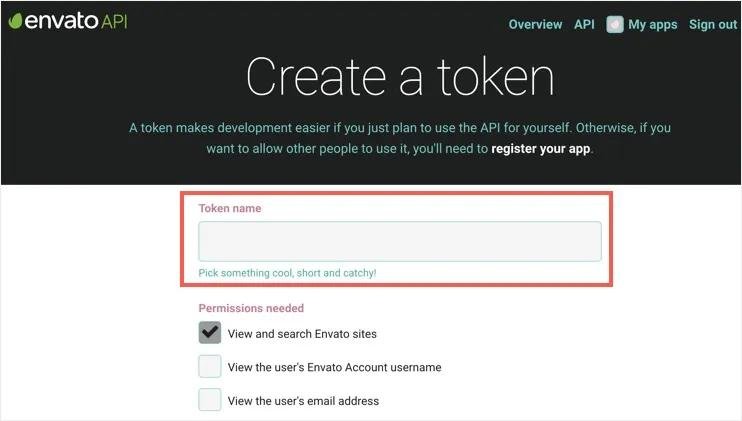
Step-by-step: Create your Envato personal token (the quick path)
Sign in to Envato
Log in with the Envato account that owns the purchases you’ll use. Use the same username/email you used to buy the item (important for theme registration).Open the token page
Go to the official token creation page:https://build.envato.com/create-token/. (You can also reach it from Envato’s API or account links.)Give the token a clear name
Use a name that tells you what the token is for — e.g.,MySite-theme-updatesorFTP-token-2026. That makes it easier to manage later.Select the permissions (scopes) you need
The token page lists checkboxes for what the token can do. At minimum, many tools require:View and search Envato sites
View your Envato account username
Those two are needed for simple verification and many update workflows.
If you need automatic downloads or theme updates, also enable:
Download your purchased items
List purchases you’ve made
Verify purchases you have made
Only grant extra permissions if the plugin or process explicitly requires them — don’t give more rights than you need.
Agree to the terms and create the token
Tick the terms box if required, then click Create Token. Envato will generate the token string and show you a success page.Copy and store the token securely
Copy the token to your clipboard and paste it into the plugin/theme settings or your app. Treat it like a password — don’t paste it into public code or a shared doc.Test validation
Use your theme/plugin “validate token” or “check updates” button. If it fails, double-check that you used the Envato account that bought the item and that you gave the token the required permissions. Many theme docs list the exact checkboxes to enable.
Envato Elements Free Download: 7 Must-Have Freebies to Transform Your Work
Which permissions should you check? (Common setups)
Theme/plugin automatic updates (WordPress themes):
CheckView and search Envato sites,View your Envato account username, andDownload your purchased items+List purchases you’ve made. Some themes also requireVerify purchases. Your theme docs will usually say which ones.Just verifying account / basic API calls:
View and search Envato sites+View your Envato account usernameare often sufficient. That is the minimal safe set for tools that only need to confirm identity.Custom app or developer use:
If you’re building an app for other users, follow the full API/OAuth flow in Envato’s API docs rather than using a personal token for multiple users.
Security & maintenance (do this every time)
Keep the token secret. Treat tokens like passwords. Do not commit them to public GitHub repos.
Use separate tokens for separate uses. Create one token per site or purpose — it’s easier to revoke one token without breaking other integrations.
Revoke if compromised. If the token leaks, revoke/regenerate it immediately from your Envato account. Tokens can be revoked by the account holder at any time.
Rotate periodically. Even if Envato tokens may not force-expire by default, I recommend regenerating them periodically and updating your installs — especially for production sites. (Rotation reduces risk.)
5 Essential Envato Elements Free Download Assets for Your Next Project
Common problems & how to fix them
Token says “invalid” when validating in theme settings
(Ad)

Make sure you created the token with the same Envato account that owns the purchase. Many validation fails are caused by using a different Envato username.
Theme still doesn’t show updates
Verify you selected the “Download your purchased items” and “List purchases you’ve made” scopes, then click the plugin’s “Check token” or “Sync purchases” button. Clear caches if needed.
You don’t want to give full download access
Create a token with only the minimal scopes for verification and use that where possible. If a plugin absolutely needs more, weigh the trade-off and use a dedicated token.
UX Design Terms Glossary – 120+ Essential Definitions Every Designer Should Know
Quick checklist
Logged into the Envato account that owns the purchases
Token name picked (descriptive)
Required permissions selected (see your theme/plugin docs)
Copied token into secure vault (password manager) and into the plugin/theme settings
Tested validation and update check
8 Creative Envato Elements Free Download Gems to Elevate Your Designs
FAQs
Q: Where do I create an Envato personal token?
A: Create it at https://build.envato.com/create-token/ after signing in to the Envato account that owns the purchases.
Q: Which permissions are required for theme updates?
A: For updates, most themes need View and search Envato sites, View your Envato account username, plus Download your purchased items and List purchases you’ve made. Check your theme docs for the exact list.
Q: Do tokens expire?
A: Envato’s docs don’t force short lifetimes on personal tokens; however, treat tokens as secrets and rotate or revoke them if needed. It’s good security practice to regenerate tokens periodically.
Q: What if validation fails?
A: Confirm you used the same Envato account used to buy the item and that the token has the required permissions. Recreate the token if needed and retry
Now loading...