Click here to buy secure, speedy, and reliable Web hosting, Cloud hosting, Agency hosting, VPS hosting, Website builder, Business email, Reach email marketing at 20% discount from our Gold Partner Hostinger You can also read 12 Top Reasons to Choose Hostinger’s Best Web Hosting
When your browser feels like a corridor of tabs, logins, and context-switching, getting real work done becomes its own chore. That slow drift between pages, notes, and copy-paste costs time and invites mistakes. OpenAI Launches ChatGPT Atlas Browser — a move designed to address this. Enter ChatGPT Atlas — OpenAI’s attempt to bring the assistant into the browser itself so the context you’ve already built can be used where you are, without jumping back and forth. The idea is simple: make the assistant part of the page so it can help with tasks like summarizing a long article, pulling together job postings you viewed last week, or even acting (with your permission) to complete multi-step web tasks.
GPT-5’s launch will likely trigger demand spikes that OpenAI cannot immediately satisfy
Why this matters now
OpenAI Launches ChatGPT Atlas Browser as a browser that embeds ChatGPT across the web, with a persistent sidebar, optional “browser memories,” and an agent mode that can carry out sequences of web actions while you watch. Atlas is available on macOS at launch and enters preview for some paid tiers; Windows and mobile are coming later. These core facts are in OpenAI’s announcement and release notes.
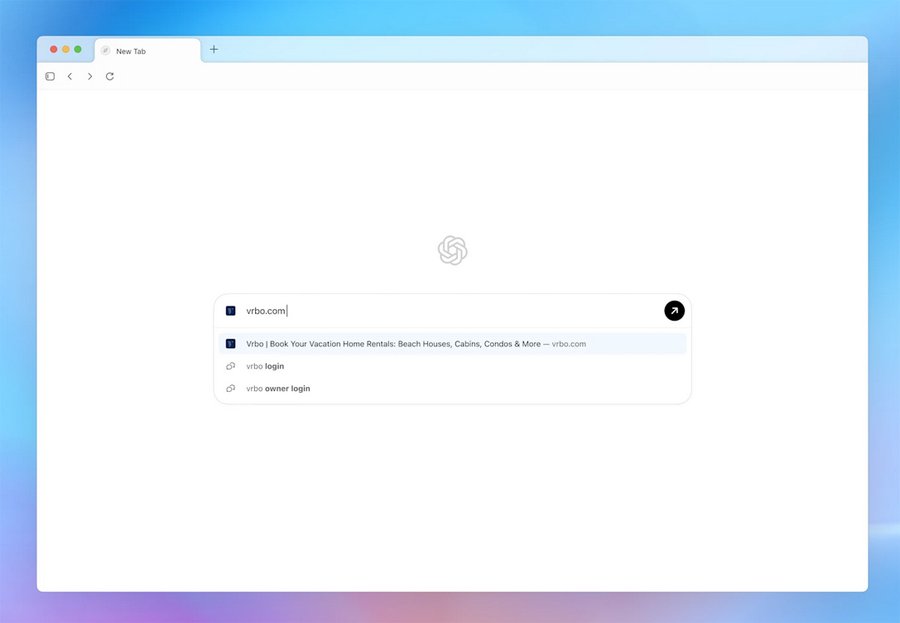
What Atlas actually does
Persistent Chat sidebar — A panel lives next to any page so you can ask ChatGPT about the content in view, request summaries, or refine search results without copying text into a separate chat. This is more than a search box: it keeps your conversation and browsing context together.
Browser memories (optional) — After OpenAI Launches ChatGPT Atlas Browser, one of the notable features is optional browser memories. Atlas can remember details from pages you visit and bring that context back into later chats: think “remember the job listings I checked” or “keep the product pages I compared last night.” These memories are opt-in and can be viewed, archived, or deleted. Clearing browsing history removes associated browser memories.
Agent mode (preview) — When you ask it to, Atlas’ agent can open tabs, click through sites, and complete tasks (for example, gather flight options or add grocery items to a cart). The mode is explicit — ChatGPT will ask for permission to start acting — and it’s released in preview for Plus, Pro, and Business tiers. OpenAI warns it may make mistakes on complex workflows as they improve reliability and latency.

Safety and limits — After OpenAI Launches ChatGPT Atlas Browser, safety is a clear focus. Atlas’ agents can’t run arbitrary code, download files to your system, or access apps beyond the browser. Agent activities pause for extra checks on sensitive sites (banks, etc.), and visibility toggles let you stop ChatGPT from seeing a page. OpenAI highlights the remaining risks — agents can still be tricked by hidden or malicious instructions on web content — and recommends cautious use, such as running agents in logged-out mode for sensitive tasks.
A fresh angle: why publishers and developers should care
Most coverage summarizes the product. Here’s something less reported: OpenAI Launches ChatGPT Atlas Browser changes how web pages are “read” by an assistant and creates a new, measurable incentive for accessible markup. OpenAI explicitly says Atlas uses ARIA labels (the same tags used by screen readers) to understand page structure and interactive elements. That means a small, well-scoped investment in accessibility markup can make your site far easier for Atlas agents to interact with — improving form handling, enabling better on-page actions, and increasing the chance your product or listing shows up correctly when an agent is working. If you run a commerce site, travel booking tool, or job board, this matters. Add descriptive roles and labels to buttons and forms and Atlas can more reliably click and extract the data you want.
Perplexity Masterclass — How to Use Perplexity AI for Faster, Source-Backed Research
Practical takeaway for developers: follow WAI-ARIA best practices, test elements with assistive tooling, and think about intent — not just SEO. A button that’s labelled “Buy” becomes far more actionable to an agent than one labelled with an icon and no ARIA text.
Mini use cases — real workflows I’d try today
1. Research assistant for hiring — I can open a set of job listings across multiple sites, ask Atlas to find every job with “remote” in the title, and generate a short brief with the most common required skills and a tailored checklist for interview prep. Browser memories let that context persist across sessions, so I don’t repeat the same scraping steps.
2. Trip planning, minus the tab chaos — Start with a prompt (e.g., “Plan a 3-day trip to Lisbon around mid-November”), let an agent pull flight options, open hotels, and note cancellation policies. You still confirm purchases, but Atlas can assemble the plan, saving hours of back-and-forth. After OpenAI Launches ChatGPT Atlas Browser, this kind of workflow becomes more mainstream.
3. Marketer: competitive research snapshot — Ask Atlas to pull product pages you viewed last week, summarize price trends, and output a short brief with suggested talking points for a campaign. The agent can collect examples and create a draft brief you can edit in the browser.
ChatGPT 5 vs Claude vs Gemini vs Grok vs DeepSeek — Choosing the Right AI for the Right Task
Privacy and data controls — what you need to check
Atlas puts privacy controls front and center but also adds new surfaces to manage:
Opt-in browser memories. Turn them off if you don’t want browsing context stored.
Per-site visibility toggles. You can block the assistant from seeing a site at the address-bar level.
Training opt-in. By default, browsing content isn’t used to train OpenAI models; if you enable training in your account settings, content you share during Atlas sessions can be included. If you want to exclude server-side indexing, publishers can disallow GPTBot.
If your organization handles sensitive logins or regulated data, treat Atlas like a new tool in the stack — test agent actions with non-critical accounts and require explicit consent for anything that carries risk.
Apple Develops ChatGPT-like App – What it Means for Siri and Your iPhone
Market impact — short forecast
Opinion: OpenAI Launches ChatGPT Atlas Browser accelerates a shift that’s been simmering: search and the browser are converging toward interactive assistants. That’s good for users who want fewer context switches, and it opens new discovery channels for publishers — but it also pushes the web toward a more agent-oriented model where structured markup and clear semantics matter far more than before. Expect other browser and AI players to respond quickly; publishers who ignore ARIA and clear on-page semantics may find their content works poorly with agents and therefore shows up worse in these new assistant-driven flows.
Key Takeaways
OpenAI Launches ChatGPT Atlas Browser bringing a ChatGPT sidebar, optional browser memories, and an agent mode to the browser experience.
Agent mode can act for you in the browser, but it’s a preview feature and may make mistakes; OpenAI added explicit safeguards.
Atlas depends on good page markup — ARIA labels help agents understand and interact with sites, making accessibility work more valuable than ever.
Users control memory and training settings; clearing history removes associated browser memories.
Publishers should test and label interactive elements to ensure compatibility and a better experience when agents interact with their pages.
Mastering ChatGPT Deep Research Mode: A Step-by-Step Guide for In-Depth AI-Powered Research
FAQs (People Also Ask)
Q: Is OpenAI Launches ChatGPT Atlas Browser available now?
A: Atlas launched in preview and macOS availability was announced at release — availability and platform specifics are in OpenAI’s announcement and release notes.
Q: Can Atlas use what I browse to train OpenAI models?
A: By default, browsing content isn’t used for training. If you enable training in your account settings, content from Atlas chats and attached pages may be included; users control this setting.
Q: Will Atlas replace Chrome or other browsers?
A: Atlas is a new entrant focused on assistant-driven workflows. Adoption will depend on user habits, platform availability, and developer support; other browsers are already integrating AI, so expect competition and co-existence. (This is a forward-looking assessment based on market trends.)
Q: What should web developers do right now?
A: Improve ARIA labels and test interactive elements with assistive tools. That helps Atlas agents recognize buttons, forms, and controls so they can interact reliably with your site. Also consider test accounts for agent workflows to ensure actions don’t break in unexpected ways.
Wondering is ChatGPT an AI agent? Discover how it works, its autonomous skills, and real‑world applications to boost your productivity.
Conclusion
OpenAI Launches ChatGPT Atlas Browser marks both an interface shift and a development signal: the assistant is moving from a separate tab to the place where most of our work happens. For users, that promises less copying and a quicker path to summarize, compare, and act on web content. For developers and publishers, it means accessibility semantics — ARIA and clear roles — suddenly carry practical value beyond inclusive design. Try Atlas on macOS if you want to experiment (it’s in preview for some paid users and available to Free users), test agent actions with safe accounts, and consider auditing your site’s ARIA coverage to ensure your pages behave predictably.
Sources (official)
OpenAI — “Introducing ChatGPT Atlas.”
Now loading...