Click here to buy secure, speedy, and reliable Web hosting, Cloud hosting, Agency hosting, VPS hosting, Website builder, Business email, Reach email marketing at 20% discount from our Gold Partner Hostinger You can also read 12 Top Reasons to Choose Hostinger’s Best Web Hosting
Adobe AIR is a cross-platform runtime environment for building rich Internet applications using Adobe Flash, Adobe Flex, HTML, or Ajax. It’s popularity is increasing every day and getting more lovers who are using tools developed on Adobe AIR for diversified purposes. Designers are the top on the list in those lovers and this list is specially for designers who can save their time and complete their task in the less time using these little but simple AIR apps. But you probably will like this if you are developer, office worker, manager, supervisor, student, home user, etc. Because we make sure to add something interesting for everyone. Most of them are not very well-known, but they are really amazing in respect to their features. The best thing about these apps that they are cross-platform using Adobe’s AIR technology. Just take a look at them and share your thought here.
You are welcome if you want to share more free and simple Adobe AIR apps that are useful and our readers/viewers may like. Do you want to be the first one to know the latest happenings at SmashingApps.com just subscribe to our rss feed and you can follow us on twitter as well.
You may be interested in these older posts
13 Simplest Free Web Tools That Are Absolutely Useful
5 Useful And Free Photo Viewers For Your Mac OS X
7 New And Useful Free Sites With Unique File Hosting Features
11 Premium But Free And Useful Web Apps For Designers
31 Power Tools For Twitter Lovers To Make Lives Easier
13 Premium-Like WordPress Themes That Are Free And Stunning
13 Simple And Elegant Free WordPress Themes
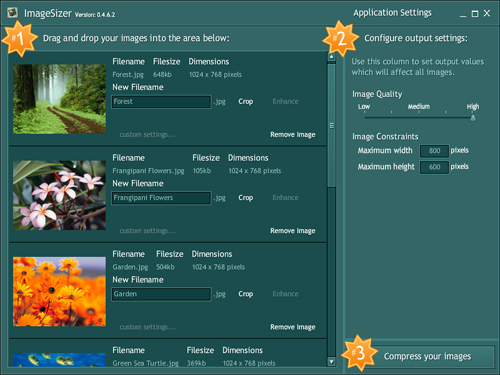
ImageSizer is an application built to resize, optimize and rename a batch of jpg images producing a zip file containing the images. ImageSizer also allows users to resize images that are greater than 2880px by 2800px, however the resized images cannot be greater than this size. As often as you want to resize images, you find you also want to cut just that little bit off the image. Well now you can do, with the built-in Crop tool.

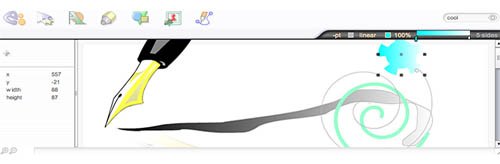
e2vector is an illustration application with powerful features such as layers, masks, pen-tool, gradient, undo-redo, SVG import and export, path splicing, shape union and intersection, etc. You can even upload SVG and PNG artwork from Creative Common’s large online database.
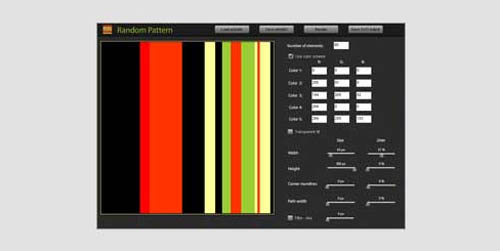
This is an easy app that renders patterns based on given parameters. Rendered image can be used as a base of a mosaic. Preset parameters can be saved and loaded (in xml file format) and output image can be saved as SVG document.

WebKut is an AIR application that allows you to capture web pages, or parts of them in a very simple way. It provides you 3 capture options that can be the entire page, the current view, or only a selection.
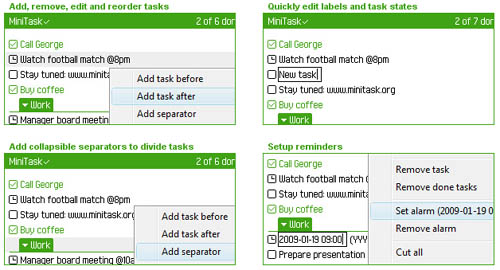
MiniTask is a FREE, fast and easy-to-use task management application that helps you with organising your daily todos more efficiently. It supports features like drag ‘n’ drop reorder, alarm timers, printing of pretty task sheets, copying tasks from and to other applications etc.

Splashup Light is an image editor tailored for those that want to enhance, beautify, or merely play with their photographs. Effects include Levels, Contrast/Brightness, Hue Saturation, Text Editing and Shapes and much more. Splashup Light is ideal for those using Tablet PCs and other Portable Computers, but many find it just as suitable for everyday use on their desktops.

ImageDropr is a flickr image transport application that installs to your Mac, Windows, or Linux computer on top of the Adobe® AIR™ runtime. By creating a simple drag and drop interface the application is very easy to navigate application and therefore pleasing user experience. Simply drag some images from your file system and drop them on the application, add a few tags if you wish, and hit the upload button to send your files to yor flickr account.
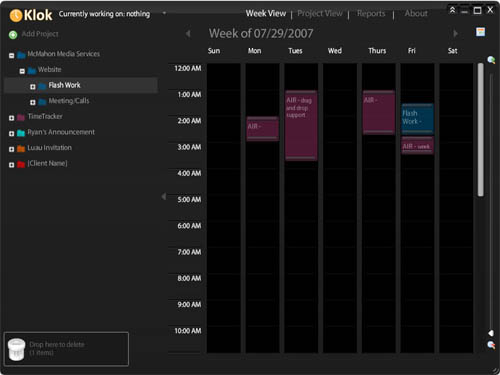
Now you can keep track of anything with Klok’s simple work timer and see visual display of how your days “fill up”. You can see Monthly and Weekly timesheet export with comments. It has an ability to reorganize the project tree through drag and drop and drill down ability on Pie chart reports and much more…

You can convert images captured with a webcam to an animated GIF. Just use this to create an animated avatar for forums, social sites etc.
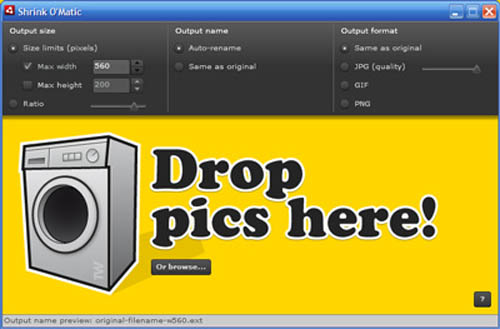
Shrink O’Matic is an AIR application to easily (batch) resize (shrink) images. It handles JPGs, GIFs and PNGs. Simply drag and drop images and they’ll be resized as you wish. This options allow you to choose the output sizes, names and formats.

There’s a better way to look at your favorite pics every time as long as you become sick of it 😉 Just drag the image out of every browser to the PhotoTable Icon and it shows up on your screen, always in top, on- and offline. You can collect them on your screen, drag them, show/hide all at once and of course delete them one by one or even all at once. Bring them to front or back, change your PhotoTable Icon or copy the link of the picture was assigned to. You also can drag files from your OS to the screen by dragging them to the PhotoTable Icon without losing the original image when deleting them from screen.

Icon Generator is a little application that lets you generate a CS3 or Web 2.0 style icon in only 3 steps. You can pick color, type characters, and save it. It lets you create 4 different sizes of the icon.

This application is a simple way to create and organize your favorite color palettes. Sets of colors are easily viewable in a clean interface. Edit them, rearrange them, create new sets, make them your own. This is cross-platform using Adobe’s AIR technology.

With Websnapshot, you can enter the Url and press snap to capture the web page or just drag & drop it from your browser. Just click on the thumbnails to save. with auto save checked, the thumbnails are immediately saved to your ‘save’ folder. You can also select the type of snapshot you want to make like thumbnail, browser size, or full Page.

This simple tool shows you all the fonts installed on your computer and helps you choose which one is most suitable for a particular project. You can select the text in one of the boxes and type the text you will be using for your project.

Doc? is a free desktop Application, made entirely in FLEX & AIR. Doc? allows you to view your Flash documentation outside of Flash. This enables you to view, search and bookmark your documentation a lot faster than you could with the built in Flash support.

Fractal 4D is a simle and very useful Adobe AIR app that enables you to draw beatiful fractal swirls. You can them as a vector for use in Adobe Illustrator or as a plain PNG whatever you want. You can change the colours, also have blending/easing and blurring options to make your fractal more beautiful and as per your need.
Now loading...