Contact us for Sponsored Post or to Promote your Services or Products here.
Click here to buy secure, speedy, and reliable Web hosting, Cloud hosting, Agency hosting, VPS hosting, Website builder, Business email, Reach email marketing at 20% discount from our Gold Partner Hostinger. You can also read 12 Top Reasons to Choose Hostinger’s Best Web Hosting.
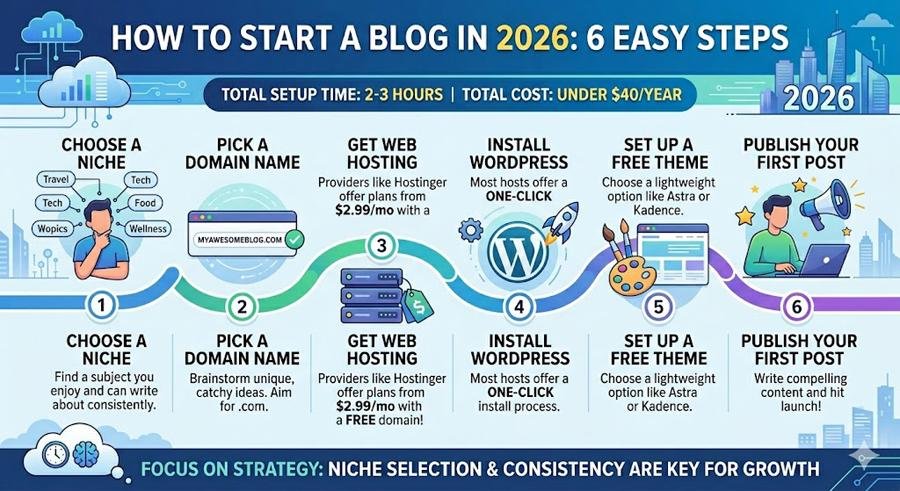
How to start a blog in 2026 in 6 steps: (1) choose a niche you can write about consistently, (2) pick a domain name, (3) get web hosting — Hostinger costs from $2.99/month and includes a free domain, (4) install WordPress (one-click install via your host), (5) set up a free theme like Astra or Kadence, (6) write and publish your first post. Total setup time: 2–3 hours. Total cost to start: under $40 for the first year.
Learning how to start a blog in 2026 is genuinely simpler than it was five years ago — the tools are better, the hosting is cheaper, and the path from zero to published is faster than ever. The harder part is not the technical setup, which takes a few hours, but the strategic choices that determine whether a blog grows or stagnates: niche selection, content strategy, and consistency. This guide covers both.
You can click here to check out 100s of responsive wordpress themes to design your responsive website.
Whether you want to blog as a hobby, build a side income, or create a platform for your professional expertise, the foundation is the same and the steps below take you through it completely.
Step 1 — Choose Your Niche
Your niche is the topic your blog focuses on. The biggest mistake new bloggers make is choosing a niche that is too broad (“lifestyle”, “technology”, “health”) or too narrow (“left-handed knitting in Vermont”). The right niche sits at the intersection of three things:
- Something you can write about consistently — enthusiasm matters because you will write 50–100 posts before seeing significant results
- Something people search for — your posts need to solve problems people are actively searching for on Google
- Something with commercial potential — ideally a topic where advertisers, affiliate programmes, or digital products exist
High-potential niches in 2026
| Niche | Why it works | Monetisation options |
|---|---|---|
| Personal finance and budgeting | Universal need, US/Canada audience, high CPC | Financial affiliates, banking affiliates, AdSense |
| Software reviews and comparisons | Evergreen demand, high RPM, affiliate commissions | SaaS affiliates, AdSense, sponsored content |
| Home office and remote work | Growing audience, high-ticket product affiliates | Amazon affiliates, chair/desk manufacturers, AdSense |
| Web development / coding tutorials | Large search volume, strong US audience | Course affiliates, hosting affiliates, AdSense |
| Health and fitness | Massive audience, supplement affiliates | Requires medical expertise for Google trust |
| Food and recipes | Huge traffic potential, strong social sharing | AdSense, cookbooks, sponsored recipes |
💡 The niche you know beats the niche you research
A blog about a topic you know well and enjoy writing about will consistently outperform a blog about a topic you chose purely for its financial potential. Readers and search engines both detect authentic expertise. The financial potential matters — but only if you can sustain the writing long enough for the blog to actually earn.
A Step-by-Step Comprehensive Guide to Starting Your Blog
Step 2 — Choose Your Domain Name
Your domain name is your blog’s address on the internet (e.g., smashingapps.com). It is permanent — choose it carefully because changing it later costs you all your existing SEO authority.
Rules for a good domain name
- Short — under 15 characters ideally. Shorter is more memorable and easier to type
- .com extension — still the most trusted TLD for English-language blogs targeting US/Canada. Use .com unless there is a strong reason not to
- Easy to spell and say aloud — if you have to spell it out when you tell someone the URL, it is too complicated
- No hyphens — hyphenated domains look spammy and are harder to share verbally
- No trademark issues — check that the name you choose is not trademarked by another company
Finding a domain name that is available
Most obvious domain names are taken. Strategies: combine two words (SmashingApps, ProBlogger), add a descriptor (TheSoloFreelancer, TechWithTom), use your name (JohnSmithDesign), or find an angle the obvious names do not cover.
(Ad)

Check availability at Hostinger’s domain checker — and if Hostinger is your host, you get a free domain for the first year included in the hosting plan.
How to Transfer Your Domain Name Without Hassle
Step 3 — Get Web Hosting
Web hosting is the service that makes your blog accessible on the internet. Without hosting, your domain is an address with no building — visitors cannot reach anything.
Hostinger vs Namecheap – Which is Right for Your Website?
What to look for in a hosting provider
- WordPress compatibility — one-click WordPress installation
- Free SSL certificate — required for HTTPS, which Google requires for ranking
- Free domain — saves $10–15/year at entry level
- Uptime — 99.9% uptime guarantee is standard
- Customer support — live chat 24/7 is important when you are new and have questions
🔗 Recommended Hosting for New Bloggers
For new bloggers, Hostinger is the best combination of price, performance, and beginner-friendliness. Plans start at $2.99/month (billed annually) and include a free domain, free SSL, one-click WordPress install, and 24/7 live chat support. You can start your blog for under $40 for the entire first year. Get 20% off Hostinger →
Step‑by‑Step Guide to Build Your Free AI‑Powered Website with Free Domain & Hosting
Shared hosting vs managed WordPress hosting
For a new blog with under 10,000 monthly visitors, shared hosting ($2.99–$6.99/month) is completely sufficient. Managed WordPress hosting (WP Engine, Kinsta — $25–$35/month) is faster and more secure but is appropriate for established blogs, not new ones. Start on shared hosting and upgrade when your traffic demands it — you will know when that is because the hosting provider will tell you.
3 Simple Tips to Create Free WordPress Website for Beginners
Step 4 — Install WordPress
Installing WordPress via Hostinger (takes 5 minutes):
- Log into your Hostinger hPanel dashboard
- Click Website → Auto Installer
- Select WordPress
- Enter your domain, a username, and a password for your WordPress admin account
- Click Install — Hostinger installs WordPress in about 60 seconds
- Click the link to your WordPress admin panel (yourdomain.com/wp-admin)
- Log in with the username and password you created
You now have a working WordPress installation. The default Twenty Twenty-Five theme is active — you will replace this in the next step.
How to Move WordPress Website to New Host
Step 5 — Set Up Your Theme and Basic Settings
Choose a free theme
For a new blog, a free theme is the right choice — you do not need to spend $60 on a premium theme before you have established your blog’s direction. The best free themes for 2026:
- Astra — fastest, most versatile, 150+ free starter templates. Best for most new blogs
- Kadence — most beautiful defaults, excellent for beginners. Best if you want to look great immediately
- GeneratePress — fastest performance scores, best for developer-focused blogs
See our full comparison: Free WordPress Themes That Look Premium in 2026
Essential plugins to install first
- Rank Math SEO (free) — SEO optimisation for every post. Guides you to optimise focus keywords, meta descriptions, and titles
- WP Rocket or W3 Total Cache (caching) — dramatically improves page load speed. WP Rocket is paid ($59/year) and excellent; W3 Total Cache is free and functional. Is WP Rocket is 100% Compatible With Rank Math
- Smush (free) — automatically compresses images you upload, improving page speed
- Akismet (free for personal blogs) — blocks comment spam
- UpdraftPlus (free) — automatic backups to Google Drive or Dropbox
Step 6 — Write and Publish Your First Post
In WordPress, go to Posts → Add New Post. The Gutenberg block editor is the default — you add content by clicking the + button to add blocks (paragraph, heading, image, list, table).
What your first posts should be
The most common mistake new bloggers make: writing a “Welcome to my blog!” post as the first post. No one searches for that. Your first posts should answer specific questions your target audience searches for on Google. How to Post a Guest Column on Money.com
- Think about the 5 questions your target reader asks most often
- Search each one on Google — look at what the top results say and how you can write something more complete, more honest, or more specific
- Write posts that are at least 1,000 words — enough to comprehensively answer the question
- Publish at least 10 posts before expecting any Google traffic — Google’s algorithm gives more authority to sites with a catalogue of content than single posts
How Blogs Make Money — The Main Revenue Streams
| Revenue stream | When it becomes viable | Monthly potential |
|---|---|---|
| Google AdSense | Once approved (usually after 20+ posts, some traffic) | $1–50/day depending on niche and traffic |
| Amazon Associates (affiliate) | From day one — add affiliate links to relevant posts | 3–10% commission on referred purchases |
| SaaS affiliate programmes | From day one if you review software | 20–40% recurring commission per referral |
| Sponsored content | Once you have 10,000+ monthly visitors typically | $100–$500+ per sponsored post |
| Digital products (courses, ebooks) | Once you have an established audience | Unlimited potential — no ceiling |
ℹ️ Realistic timeline for a new blog
Most blogs see their first significant Google traffic at 6–12 months after starting. The first $100/month from AdSense typically comes at 12–18 months for bloggers who publish consistently (2–4 posts per week). $1,000/month is achievable at 24–36 months with the right niche, consistent publishing, and good SEO. Blogs that grow faster typically have competitive niches with high search volume and invest in SEO from the beginning.
Free Managed WordPress Hosting vs. Hostinger: The Real Cost of $0 (2026 Review)
Frequently Asked Questions
The Bottom Line
Learning how to start a blog in 2026 takes a few hours of setup and a commitment to publishing consistently for 12–18 months before seeing significant results. The technical barrier is low — a domain, Hostinger’s entry-level hosting, and WordPress installed in an afternoon. The real work is the content: choosing a focused niche, researching what your audience searches for, and writing posts that genuinely answer those questions better than what currently ranks.

Greetings! I’m An Jay, and I’ve been running SmashingApps.com since 2007. Over the years, I’ve poured my passion into web design, graphic design, and SEO—helping readers discover the best tools, tips, and techniques to make their online projects shine. I believe in keeping things simple, practical, and results‑driven, and I’m excited to share everything I’ve learned with you.





![SAP Crystal Reports 2020 Reporting Software [64-Bit] [PC Download]](https://www.smashingapps.com/wp-content/uploads/2023/12/51tlGzJRQlL._AC_SX679_1-150x150.jpg)