Contact us for Sponsored Post or to Promote your Services or Products here.
Click here to buy secure, speedy, and reliable Web hosting, Cloud hosting, Agency hosting, VPS hosting, Website builder, Business email, Reach email marketing at 20% discount from our Gold Partner Hostinger. You can also read 12 Top Reasons to Choose Hostinger’s Best Web Hosting.
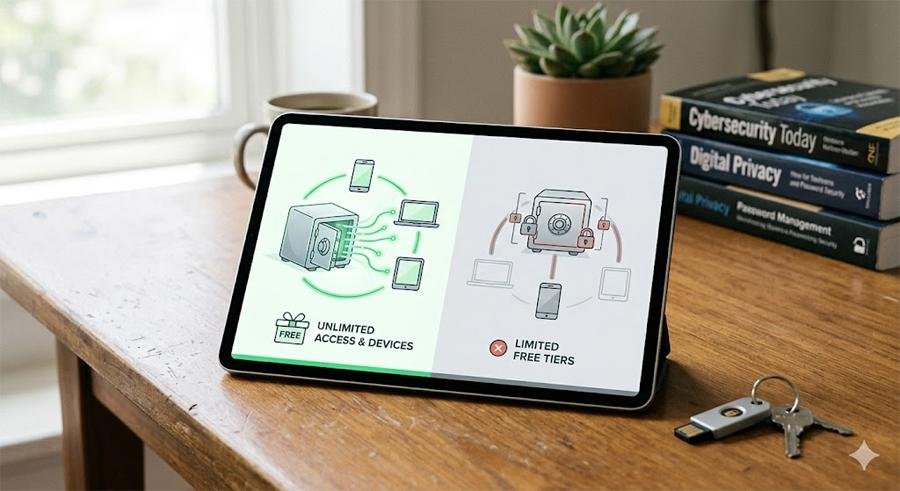
The best free password manager in 2026 are Bitwarden (best overall — open source, unlimited passwords, unlimited devices, genuinely free forever) and Proton Pass (best for privacy — from the makers of ProtonMail, end-to-end encrypted, unlimited free). Both beat every paid competitor’s free tier. The only reason to pay for a password manager in 2026 is for advanced team sharing, breach monitoring, or priority support — none of which most individual users need.
The best free password managers in 2026 are genuinely better than the paid options most people are currently using — and most people do not realise this. LastPass’s free tier was gutted in 2021 (now limited to one device type). Dashlane’s free tier is limited to 25 passwords. 1Password has no free tier at all. Yet Bitwarden offers unlimited passwords across unlimited devices, and Proton Pass offers unlimited passwords with end-to-end encryption — both completely free forever.
3 VPNs That Pass All Tests
NordVPN: Zero leaks in tests, RAM-only servers, and Threat Protection to block malware.
Surfshark: Unlimited devices, Camouflage Mode for bypassing VPN blocks, and CleanWeb ad-blocker.
ExpressVPN: Trusted Server tech (data wiped on reboot) and consistent streaming access.
This guide cuts through the noise: which password managers are genuinely free with no meaningful restrictions, which are free trials in disguise, and which are the right choice for your specific situation.
Why You Need a Password Manager — The Case in 30 Seconds
The average person has 100+ online accounts. Using the same password across multiple sites means one breach exposes everything. Using simple memorable passwords means they are easily guessed or cracked. Writing passwords down is a single point of failure. A password manager solves all three problems simultaneously: it generates a unique, strong, random password for every account, stores them all encrypted, and auto-fills them so you only need to remember one master password.
The risk of not using one in 2026 is not hypothetical — data breaches are routine. The question is not whether to use a password manager but which one.
Best Password Manager for Beginners Who Hate Complicated Apps
1. Bitwarden — Best Overall Free Password Manager
✅ Genuinely free — no device limit, no password limit, forever
Bitwarden is the most important password manager recommendation in 2026 — not because it is free, but because it is genuinely excellent and happens to be free. Open source (code auditable by anyone), independently security audited, used by millions of individuals and organisations, and the free tier has no meaningful restrictions for individual users.
(Ad)

What Bitwarden free includes
- Unlimited passwords — no cap on entries
- Unlimited devices — sync across your phone, laptop, desktop, tablet simultaneously
- Browser extensions for Chrome, Firefox, Safari, Edge, Brave, and more
- Mobile apps for iOS and Android
- Desktop apps for Windows, Mac, and Linux
- Secure notes, credit card storage, identity storage
- Password generator (customisable length, special characters)
- End-to-end encrypted vault — Bitwarden cannot read your passwords
- Two-factor authentication (authenticator app, email, FIDO2/WebAuthn)
- Self-hosting option — run your own Bitwarden server if you want complete control
What requires Bitwarden Premium ($10/year)
- Advanced 2FA options (Duo, YubiKey hardware keys)
- Integrated TOTP authenticator (Bitwarden generates your 2FA codes)
- Vault health reports (weak passwords, reused passwords, breached passwords)
- Encrypted file attachments
- Priority support
Verdict: For individual users, Bitwarden free is the best password manager available at any price. The $10/year premium is worth it for the vault health reports alone — but the free tier covers everything the vast majority of users need.
1Password vs Bitwarden : Honest Comparison of 2026 – Plus the Price Hike Nobody Warned You About
2. Proton Pass — Best for Privacy
✅ Genuinely free — unlimited passwords, unlimited devices, end-to-end encrypted
Proton Pass is the newest major entry in this category, launched in 2023 by the team behind ProtonMail and ProtonVPN. The privacy credentials are the strongest of any password manager: based in Switzerland (strong privacy laws), open source, end-to-end encrypted, and operated by a company whose entire business model is privacy rather than advertising or data monetisation.
What Proton Pass free includes
- Unlimited passwords across unlimited devices
- Unlimited hide-my-email aliases (create unique email addresses for each site — a significant privacy advantage over Bitwarden)
- Pass Monitor — dark web monitoring for your email addresses
- 2FA authenticator built in
- Browser extensions (Chrome, Firefox, Edge, Brave, Safari)
- iOS and Android apps
- End-to-end encryption by default
Where Proton Pass edges ahead of Bitwarden free: the built-in email aliases and the built-in 2FA authenticator are both paid features in Bitwarden. If email privacy and integrated 2FA matter to you, Proton Pass free provides more value than Bitwarden free.
Where Bitwarden is still better: Bitwarden has a more mature, polished interface and is more widely integrated with enterprise tools. For most users, either is excellent — the choice comes down to which interface feels better.
3. NordPass Free — Best Brand Name Free Option
⚠️ Limited free tier — only 1 active device at a time
NordPass (from the makers of NordVPN) offers a genuinely secure free tier but with an important limitation: you can only be logged in on one device at a time. Switching from your phone to your laptop requires logging out of one and into the other. This limitation makes it substantially less convenient than Bitwarden or Proton Pass for most users, but NordPass’s interface is arguably the most polished of the three and XChaCha20 encryption is technically superior to standard AES-256.
Best for: users who primarily use one device and want the most polished password manager interface.
4. KeePass — Best for Maximum Control (Advanced Users)
✅ Completely free and open source — local storage, no cloud
KeePass stores your password database locally on your device rather than in the cloud. Zero cloud dependency, no subscription, no company to be hacked or acquired. The trade-off: no automatic sync across devices (you manage sync yourself via Dropbox, OneDrive, or a USB drive), and the interface is significantly less polished than cloud-based options.
Best for: technically confident users who want complete control and zero cloud dependency. Not recommended for general consumers — the convenience deficit is significant.
5. Apple iCloud Keychain — Best for iPhone/Mac Users Already in Apple Ecosystem
✅ Free, built-in to all Apple devices
If you use an iPhone and a Mac exclusively, iCloud Keychain is genuinely excellent and already on your devices. Passwords sync seamlessly across all Apple devices, auto-fill works flawlessly in Safari and supported apps, and the interface is integrated into Settings rather than a separate app. Since iOS 17 and macOS Sonoma, Keychain includes a dedicated Passwords app, making it a first-class password manager rather than a buried setting.
Limitations: limited functionality on Windows (requires iCloud for Windows app, works only in Chrome and Edge), no native Android support. Not suitable if you use Windows or Android devices regularly.
What to Avoid — Free Password Managers With Hidden Costs
| Tool | Free tier in 2026 | The catch |
|---|---|---|
| LastPass | One device type (mobile OR desktop — not both) | Gutted in 2021 after multiple security breaches. Avoid. |
| Dashlane | 25 passwords maximum, 1 device | 25 passwords is insufficient for most users |
| 1Password | No free tier — 14-day trial only | $2.99/month minimum. Good product, no free option. |
| Keeper | Mobile device only, no desktop on free | Very restrictive — not practical for most users |
| RoboForm | Unlimited passwords but 1 device, no sync | No cross-device sync makes it impractical |
⚠️ Specifically avoid LastPass in 2026
LastPass suffered major security breaches in 2022 and 2023 — encrypted password vaults were stolen. While the encryption should protect passwords if you had a strong master password, the company’s security response was widely criticised. The free tier was simultaneously made significantly less useful (one device type only). There is no reason to choose LastPass over Bitwarden or Proton Pass in 2026.
How to Switch to a Password Manager — Step by Step
Getting started with Bitwarden (takes 15 minutes):
- Go to bitwarden.com and click Get Started
- Create a free account with your email — choose a strong master password (this is the only password you need to remember)
- Install the browser extension for Chrome, Firefox, or Edge from bitwarden.com/download
- Install the mobile app on iPhone or Android
- Start saving passwords: next time you log into any site, Bitwarden prompts you to save the password
- For existing passwords: go to Settings in your browser → Passwords → export them as a CSV, then import into Bitwarden via Tools → Import Data
- Enable two-factor authentication for your Bitwarden account (Settings → Security → Two-step Login)
Best Password Managers
Simple, Safe, and Portable Username and Password Organizer for the Internet
NordPass Premium, Unlimited Devices, 1-Year, Password Manager, Digital Code
McAfee Total Protection 3-Device 2025 Ready |Security Software Includes Antivirus, Secure VPN, Password Manager, Identity Monitoring | 1 Year Subscription with Auto Renewal
ESET Home Security Premium | Antivirus | 2025 Edition | 5 Devices | 1 Year| Password Manager | Privacy Protection | Ransomware | Anti-Theft | Digital Download [PC/Mac/Android]
Offline Password Keeper – Secure Bluetooth Drive with Autofill, Store 1,000 Credentials, Military-Grade Encryption for Safe Password Management (Black)
FIDO2 / U2F Security Key and Hardware Password Manager | Universal Two Factor Authentication | Portable Professional Grade Encryption | PGP/SSH/Yubikey OTP | Windows/Linux/Mac OS/Android
Frequently Asked Questions
The Bottom Line
The best free password manager in 2026 is Bitwarden for most users — unlimited passwords, unlimited devices, open source, genuinely free forever. Proton Pass is the right choice if email privacy and built-in 2FA matter to you. Apple Keychain is the right choice if you live exclusively in the Apple ecosystem. There is no reason to pay for a password manager as an individual user when these options exist.

Greetings! I’m An Jay, and I’ve been running SmashingApps.com since 2007. Over the years, I’ve poured my passion into web design, graphic design, and SEO—helping readers discover the best tools, tips, and techniques to make their online projects shine. I believe in keeping things simple, practical, and results‑driven, and I’m excited to share everything I’ve learned with you.