Web Services

Five Great Web Apps For People Who Run Professional Websites

There are many web apps out there, but getting by free and good ones is not that easy. That is why I am sharing The Five Great Web Apps For People Who Run Professional Websites. Read each entry in the list and see which tool suits your needs best.

You are welcome if you want to share more useful web apps that our readers/viewers may like. Do you want to be the first one to know the latest happenings at  SmashingApps.com just subscribe to our rss feed and you can follow us on twitter as well.

Kroud

Kroud is the simplest way to build an engaging, community driven, Frequently Asked Questions page for your website.

Qhub

Qhub is a platform you can use on your blog or website that allows your audience to ask questions and get real answers, it doesn’t just help answer questions it allows a genuine community to develop around your site.

zferral

zferral allows you to scale your business by crowdsourcing sales and marketing. You can create and manage your custom affiliate and referral programs from a single dashboard.

Respelt

Respelt is a free online spell checker with a powerful feature set. It help you spell check your documents, web pages and even RSS feeds.

Jazzdesk

Jazzdesk is a simple, intuitive and user friendly support web app that works the way you want. You can create, manage and share tickets with your staff or support company, work individually or as a team and get an overview on who’s doing what.

10 Great Online Tools That Help You Find Out A Lot About Live Websites

Webmasters often need to get information on websites. This information can be anything ranging from one’s own website traffic analysis to a competing site’s owner’s name. Along with webmasters, blog owners can also make use of site information and have it work to their advantage in numerous ways.

For our blog and site owning readers out there, we present a list of 10 free online tools that help you find out a lot about live websites. Read this list, check out each tool, and find out which one can help you best.

w3who

w3who

This web tool will let you find out a lot about a site including AdSense and Google Analytics status, server location, IP address, title, and description. A thumbnail image of the site is also displayed. Check out w3who @ http://www.w3who.com/

Moniitor

clip_image004

Through Moniitor, webmasters can carry out multiple traffic analyses – such as Alexa , Pagerank, and Twitter mentions– at the same time. A greatly useful site, you can visit Moniitor @ http://www.moniitor.com/

PlaudIt

clip_image006

PlaudIt is a wonderful Google Analytics alternative. You can use it to monitor your site’s stats including its Pagerank, changes in Feedburner subscribers, mentions on Twitter, inbound links, Google Pagerank, Quantcast Rank, Alexa Rank, and more. Visit PlaudIt @ http://www.plaud.it

WebsitesLog

clip_image008

WebsitesLog is a great tool to get the summary of a site’s information. It can deliver information about hosted servers, indexed pages, blog entries and Alexa ranking, amongst other stats. Visit WebsitesLog @ http://www.websiteslog.com/

Dataopedia

dataopedia

dataopedia will help with a traffic estimate of your site or a competing site. Along with basic information such as title, description, and date of going live, the site provides Alexa ranks via graphs. Check out dataopedia @ http://dataopedia.com

Statsaholic

stats

Statsaholic is a great site traffic comparison tool. It lets you add up to 3 websites; then a graphical comparison of their monthly traffic is displayed. Check out Statsaholic @ http://www.statsaholic.com/

Attention Meter

dom

Attention Meter is a site similar to Statsaholic with the improvement that it lets you add up to 5 sites instead of 3. Visit the Attention Meter @ http://attentionmeter.com/

Abouthisite

whoo

Through Abouthisite you can find out the main details of a site – owner’s name, daily visitors, language, server location, server location’s on a map, thumbnail image of the homepage, and the color composition of the thumbnail image. Visit Abouthisite @ http://abouthisite.com/

WhoIsHostingThis

whoishosting

WhoIsHostingThis is a highly helpful and straightforward website that helps determine the host of a website. You are provided with the site’s host’s website along with the IP address and name servers. Check out WhoIsHostingThis @ http://www.whoishostingthis.com

WhoIs

whois

WhoIs is a site already used by many webmasters for site information. In addition to domain name, registrar, and referral URL, you also get the site creation date, and update dates, amongst other details. Check out WhoIs @ http://www.whois.net/

Incredibly Helpful Online Tools For People Who Develop Websites

This is one of the very best list of its kind where you can find Incredibly Helpful Online Tools For People Who Develop Websites.  These would be great enough to bookmark or just for get in your knowledge. I hope everyone of you will like this list. This is absolutely helpful for web developers, designers, web designers, developers etc. Just take a look at them and share your thought’s here.

You are welcome if you want to share more useful web apps that our readers/viewers may like. Do you want to be the first one to know the latest happenings at  SmashingApps.com just subscribe to our rss feed and you can follow us on twitter as well.

Google Chart Tools

The Google Chart API lets you dynamically generate charts with a URL string. You can embed these charts on your web page, or download the image for local or offline use.

Pingdom Tools

Pingdom Tool helps you test the load time of any web page. You would just need to enter a URL to test the load time of all elements on that page and you can view the list of objects either in load order or as a hierarchy.

CodeRun Studio

CodeRun Studio is a cross-platform Integrated Development Environment (IDE), designed for the cloud. It enables you to easily develop, debug and deploy web applications using your browser.

CSS Menu Builder

This is a huge collection of ready to build 300+ horizontal menus, 700+ vertical menus combinations and breadcrumb menus that consist of more than 200+ combinations, in total this site offers more than 1000 menu combinations not including the endless color combinations.

Variable Grid
System

The variable grid system is a quick way to generate an underlying CSS grid for your site. The CSS generated file is based on the 960 Grid System.

247webmonitoring

Having a good uptime is essential for the success of your website. 247webmonitoring will monitor it 24X7 from their servers and notify you whenever it goes down. This will check your website every 15 minutes to know it is up. They will send you notification by email or SMS when it goes down. So you can quickly fix the issue and you can stay happy. This way you can relax and focus on your core business. In future, you will also find out how fast your site is from different location.

PHPanywhere

PHPanywhere is an online service that’s changing the way people develop on the web. They enable users to develop and maintain their php/html projects online using any standard web browser.

Load Impact

Load Impact generates simulated user traffic to your site – for example it might simulate that 50 users are trying to load your web pages at the same time. While simulating the traffic from these 50 users, it also records how fast pages are loaded from your server. This lets you know how fast your site is (as experienced by a user) when it is being accessed by 50 users at the same time.

CSS Type Set

A real handy css creation tool where you can easily create CSS stylesheet without any css coding skills.

Adobe BrowserLab

An easier and faster solution for cross-browser testing. You can preview and test your web pages on leading browser and operating systems. This will help you get your results in real time, from virtually any computer connected to the internet.

codepaste

CodePaste provides an easy and convenient way to send/share PHP, C++, Javascript, Java, CSS, Actionscript and HTML code with others. Copy and paste the code and enter the email where you want the CodePaste to send it. CodePaste then nicely formats the code and sends it over.

Ten Best Web Services to Create Free Slideshows Online

Slideshow creation is something we all do on regular basis. Whether family or vacation pictures are turned into slideshows for sharing with family and friends or an info graphics bar chart slideshow is created for a professional presentation, slideshow creation is commonplace today. We have lined up ten great free slideshow creation services online which help make slideshows without any fuss. SO have a look:

PhotoPeach

PhotoPeach is a great free web based slideshow creation service which allows creating, sharing and embedding slideshows online for any type of content which you want. A sign up is required to use the service.

clip_image002

myPicPals

myPicPals enables slideshow creation and sharing on websites which support Flash as well. This free service is geared towards social networks and has support for many including MySpace, Facebook, Xanga, Blogger, hi5, TypePad, Friendster etc.

clip_image003

Kioza

WithKioza’s slideshow creation service, text and audio/video clips can also be added to slideshows and it also allows burning slideshows to DVD via its premium service.

clip_image005

Smilebox

Smilebox works seamlessly in creating slides shows which can then be instantly e-mailed and uploaded on Facebook for your family and friends to view. It has a large collection of slideshow templates available as well.

clip_image007

Picturetrail

Picturetrail features a photosharing and image hosting service as well along with standard slideshow creation and claims to have the largest collection of slideshow templates online. Try it out and see if its really true.

clip_image009

Slide

Slide offers a multitude of skins, themes, backgrounds, effects, sizes and a lot more to customize the slideshows you create with its service. Creating slideshow is easy and can be done in as many as three steps only.

clip_image011

Roxio

Quite popular service, Roxio provides free online slideshow creation along with cool musical backgrounds matching to the pictures depicting inside. Also, slideshow sharing is fun and easy with Roxio.

clip_image013

MySpace Slideshow

The name might confuse you, MySpace slideshow isn’t an official slideshow creation service from MySpace social network, but that doesn’t hides the fact how good it is. With MySpace Slideshow you can upload multiple MySpace photo albums in a single slideshow. It also allows an unlimited number of pictures per slideshow along with resizing and direct access to Photobucket.

clip_image015

Scrapblog

Scrapblog lets one create multimedia scrapbooks featuring photos, videos, audio and other elements. You can share your scrapblog online with friends. Once a slideshow is created, it can be turned into high-quality photo books and DVDs.

clip_image017

Thumbstacks

clip_image018

With Thumbstacks, presentations and slideshows can be created right in the web browser with Word-like rich-text editing controls and with images and drawings. Created slideshows and presentations can be shared with friends via a single unique URL for each one.

Save Your Bookmarks With Historious And Always Get Access to Them

Normally when you work with separate computers, there are not many ways you can share your bookmarks. Chrome has worked out a brilliant bookmark synchronization strategy that automatically keeps all your bookmarks updated but for this you need a Google account. Moreover many other browsers do not have such synchronization features. Having access to your bookmarks therefore, is quite a problem. And Historious is its solution.

Historious stores your bookmarks by indexing them, much like a search engine does. Usage of Historious is absolutely free. You start by creating an account on the site. After you sign in, you can drag the Historious bookmarklet on to your bookmarks toolbar; if you are a Chrome user, you can either use the bookmarklet or the Historious extension for Chrome.

clip_image002

Whenever you are on a website, all you do is click on the extension icon or bookmarklet to add the website to your Historious bookmarks. A message will pop up in the top right telling you that the page is being indexed.

clip_image004

A completion message is shown after the page has been indexed.

clip_image006

Another way to add bookmarks to your Historious account is by visiting http://USERNAME.histori.us/ (replace USERNAME with your Historious username) and either typing the URLs of all websites or upload a bookmarks file created by a web browser or services like Delicious.

clip_image008

When you visit http://USERNAME.histori.us/ you encounter a search-engine like view.

clip_image010

Either search for your bookmark by its name or click on the “Show all sites” link to view all the indexed bookmarks.

clip_image012

Since the bookmark list is stored you can access it from any computer with a web connection.

Check out Historious.

Easily Create Online Survey Polls With Flisti

Are you thinking of holding up a vote on your website or blog? Holding an online poll is perhaps the easiest way to do this. And thanks to Flisti, creating online polls had never been easier.

Flisti is a free and user friendly website that assists visitors in poll creation. There is nothing to download or install – everything happens within your web browser. Moreover no registrations or account creations are required. You can jump right into the poll creation process.

The entire poll creation interface is located on the site’s homepage. You start by entering the question your poll will ask. Then you enter the answers. By default you can enter two answers; using the little “Add” button in the bottom right, you can add fields for more answers.

You can also allow or disable choosing multiple answers. When you have entered your questions and answers, click on the “Create New Poll” button. This will create a simple poll with a unique URL.

You can invite people to cast their vote by sharing the poll’s URL or by sharing it directly on the supported social networks. If you want to put the poll up on your own website or blog, you can copy the generated HTML code and paste it on your website.

In these easy steps, you would have created your online poll. Visit Flisti.

Read User-Generated News From Across the Globe With MaYoMo

Many people believe that news channels keep their sponsors’ interests in mind and broadcast biased views on news. It is believed that the simplest solution to this is user-generated news: news reported and shared by average people. Of course if you have something about your area to share, it might be quite some time before your local news channels airs it, if at all. This is exactly why online user-generated sources are great to publish and share news.

One such online source is MaYoMo.

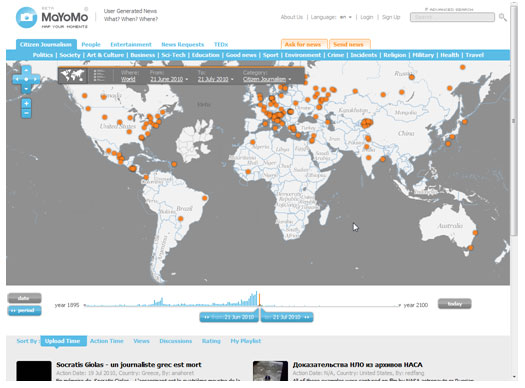
MaYoMo is a great user-generated news website. It derives its name from “Map Your Moments.” Visitors to the site find a map on the homepage with red dots spread out geographically.

These red dots represent active news in the areas they are placed on. You can hover your mouse pointer over any red dot and a preview of the news will be shown.

You can click on the red dot to display the news details which can include text, pictures, audio, and video. The news might be in a non-English language; you can figure this out by reading the text in the preview.

If you would like to view news according to your interests, you can filter the global news according to the category that interests you. Choose the news genre at the top of the global news map. The website also provides visitors with the option to filter news by their date. This can be done via a slider present at the bottom of the global news map. You can create an account on MaYoMo to submit news you have.

Overall, MaYoMo is a wonderful news website that can help you stay aware of what is going on in the world. Check out MaYoMo.

Top 12 Sites For Online Video Chatting

If you feel that your instant messaging client is not satisfying your video chat needs, do not try downloading and installing any other applications. Give video chat facilitating websites a try. You are bound to find something that will let you video chat the way you want. The best part is that you will not have to install any new applications on your computer.

The internet has many video chat websites. In case you are looking for one, do not spend time searching on the web; simply give my list of top 12 sites for video chat a read. You will find the list below. See which site suits you best.

1. EkkoTV

If you are already familiar with video chatting sites and want something more, then visit EkkoTV. On the site you can have a 3 people video conference. This is great for chatting with 2 friends at the same time. Click here to visit EkkoTV.

2. RandomDorm

This video chatting website is for college students. You need to sign up using your college’s email (ending with EDU or AC). You can use this site to fine students from other or even your own universities. Click here to visit RandomDorm.

3. StreamFame

SteamFace is a site to tell show the world how entertaining you can be. You can choose to have your webcam broadcast video to the website; your feed is kept active unless more than 50% of your audience votes you down. Click here to visit StreamFame.

4. ChatRide

ChatRide is a more traditional video chatting website. You can create a chat room and share its URL with another friend to video chat. Only one on one video chat is possible. Click here to visit ChatRide.

5. Imo.im

This website is a collection of web messengers for popular instant messaging clients. In case the person you chatting with supports video chat, you can use Imo.im to initiate one on one video chatting. Supported services include MSN, AIM, Yahoo, Skype, Google Talk, MySpace, and Facebook. Click here to visit Imo.im.

6. MeBeam

MeBeam is another traditional video chatting site that lets you create a video chat room to which you can invite others. Visit MeBeam here.

7. BoostCam

BoostCam focuses on speed. You can start video chatting rather quickly. After gving the site access to your webcam, it creates a temporary URL which you share with people to video chat. Click here to visit BoostCam.

8. Confabio

Similar to BoostCam, Confabio lets us create a chat room of which the URL can be shared to invite others. Click here to visit Confabio.

9. WooMe

If you are hoping to find a special someone through video chatting, pay WooMe me a visit. The site helps singles get to know other singles through video chatting. Visit WooMe here.

10. Chatroulette

Even if you have not video chatted before, you must have heard of Chatroulette. It is a highly popular speed-video chatting site. Random connections are made between two people; this connection can be terminated by any party anytime. The site is highly addictive and has a very simple interface. Visit Chatroulette here.

11. TinyChat

TinyChat is a great video chat site especially for Twitter users. Visitors can sign in with their Twitter accounts, create a video chat room, then invite up to 10000 people to video chat with them. Visit TinyChat here.

12. 6rounds

Chatroulette might be addicting for many people but it provides very few options to play around with. 6rounds expands the Chatroulette concept and does a wonderful job in helping you find new friends online. The interface is very user friendly and new features are constantly being added to the site. Click here to visit 6rounds.

Mugtug Offers Online Image Editing & Drawing Tool At One Place

If you have been using your computer for some time, you already have separate applications installed for image editing and drawing. But if you are using somebody else’s computer, you might not have the administrative privileges required to install new programs. In this case online apps come quite in handy. Rather than looking for separate web apps for image editing and drawing, you should pay a visit to “Mugtug.”

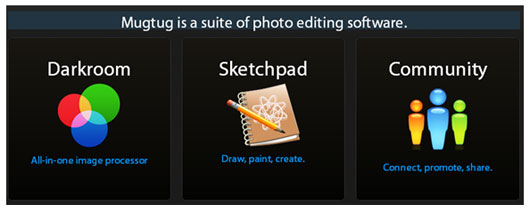
Mugtug is a free to use web service that offers two web apps – an online image editor and an online drawing tool, both HTML5-based.

The site also has a small community which users can log in to share the work they got done through Mugtug.

The online image editor is called “Darkroom” and offers a number of impressive features.

You can upload an image to the editor from your computer, a URL, or through your Picasa or Flickr accounts. Once uploaded you could use one of the basic features from the top pane. These features include rotate, mirror, crop, and red eye removal.

Further options can be found in the left pane. Here you can set the colors, set the brightness and exposure levels, and modify the contrast and saturation levels.

You can also add effects to the pictures. Previews of each effect can be seen by placing your mouse pointer over the effect.

When done editing, you can save or share the picture using the button on the top left. You can do a final resizing of the picture and choose to save the picture, share it via URL, or publish on your Picasa or Flickr account.

The drawing app offered by Mugtug is called “Sketchpad.”

This tool offers standard drawing options along with advanced features of pattern, gradient, and swatch. You can also create your own colors using the color chooser set in the top right. When done drawing, you can use the button in the top right to save your drawing in PNG image format.

Mugtug successfully merges these tools in a user friendly interface. The next time you need to draw or edit a photo, remember to visit Mugtug.

See How Sites Would Look If They Use Web FontFonts

“Web FontFonts” are high quality, screen-optimized fonts designed specifically for web use. There are many websites that do not currently use Web FontFonts; they use regular fonts instead. But using “FontFonter”, you can view any website’s text in Web FontFonts.

FontFonter is a free and simple to use website that will let you view any website in Web FontFonts. The site’s usage is extremely simple: you enter a website’s URL, FontFonter analyzes the webpage, and displays the website with its default fonts replaced by Web FontFonts.

For example, our SmashingApp website looks like this by default:

But if I pass SmashingApp’s website through FontFonts, I get the following view:

You can see the clear font difference between the two images. Of course there are different types of Web FontFonts. You can choose to jump from one Web FontFonts view to another using the yellow bar that is located at the top of each preview.

Here you can check which font on the webpage to replace and which font to replace it with. The preview you see above replaced Sans Serifs with FF Meta Web and Serifs with FF Meta Serif Web.

In the image below, all fonts have been replaced by FF Yoga Web.

Currently FontFonter can be used for previewing purposes only and it does not support JavaScript, cookies, mobile browsers, Opera, and Internet Explorer. Furthermore FontFonter uses some HTML tricks that do not work on all sites.

Nonetheless, it is an interesting tool which web developers should check out. Visit FontFonter now.