Rss/feeds
5 Websites & Tools Bloggers Should Know About
While the job is interesting and one gets to discover the latest about the Internet, blogging is no easy task. “Time is money” could not be any truer for bloggers; impossible deadlines put us under harsh time constraints. Due to this constraint, bloggers are always actively on the lookout for the next great tool that can help us cut back on the time it takes to write our articles/reviews.
Bloggers who run their own website, on the other hand, are not under any critical deadlines – their worries are of a different nature. Taking constant care of their website and monitoring it is an absolute must for them; if a site owner’s website unexpectedly goes down, his/her income will be negatively affected.
Therefore one way or the other, all bloggers have problems whether they are self-employed, freelancing, or fulltime employed. They need all the help they can get.
Today we present to our fellow bloggers five tools available on the internet which will help them in one way or the other. We hope you all find the following tools as helpful as we did.
You are welcome to share if you know more useful tools which our readers/viewers may like. Do you want to be the first one to know the latest happenings at SmashingApps.com just subscribe to our rss feed and you can follow us on twitter and do not forget to become our fan on facebook as well.
1. DomainTools

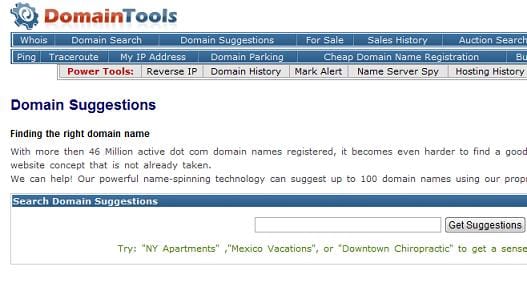
For somebody who plans to start out his/her own website, the first most important step is to come up with a great name. Once the great name has been thought of, one needs to check its availability. DomainTools is a free website that does both things. Firstly it can suggest various names to a user by taking as input a keyword. Secondly it shows us which domain extensions (COM, NET, etc.) is the site name available. If a user wishes, he/she can buy and register the domain name right from the site. In this way, DomainTools eventually saves us a lot of time in the process of naming our website.
2. WhoisLookup/WhoisApplication

WhoisLookup is a freeware application less than 100KB in size. The EXE file is downloaded and can be run without any installation. In the program we can enter the URL of a site and get its Whois information which shows us the site’s various attributes such as its registrar’s information, the location of the site, and the details of its administrator. Whois specifics can help out a great deal when trying to determine which website to blog about. To some extent, it can also show us whether or not the site’s claimed location matches its actual location; this helps us judge the trueness of the website’s credentials.
3. dnspchecker

This nifty little freeware is about 3MB to download and is helpful in determining the status of a website. It is compatible with Linux and Windows operating systems. After we enter a URL into the program, it uses ping command to see if the DNS is live. In other words you can see if a site is up or not. A successful message is show each time the site if up; if the site is down or a valid response could not be received then it automatically checks the site every 60 seconds. This way we do not have to recheck the status of the site each minute (because it is automatically being done for us). To have it not interfere with our work, the program can be minimized to the System Tray and gives an alert when DNS is propagated.
4. Observu

dnschecker can only help you if you have it installed on your system. If you are using a computer on which you do not have the privilege to install new programs and you would like to check the status of your websites, the only way that comes to mind is by actually visiting the website in your internet browser. If the number of websites is more than one then the process could be considerably time consuming. Observu is a free website that lets us register for a free account and enter an unlimited number of websites to be automatically monitored. If any one of them goes down, we are immediately emailed of its negative status. There is no limit to the number of sites we want monitored. Observu can be helpful not only for site owners but also for bloggers who have reviewed a website and want to stay informed of its status. For instance John, a blogger, blogs about www.XYZABC123.com and he is emailed of its negative status the next month; upon receiving the notification, John can updates his previous review and add a note saying that the site is currently experiencing problems and is down. Such responsibility can go a long way and earn loyal readers.
5. BlogDesk

Wordpress is a blogging platform used by many bloggers. Other widely used platforms are MovableType, Drupal, Serendipity and ExpressionEngine. To blog in these platforms, we open up our internet browser window, log into our blogging Dashboard and get started. With the latest platforms we can save our work as we go along but having the data secure on our hard drive is something that most bloggers find comfortable. Also while typing on these platforms, one has to go through special means while inserting hyperlinks and pictures. BlogDesk is a 4MB freeware program that eliminates all the problems associated with typing our blogs on these platforms. It is a desktop application that enables us to type up our blog offline with ease. When we want to publish the article, we can simply blog from BlogDesk directly. The abovementioned blogging platforms are supported by the program. But before you go using it, make sure its option is enabled in the online settings of your blogging platform.
Let’s Take A Look On Some FeedBurner’s RSS Feed Analysis Tools
I will appreciate if you can spread the word via Digg or other social media websites, Thank you
FeedBurner, A must have online service to control rss feed of any website specially for the blogs. While browsing from news websites to entertainment or tech websites to general websites everyone is focusing to promote their rss feed to subscribe by their visitors or try to motivate their readers in a different attractive ways to increase his rss feed subscription. And FeedBurner is really helping the webmasters to offer rss feed subscription offer on the website.
Today, we are discussing about few rss feed analysis tools which may help you to analyze any web site’s rss feed subscribers, performance, hits, comparison etc
If you know more tools which may help to analyze rss feeds, you are welcome to share them with us here via comments. We will also welcome your feedback about any tool given below so new user will have success story to read before they will use.
BlogPerfume Feed Analysis v1.1 Analyzes Your FeedBurner Feeds
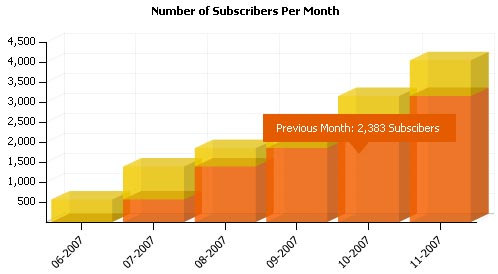
By the use Blog Perfume Feed Analysis tool, the number of subscribers for each month is neatly shown on the column chart. You can also view the number of subscribers, hits, views and clicks for every single day from the line chart. The best/worst day of the week is also available which is displayed on the pie chart. And also, Feed Analysis can give you an estimated value for your blog / site according to the number of your subscribers.
FeedCompare Helps To Compare Your FeedBurner Subscriber Numbers With Others
FeedCompare helps us compare our FeedBurner Feeds Subscriber Numbers with others. You can simply type in the FeedBurner Feeds (http://feeds.feedburner.com/SmashingApps). You can type maximum four FeedBurner Feeds and then press submit to compare them, FeedCompare will then shows the subscriber numbers of different sites on a lovely line chart.
Feed Commander Gives Complete Control Over The RSS Feed You Display On Your Website
Feed Commander is and online software that allows you to easily configure an RSS feed to display any way you like. With a few simple choices from the menu, you can hit the preview button and see exactly how the generated code will appear. When you have a preview that you like, you simply choose to generate the code, and copy and paste it wherever you wish.
Create A Simple Graph Of Your FeedBurner Subscriber Circulation Data
With this simple FeedBurner subscriber analysis graph tool you can extract the circulation data for a blog for a given period of time. If you do this for f.i. the last year, you can draw a nice graph of how your RSS subscribers have progressed over time. To do this, you need your FeedBurner name, for instance, use the FeedBurner URL SmashingApps.Com which is http://feeds.feedburner.com/smashingapps, and see the performance of last 6 month, 1 year, 2 year or 3 year.
Fresh, Free and Gorgeous RSS/Feed Icons Set Released By SmashingMagazine!
SmashingMagazine has recently released a Fresh, Free and Gorgeous RSS/Feed Icons set. The set contains 8 icons which you can use for private and commercial projects, blogs and web-sites for free. The icons are available for both Mac and Win-users in resolutions 16Ãâ€â€16px, 24Ãâ€â€24px, 32Ãâ€â€32px, 48Ãâ€â€48px, 128Ãâ€â€128px, 256Ãâ€â€256px and 512Ãâ€â€512px.
You can use the icons for private and commercial projects, blogs and web-sites for free. However, please take a closer look at the license agreement.
RSSOwl – A Java RSS / RDF / Atom Newsreader
Applications that collect data from RSS-compliant sites are called RSS readers or “aggregators.” RSSOwl is such an application.
RSSOwl lets you gather, organize, update, and store information from any compliant source in a convenient, easy to use interface, save selected information in various formats for offline viewing and sharing, and much more. It’s easy to configure, available in many many languages and the best of all: It’s platform-independent and open-source. Please click here for RSSOwl 2.
Subscribe Our Rss Feed and Always Be The First to Know About Free Smashing Online Resources For Designers And Developers
When you are desiging or developing new website it must be your routine to search for free, open-source resources. Sometimes you might get great resources and sometimes your search is just a waste of time. For those that are looking for quality and free resources try SmashingApps.Com. Because SmashingApps.Com is a hot spot and heaven on internet for open-source and free resources. But its almost impossible to visit SmashingApps.Com daily at the particular time to get updated with the latest information for open-source and free resources.
Dont worry! we have a solution for this problem. To be the first one to know the latest happenings at SmashingApps.com just subscribe to our rss feed. This way you will be informed daily so you can make your own decision or interest without having to be in the dark about any open-source or free resource.
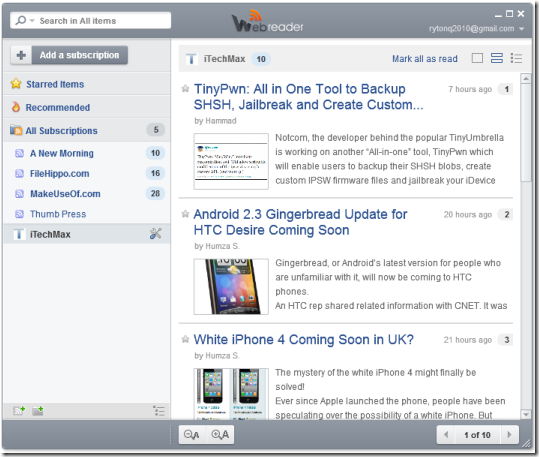
Feedreader is a FREE RSS News Aggregation Solution
Feedreader is the most robust, highly-functional personal aggregation solution on the market today. And Best of All….Its FREE! It dynamically reads, collects, and organizes syndicated Web content, and seamlessly delivers it directly to user desktops. With Feedreader, you have instant, convenient access to the up-to-the-minute news you need, without information overload.
Feedreader automatically downloads updates from your favorite Web sites. So, it eliminates the need for you to constantly monitor multiple Web pages, while allowing you to immediately identify and retrieve new articles – no matter how long you’ve been away from your desk.
Feedreader is available to end users at absolutely no cost. No hidden fees, no spyware, no adware. Just powerful collection and delivery of content from your favorite Web sites. They also offer an older version, which is available as an opensource package, for users who wish to modify the source code.