File and Data Sharing

Five Unique Search Engines That Can Help You More Effectively

There are many websites and search engines out there, but getting by free and good ones is not that easy. Today, we are sharing Five Unique Search Engines That Can Help You More Effectively. Read each entry in the list and see which search engine suits your needs best.

You are welcome if you want to share more unique search engine that our readers/viewers may like. Do you want to be the first one to know the latest happenings at  SmashingApps.com, just subscribe to our rss feed and you can follow us on twitter and follow us on Digg as well to get updated.

FindFiles

FindFiles.net is a rapidly developing search engine for files of all types, operating its own crawler. FindFiles database currently contains links to 732,941,672 files. FindFiles supports all existing Mime Types (apart from standard html text-pages) like jpeg, gif, png and tiff images, Microsoft doc and Excel documents and exe executables, pdf and plain text documents, dwg AutoCAD and wrl virtual reality data files, archives like zip, gzip and jar, apps for smartphones like apk for Android and sis for Symbian etc.

SearchPSD

Here you can search more than 1.500 psd files order by categories that are all free for you.

SaveItt

Saveitt is a Free books, pdfs and Documents Search Engine. Here, You can read online documents, books, pdfs and free download documents, books, pdfs.

Dooblet

Dooblet is a search-engine to find the alternatives to a broad range of subjects. You have something you are not happy with? Feed its name to Dooblet and see what the search-engine can propose you as an alternative. It doesn’t really matter whether you need the alternatives for software, cars, medical treatments, trademarks, movies, artists or even philosophy terms. Dooblet is expected to find some alternative for you.

Abbreviations

Abbreviations.com is the world’s largest and most comprehensive directory and search engine for acronyms, abbreviations and initialisms on the Internet. Abbreviations.com holds hundreds of thousands of entries organized by a large variety of categories from computing and the Web to governmental, medicine and business and it is expanding daily.

Top 10 Evergreen (Yet Free) iPhone Apps To Make Your Life Easier

There are many applications out there, but getting by free and good ones is not that easy. Today, we are sharing Top 10 Evergreen (Yet Free) iPhone Apps To Make Your Life Easier. Read each entry in the list and see which iPhone app suits your needs best.

You are welcome if you want to share more iPhone apps that our readers/viewers may like. Do you want to be the first one to know the latest happenings at  SmashingApps.com, just subscribe to our rss feed and you can follow us on twitter and follow us on Digg as well to get updated.

TeamViewer

TeamViewer provides easy, fast and secure remote access to Windows, Mac and Linux systems. TeamViewer is already used on more than 100,000,000 computers worldwide and with the TeamViewer App for iPhone and iPod Touch you are able to support your family and friends and can have access to your own computer with all of its documents and installed applications.

Idea Sketch

Idea Sketch lets you easily draw a diagram – mind map, concept map, or flow chart – and convert it to a text outline, and vice versa. You can use Idea Sketch for anything, such as brainstorming new ideas, illustrating concepts, making lists and outlines, planning presentations, creating organizational charts, and more.

Timer+

Timer+ is a simple countdown timer that can run multiple timers from a list of presets. It lets you pause and resume timers and set timers with seconds. Timer+ will alert you even when it’s running in the background.

Documents Free (Mobile Office Suite)

iPhone’s only light weight mobile office suite. This essential application allows you to edit and manage spreadsheet & text files on your iPhone. It works both online and offline. You can also synchronize files to your Google Documents account and open files on your PC or Mac.

USB Disk

USB Disk lets you store and view documents on your iPhone and iPod. It has an amazing built in document viewer and is very easy to use, with a simple and intuitive interface, yet it contains many powerful features. Drag and drop files in iTunes to transfer them to your iPhone / iPod, then view them anywhere.

Schedule Planner

Schedule Planner was developed to aide users in planning out daily activities by category and priority. Busy users are provided with a flexible set of categories ranging from “Meals” to “Health” and “Work” among others. Once a category is selected users simply input the specific nature of each time block, including when each task should be started and its overall duration. Tasks and full days can be planned in advance & viewed day-by-day via a practical graphic calendar. Furthermore, tasks are color coordinate for convenience, while the app employs an in-depth pie-chart diagram color coded to let users see how they send their time with a quick glance.

Pageonce

Pageonce automatically organizes and tracks your money and bills. See your banks, credit cards, bills and investment accounts in one simple place. Control where your money goes and get important real-time alerts and reminders about your accounts. You can even track your frequent flyer miles, rewards, mobile minutes, text and data usage. Pageonce is safe and secure, and was chosen by millions of people to simplify their daily financial lives.

ScatterBrain

ScatterBrain is an extremely focused note taking app designed to let you capture thoughts and ideas quickly when they happen. It’s simple enough to start using immediately, but versatile enough to keep track of all your thoughts. Whether it’s a grocery list, your next great idea, or just some random stuff you don’t want to forget, ScatterBrain will quickly become your go-to notes app.

Keeper® Password & Data Vault

Keeper® keeps your most important information totally secure and easy for you to access. It also protect and store your secret passwords. You can log in to websites with one touch.

DocScan

DocScan lets you instantly scan multi-pages document and send out when there is no scanner nearby. By having it, you can scan not only documents in sight, but also whiteboards, receipts, business cards, posters, coupons, books …etc.

10 Best Online Tools For Converting Documents

Have a document you or your friend cannot open? No need to worry. The internet has numerous web solutions for this. You can use various websites to convert the format of your documents into something software installed on your computer can open.
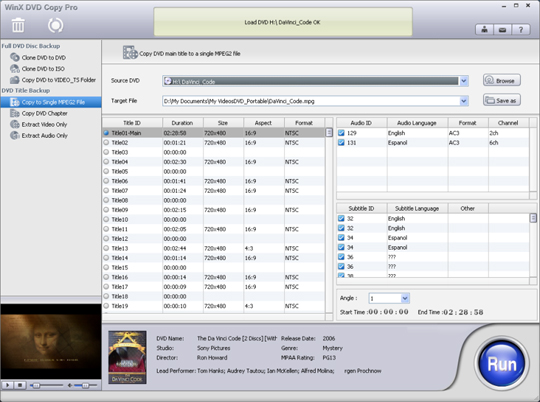
We have gathered the top 10 of such web tools and have shared them with you below. Check them out and see which ones suit you best.

PrimoPDF

With PrimoPDF you can have files converted to PDF with ease. Whether your file is store on your computer or online, you can provide it to Primo, provide it with your email address, and then receive the email notification when the conversion is complete.

Neevia Document Converter

With Neevia you can convert documents into a variety of file formats including images as well as PDF files. For each type of file format you can modify respective advanced options such as resolution and encryption.

DocsPal

DocsPal supports a wide range of document formats for both input and output. It also accepts the URL of online files in addition to getting files from your computer. You can have the files converted on the site and optionally have a download URL emailed to yourself.

DOCX to DOC

DOCX to DOC is a simple web app. Its name says it all – it helps you convert DOCX files into the DOC format.

Word to PDF Converter

Another quite simple to use web app is Word to PDF Converter. Using this app you can quickly convert documents created by Microsoft Word into PDF files online.

Investintech DOCX to DOC

Investintech DOCX to DOC is another online tool that helps convert files from DOCX to the DOC file format. It will be preferred by people who wish not to give out their email address.

PDF to Word Online Converter

You will find numerous Word-to-PDF converters online but something that does the reverse is not that abundant. This is why many people will find PDF to Word Online Converter valuable – because it converts PDF files into Word documents.

PDF2JPG

If you simply want your PDF files to be converted into images, then this web app should suit you well. Offering a basic interface is lets you quickly convert PDF files into JPG images.

CometDocs

CometDocs lets you create PDF files from existing digital documents that you can upload to the site. You can also get information on the files that you upload.

Adobe CreatePDF

Adobe CreatePDF is for people who want to create PDFs online with a wide range of features at hand. With this web app you will have full control over how the final PDF turns out to be. This is also the only paid application on our list, starting from $9.99 per month.

Top 5 Tools To Shorten Your Google Plus Profile URLs

Facebook’s profile URLs are easy to remember. Mostly they are Facebook’s own URL followed by your username. This makes it easy for you and others to visit your profile directly by typing the URL in their browser’s address bar. But this convenience of Facebook cannot be offered by Google+. By the way, we are on Google+ too, please feel free to add us in your circle to get updated with latest free resources on the web.

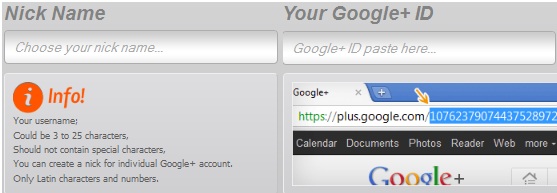
Since Google+ users join the network using their Gmail email address, their Google+ username can directly reveal their Gmail address. Thus Google+ has no choice but to give you profile ID numbers. These ID numbers are part of your direct URL for the Google+ profile. Thankfully however there are numerous web apps you can use to get a shortened URL for your Google+ profile by creating a nickname for yourself.

We have shared the best 5 of these applications below. Check them out.

GplusTo

GplusTo is a free to use web tool that lets you easily create a Google+ nickname. Based on your nickname it gives you a shortened URL that redirects to your original Google+ profile. Your shortened URL appears as a subdomain of GplusTo with your nickname added.

ToplUs

ToplUs works on the same principle like GplusTo: it asks you for a nickname and your Google+ profile URL. Then it gives you a shortened URL for your Google+ profile; this shortened URL is a subdomain of ToplUs.

PlusLy


PlusLy is yet another web service that can be used to obtain a shortened URL for your Google+ account. Like similar tools, it asks you for your Google+ profile ID and asks you to specify a nickname. You are then given a shortened URL that redirects to your Google+ profile.

G+Nick


G+Nick is free web tool that inputs your Google+ ID and a nickname of your preferences to generate a subdomain that redirects to your Google+ profile. The shortened URL makes it easier for you to directly visit your Google+ profile.

DirplUs

The final tool in our list is DirplUs and it serves a similar function as the abovementioned tools: it provides you with a shortened URL that redirects to your Google+ profile page. You can provide the site with your Google+ ID and preferred nickname to get the shortened URL.

By the way, we are on Google+ too, please feel free to add us in your circle to get updated with latest free resources on the web.

Top 5 Tools To Find Out Who A Phone Number Belongs To [US & Canada]

I get awfully curious when I receive a miscall on my cellphone from a phone number I do not recognize. Calling back is not always the wisest thing to do; what if it is somebody you do not really want to talk to?

“If only there were tools that helped me find who phone numbers belong to.” Thinking that, I searched the internet for such a tool. And I found five! Check them out below.

Canpages

For Canadian phone numbers, one of the best lookup tools is Canpages. The site lets you lookup phone numbers, fax numbers, and even toll free numbers. It even acts as an online edition of the yellow pages and helps you find phone numbers of people and businesses.

411ca

Another resource for looking up Canadian phone numbers is 411ca. Offering nearly the same set of features as Canpages, 411ca will be equally helpful.

Free411

Free411 will quickly become a favorite for people looking up phone numbers in the US. In addition to letting you reverse-lookup publicly listed phone numbers, the site lets you use it as the yellow pages. You can find the publicly listed addresses and phone numbers of people and businesses. You can also search for businesses in a certain area by selecting a business category.

Free Phone Tracer

Free Phone Tracer is as simple as it could get. Just type in the phone number you want to know the owner of, it is looked for in the site’s extensive directory of cellular and landline numbers and results are shown.

Google

Google web search should be your last landing spot. Many people provide their phone numbers on public listing online, online forums, social networks, etc. If it is there are publicly viewable, Google will help you find it. Try searching for the phone number with and without hyphens and compare your results.

IMPORTANT NOTE: Please keep in mind that the above-mentioned tools usually help trace only publicly listed numbers. They might not successfully help you find the owners of all phone numbers.

7 Applications To Help You Hide Images And Videos On Android Phones

Are you looking for an effective way to hide personal pictures and media files on your phone from others? If yes, then your search ends today! We have gathered a list of 7 excellent Android apps that will help you password protect your pictures and various other files on your phone.

Gallery Lock Pro

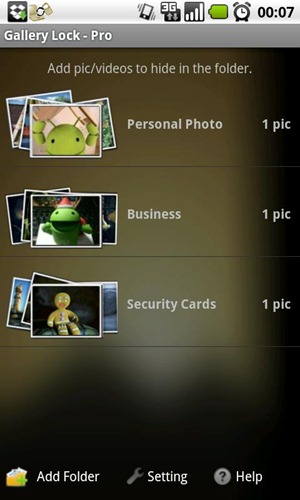
Gallery Lock Pro is a must have android app for all those who are looking for a way to encrypt their galleries. Users can easily lock photos and videos and can even hide the app launch icon. The application can be downloaded from the Android Market for $1 but if you want to try the application before buying, you can download the lite version and test it.

gallery lock pro

Download Gallery Lock Pro

File Cover

File Cover is another excellent application which can help users set a password on their folders and images. Users can even hide pictures and other media files so that they can view it privately. Users can even share the hidden files with friends and family via email or MMS. The application is available for download in Android Market and a free version is also available for those who wish to try application with limited features.

filecover

Download File Cover

Free Data Vault

Free Data Vault is an excellent free android app which can help users hide any data type including photos and other media files. This application is different from other applications which allow users to set a password on different folders as it allow users to hide one photo in another and store the fake image on the sd card.

free data vault

Download Free Data Vault

Video Safe

Video safe is another useful android application which helps users lock different video files on your device. However, the user must buy Video Safe License for unlimited use. You can download Video Safe Free from the link given below and if you like the application, you can purchase its license.

Videosafe

Download Video Safe

Kii Safe

With Kii Safe, users can easily lock their photos and they will disappear from the gallery. Only you will be able to view the contents of any folder or locked images.

kii-image-safe

Download Kii Safe

Gallery Private

Gallery Private is a free application for android devices which allow users to password protect photos and videos. The files encrypted with Gallery Private will still be locked even if the memory card is removed from the device.

galleryprivate

Download Gallery Private

Image Lock

Last but not least, Image Lock is another free android application which can help users lock photos with a password. The locked images cannot be viewed by anyone until and unless they know the password to unlock the photo.

Imagelock

Download Image Lock

If you know about any other application which can be used to lock photos and media files on Android smartphones, please share with us.

Five Excellent Free Tools To Create Your Own Map

Traveling can be hectic job if you don’t plan your trip properly and make a digital map of the places you want to visit. This will not only make your trip tiring but you will also have less time to visit different tourist spots. To solve this problem, we have gathered a list of 5 useful tools which can help users create maps of the places they are going to visit and plan their trips.

TravellersPoint

TravellersPoint is an excellent online utility which help travelers plan their trips and create visualizations of places you are planning to visit or have visited in the past. You can easily add details about the points on map, attach photos and much more. Users can even ask other travelers for help regarding the places and stuff they should pack for different places.

travellerspoint

QuickMaps

With QuickMaps, users can easily create a map of places they are planning to visits and put different markers on specific places, draw lines, mention details and work they are going for and much more. After creating the map, users can easily post it on their websites or save it so that they can carry it while travelling.

quickmaps

ZeeMaps

ZeeMaps is simple and useful online service which provides users with many useful tools and customizations to help them create interactive maps, add markers, highlight regions which they are planning to visit and much more. After creating the map, it can be published on blogs or websites or saved in JPG or PDF format so that they can be downloaded on different portable devices and computers.

zeemaps

TripGeo Direction Map

With TripGeo Direction Map, users can easily create maps and find directions to different places using Google Maps. It provides users with animated view of the street along with the street name so that its easier for the user to find directions to their destination. Once its done, the map can be embedded or shared with other people.

tripgeo

Planiglobe

Planiglobe help users create digital maps online, define places, add your own location and much more. It provides users with many different options like legends to see the terrain of any location, download printer friendly format of the map and much more.

planiglobe

If you know about any other useful tool to create digital maps online, please share with us.

Five Simply Effortless Tools For Meetings And Schedulings

There are many online meeting organizers are out there for every type of computer users, but getting by good ones and free is not that easy. That is why I am sharing Five Simply Effortless Tools For Meeting And Scheduling. Read each entry in the list and see which one suits your needs best.

You are welcome if you want to share more online meeting organizers that our readers/viewers may like. Do you want to be the first one to know the latest happenings at SmashingApps.com, just subscribe to our rss feed and you can follow us on twitter and follow us on Digg as well to get updated.

Meetin.gs

Meetin.gs can organize meetings easily without participants having to remember passwords or fill out registration forms.

mınutes.io

minutes.io is an elegant and simple browser tool that can help you face the situation of agreeing on decisions and task assignments in a meeting.

Zeeyoo

Zeeyoo is the online service for smart scheduling and efficient meetings, in personal and professional contexts.

Meetifyr

Meetifyr gives you a simple web page where everyone who’s meeting up can show which days they’re busy and which days they’d prefer to meet on. With all this information in one place, picking the best day for everyone is easy.

WhenIsGood

An easy way to find out when everyone is free for your next meeting or event.

Five Desktop Tools To Create Excellent Windows Environment

There are many desktop tools out there for every type of computer users, but getting by good ones and free is not that easy. That is why I am sharing Five Desktop Tools To Create Excellent Windows Environment. Read each entry in the list and see which one suits your needs best.
You are welcome if you want to share desktop tools that our readers/viewers may like. Do you want to be the first one to know the latest happenings at SmashingApps.com, just subscribe to our rss feed and you can follow us on twitter and follow us on Digg as well to get updated.

File Repair

File Repair software is a powerful tool to repair your corrupted files. It scans the damaged file and extracts maximum data from it to a new usable file. You can repair word documents, excel spreadsheets, zip, rar, selected video formats, pdf, etc.

Cryogenic FileSplitter

This is a simple application written in C# by which you can split large files into several pieces to transfer them easily over Internet. With its unique “Drag and Drop” feature, you can split or join .001 files easily.

USBFlashCopy

USBFlashCopy is a small Windows utility to back up your flash drives and storage cards on the fly. It runs in the background and copies files from inserted media to a safe location on your hard drive. USBFlashCopy copies only newer or updated files, you can optionally keep old versions of the files.

Appnimi ZIP Password Unlocker

Appnimi ZIP Password Unlocker is designed to let you search for passwords of protected ZIP files. This program guarantees the most complicated passwords recovery. Appnimi ZIP Password Unlocker allows to search for the password of the protected ZIP file using Brute Force algorithm. After recovering the password it will extract the files to a destination folder.

Driver Magician Lite

Driver Magician Lite is freeware, it identifies all the hardware in the system, extracts their associated drivers from the hard disk and backs them up to a location of your choice. Then when you format and reinstall/upgrade your operating system, you can restore all the “saved” drivers just as if you had the original driver diskettes in your hands.

10 Online Note Taking Web Services Every Internet User Should Know About

Majority of people take notes while surfing the web to jot down ideas, bookmark websites, use notes as reminders and much more. There are certain software available as well for Windows but many people prefer not to install them as  they may hog system resources. To solve this problem, we have gathered a list of some worthy online note taking applications which one can use.

You are welcome if you want to share more Note Taking Web Apps that our readers/viewers may like. Do you want to be the first one to know the latest happenings at SmashingApps.com just subscribe to our rss feed and you can follow us on twitter as well.

PrivNote:

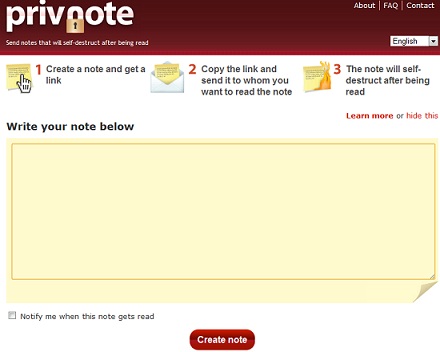
PrivNote is a free online note taking applications which you can use to jot down ideas or for any other reason. The best thing about PrivNote is that it generates a specific link for the Notes you create so that you can share them with your friends and family. Once the recipient read the note, it will be deleted automatically. It even notifies you once the recipient has read the note.

The service is absolutely free and you dont have to go through long registration process if you want to use it.

Evernote

Evernote is one of the best online note taking applications right now. You can take notes anywhere from your computer or your mobile and sync them. You can then access the notes from any device you have access to. The best thing about this service is that you can even install its desktop client as well if you are satisfied with it. You can access evernote on your iPhone, iPad or Android device as well.

Listhings

Listhings is a simple and easy to use online note taking application which can be used by users to bookmark sites on the go or write down importants tasks while working. Listhings is one of the easiest web based note taking services I came across. You can even save your notes by creating an account on Listhings and then access them from any computer you use.

Jjot

With Jjot, users can take multiple notes at the same time and share it with their friends, family or colleagues. You can either create an account on Jjot to save the notes you write or continue using the unregistered version of the tool and share it. Like other services, users can access the notes from anywhere by logging in Jjot.com.

UberNote

Ubernote is an excellent online note taking service with many exciting features apart from taking notes online. With Ubernote, users can send direct messages through Twitter and save them as notes on Ubernotes. Other main features include Firefox Toolbar for Ubernote with which you can clip different websites, save bookmarks and much more. UberNote is mobile compatible as well and you can take notes on your mobile devices by opening m.ubernote.com and save them. If you like the service, you can even subscribe to Ubernote’s paid plan which include many features which are not available in the free version.

Penzu

Penzu is an online diary and personal journal that is focused on privacy. With Penzu, you can take notes or use it as your daily diary where you write all the stuff and make your own ToDo lists or any other note. You can use Penzu on all major mobile OS including iOS, Android and Blackberry.

NoteFish

NoteFish is a nifty note taking web service which helps users take notes, gather research, write ideas, save bookmarks and much more. With NoteFish, you can drag and drop notes, colorize or annotate notes and share them with your friends and colleagues. To use Notefish, you have to make an account so that you can use Notefish’s full functionality.

Google Notebook

Google Notebook is an excellent web application for all those who take notes to save bookmarks or for any other purpose. Best thing about Google Notebook is that you dont have to create a separate account to use the service, you use your Gmail account to access this web application like all other Google Apps.

MyNoteit

MyNoteit is another excellent web 2.0 note taking application with which you can create notes, drag and drop notes to rearrange them, edit and share them with your friends or colleagues, manage To-do lists, add notes to built in calender and much more.

Memonic

Memonic is an excellent free online note taking web app. With Memonic, users can easily take notes online, clip web content and add it to their notes, share them and print them. You can even sync the notes across different computers and mobile devices so that you can access them anywhere. One drawback of Memonic is that it only allows you to save 100 Notes and if you want to take more notes, you have to subscribe to paid version of Memonic.