Browsers
Totally Awesome Tools To Improve Gmail Productivity
One of Google’s most successful ventures has been Gmail. Because of its large inbox storage capacity, simple to use interface that supports hotkeys, and flawless functioning with all web browsers, Gmail has become the preferred email client for countless internet users. But just because something is popular does not mean that it cannot be improved; similarly, even though Gmail has a vast number of people using it, there are still areas of improvement.
If you want to find out what those areas are and how you can improve your overall Gmail experience, then this list is for you. Below we have gathered 3 amazing non-Google tools that will help you remarkably increase your productivity while working with Gmail. Read about each tool and find out which one will suit you best.
Cloud Magic

Cloud Magic is a free web tool that works as a browser extension for Mozilla Firefox and Google Chrome for people running Mac, Windows, or Linux machines. The extension indexes all emails and their data locally. It then provides an interface for you to quickly search those emails. The response time is amazing because your search is conducted locally instead of online. Cloud Magic supports indexing multiple Gmail accounts. Check out the web tool @ http://www.cloudmagic.com/
Gtriage

Gtriage is a free web tool that links itself to your Gmail account. The purpose of Gtriage is to add a label titled ‘Important’ to all incoming emails that you consider important. When you logon to your Gmail you can quickly notice the Important-labeled emails and go through them first before the others. Whether or not an email is important to you is determined by first ‘training’ Gtriage; this involves Gtriage asking you whether or not any of your existing emails are important. A pattern is stored within Gtriage’s settings with which it automatically detects any important incoming emails. Gtriage also supports multiple Gmail accounts. Check out the service @ http://www.gtriage.com/
Find Big Mail

If you find your Gmail inbox running out of storage space and desperately want to get rid of those big sized emails, then “Find Big Mail” is just the tool for you. Find Big Mail scans the emails in your Gmail folders and displays them to you in different size categories. These categories can be a great help in checking your email according to their sizes and deleting the redundant ones to free up inbox space. Check out “Find Big Mail” @ http://www.findbigmail.com/
Absolutely Useful (Yet Free) Web Apps To Make Designers Lives Easier
This is one of the very best list of its kind where you can find incredibly amazing and Absolutely Useful (Yet Free) Web Apps To Make Designers Lives Easier. These would be great enough to bookmark or just for get in your knowledge. I hope everyone of you will like this list. This is absolutely helpful for designers, web designers, developers etc. Just take a look at them and share your thought’s here.
You are welcome if you want to share more useful web apps that our readers/viewers may like. Do you want to be the first one to know the latest happenings at SmashingApps.com just subscribe to our rss feed and you can follow us on twitter as well.
CloudFlare protects and accelerates any website online. Once your website is a part of the CloudFlare community, its web traffic is routed through their intelligent global network. They automatically optimize the delivery of your web pages so your visitors get the fastest page load times and best performance. They also block threats and limit abusive bots and crawlers from wasting your bandwidth and server resources. The result: CloudFlare-powered websites see
a significant improvement in performance and a decrease in spam and other attacks.
Join.me is an impromptu meeting space that happens wherever, whenever. It’s getting a second or third pair of eyes on your presentation from across the hall or across the continent. It’s sharing your screen instantly with anyone or everyone to get stuff done, quickly.
CloudCanvas enables creative people to make digital art, design and other rich media right in the web browser without any plugin to download. It has all the powerful tools and high end features that designers require to unleash creativity,
new ideas and mashups.
Recurse is a simple solution to show clients your spiffy new design. By emulating a website with multiple flat images clients will have a better idea of what the composition will look like ‘in the wild’.
Teambox is another but unique and much robust online collaboration tool. This is absolutely secure and you can access your data from any computer. It has another good feature that will help you get notified by emails from activities in your projects.
With the DevHub™ online website builder, you don’t need to be a code monkey or learn complicated coding hacks or HTML. You can quickly and easily build your site in mere seconds using our system’s click n’ drag modules that snap into place. DevHub also offers a set of themes for you to use for free. You can even tweak or modify them to fit your company or personal brand.
SlideSix is a social presentation sharing community that caters to everyone. Users can privately share a personalized and narrated photo album, or a public product introduction with an embedded multimedia demonstration. The possibilities are as endless as the users creativity.
A Web font service is only as good as the typefaces it provides. Fonts.com Web Fonts offers a selection of fonts that is unmatched in size, range and quality. Their massive inventory includes thousands of designs. From workhorse sans and serif text faces to eye-catching display designs to elegant script typefaces, Fonts.com Web Fonts offers a diverse range of styles to cover any design need.
It lets you dynamically resize your images on the fly by just calling a URL. With this, You can directly embed your resized & improved image into your webpage by simply a url.
Launchlist is intended to help and encourage web designers and developers to check their work before exposing it to the world at large.
resizeMyBrowser is simple yet very useful online tool. With this tool you will be able to set the browser size by both Inner window and Outer window.
This tool provides you an approximation tool to guide you translate those quick sketches into a design-ready format.
ClueApp is a free to use web service that helps you determine what about your website a visitor remembers. The procedure is fairly simple. You pass your site’s URL to ClueApp’s interface. The service then takes a snapshot of your website and hosts it online for 24 hours. The URL of the image can be shared amongst users and friends. The URL shows image for five-and-a-half seconds and then asks the visitor the top 5 thinks he / she remembers about the site. Later you can view what visitors to the URL had typed in as those 5 memorable things.
Excellent Chrome Extensions (For Fun & Gaming) That Can Make Your Daily Browsing More Enjoyable
You might have been using Chrome for a quite some time now but there is a good chance you are not taking its full advantage. Chrome’s maximum potential lies in the power of its extensions. Below We have gathered 6 Chrome extensions That Can Make Your Daily Browsing More Enjoyable. You will not find these extensions in similar lists on other websites; I hope you find them to be much enjoyable.
Give the list a thorough reading, try out any extension you are interested in, and let me know in the comments how they worked out for you. You are welcome to share if you know more fun and gaming chrome extension which our readers/viewers may like. Do you want to be the first one to know the latest happenings at SmashingApps.com just subscribe to our rss feed and you can follow us on twitter.
Mini Golf adds a golf ball icon in the browser that opens a fun flash mini golf game. Just press the icon again to close the game instantly and get back to work.
You can play Tic-Tac-Toe Game right from Google Chrome with this extension.
You can play Chess Game right from Google Chrome. Play Chess in Google Chrome with Computer as Opponent.
Play a prank on your friends by turning every webpage upside down. It’s version 0.2 features multiple options like flipping the whole page, only images, everything but images, and a delay to set the prank as a time bomb.
Install this fun game to kill time while waiting for slow sites to load, talking on the phone, or any other time you’d like a distraction! To start the game, hit any key. Use the arrow keys to move your character, and dodge the falling icicles.
With this Chrome Extension, all the page will show falling snow flakes.

This extension shows the interesting photos on Flickr, the same day last year.
Absolutely Amazing Firefox Add-Ons That Can Make Your Lives Easier
There are too many handy options provided by the firefox and this is the main reason for its popularity. You can easily find lots of free download able firefox add-ons too that are available on the internet, we also featured few of them before and it’s demands are increasing. In this post, I am listing down few Absolutely Amazing Firefox Add-ons That Can Make Your Lives Easier . I would love to know at least one of your most favorite firefox add-on that makes your life easier and could be the part of this list.
You are welcome if you want to share more excellent Firefox add-ons that our readers/viewers may like. Do you want to be the first one to know the latest happenings at smashingApps.com just subscribe to our rss feed and you can follow us on twitter as well.
Firefox Sync
Free browser add-on that lets you stay in sync with your Firefox. You can access your history, passwords, bookmarks and even open tabs across all your devices.
Image Zoom
If you have ever had an image that was too large to fit on your screen or too small to see the finer detail in your browser or email, then image zoom can help. Image zoom gives you complete control of the size of most images displayed in mozilla based software. Both individual images or whole pages of images can be zoomed.
BugMeNot
BugMeNot will log in for you automatically so that you quickly bypass the login process of web sites that require compulsory registration and/or the collection of personal/demographic information (such as the New York Times).
AutoPager
AutoPager automatically loads next pages when you reach the end of a page. It works on a ton of sites,Google,Yahoo. It works well with most other add-ons adblock plus, WOT and most of the greasemonkey scripts too.
FastestFox
You can save time by speeding up repetitive tasks. Get faster, parallelized downloads, see definitions, auto-load the next page, improve searching, and more. FastestFox will dramatically enhance your productivity.
BetterPrivacy
Better Privacy serves to protect against not deletable longterm cookies, a new generation of ‘Super-Cookie’, which silently conquered the internet. This new cookie generation offers unlimited user tracking to industry and market research. Concerning privacy Flash- and DOM Storage objects are most critical.
Video DownloadHelper
The easy way to download and convert Web videos from hundreds of YouTube-like sites. This works also for audio and picture galleries.
InvisibleHand
Automatically get the lowest price when you shop online. InvisibleHand shows a discreet notification when a better price is available on a product you’re browsing or shopping for. It covers over 100 retailers in the US, UK and Germany.
Pixlr Grabber
Making screen grabs and pulling down images from the web just got a bit more easy. With the Pixlr grabber add-on you can choose to Edit, Share, Save or Copy your final grabs. You also get the possibility to right-click any image or background to edit.
AutoProxy
Are you concerned about your privacy? Or, are you blocked from some websites by a firewall? And, are you arming yourself with a proxy? In that case, AutoProxy is designed for you! A tool to help you use your proxy automatically & efficiently.
The 7 Useful (And Unknown) Web Browsers That Are Worth A Try
This is one of the very best list of its kind where you can find out of the box web browsers that you probably never heard of and these would be great enough to bookmark or just for knowledge. I hope everyone of you will like this list, you can try these whether you are an office worker, a manager, a supervisor, a student, a home user, etc. These are really amazing in respect to their features. This is the list of The 7 Useful (And Unknown) Web Browsers That Are Worth A Try. Just take a look at them and share your thought’s here.
You are welcome if you want to share more unknown web browsers that our readers/viewers may like. Do you want to be the first one to know the latest happenings at SmashingApps.com just subscribe to our rss feed and you can follow us on twitter and follow us on Google Buzz as well.
Lunascape is the world’s only triple engine browser. With Lunascape, you can choose the right engine at the right time, realizing a dramatic decrease in web-browser compatibility issues, long loading times, and messed up websites display. You need only 2 clicks to change your engine. Lunascape is 20 times faster than IE7, 6.5 times faster than IE8. And it stays up! We have gone head to head with well-known “fast” browsers, and have achieved one of the fastest JavaScript speed.
Browzar is based on the Internet Explorer engine, which means it’s such a small file that it only takes seconds to download. We’ve made it disposable; so you have the choice of keeping Browzar on your PC, or downloading it each time you need to protect your privacy. You don’t even need to install it. You can just click ‘run’ and go.
SlimBrowser is a fast and secure tabbed internet browser for Windows fully loaded with powerful features. It saves you the burden of completing web forms with intelligent form filler. The built-in popup killer and AD filter eliminates annoying advertisement effectively. The quick-search box provides you instant access to all kinds of search engines and allows you to easily define your own. The auto-login function enables you to log into your favorite internet accounts with a single click.
Camino is an open source web browser developed with a focus on providing the best possible experience for Mac OS X users. With innovative features like Tab Overview alongside security features like phishing and malware protection, Camino 2 is the safest, cleanest Camino yet.
K-Meleon is an extremely fast, customizable, lightweight web browser based on the Gecko layout engine developed by Mozilla which is also used by Firefox. K-Meleon is free, open source software released under the GNU General Public License and is designed specifically for Microsoft Windows operating systems.
xB Browser is the most popular free and open-source anonymous web browser in the world. With xB Browser you can securely and anonymously surf the internet, and bypass firewalls and website censorship. xB Browser also has advanced features such as SSL MD5 RSA certificate vulnerability detection, DOM object and flash cookie protection, cross-site scripting attack prevention, user-agent cloaking, and java proxy control. xB Browser also detects and disables malicious browser addons that are hidden in the windows registry.
Flock is faster, simpler, and more friendly. Literally. It’s the only sleek, modern web browser with the built-in ability to keep you up-to-date with your Facebook and Twitter friends. You can share web pages, photos, and video. It can update your status and make comments—from anywhere on the web!
Save Your Bookmarks With Historious And Always Get Access to Them
Normally when you work with separate computers, there are not many ways you can share your bookmarks. Chrome has worked out a brilliant bookmark synchronization strategy that automatically keeps all your bookmarks updated but for this you need a Google account. Moreover many other browsers do not have such synchronization features. Having access to your bookmarks therefore, is quite a problem. And Historious is its solution.
Historious stores your bookmarks by indexing them, much like a search engine does. Usage of Historious is absolutely free. You start by creating an account on the site. After you sign in, you can drag the Historious bookmarklet on to your bookmarks toolbar; if you are a Chrome user, you can either use the bookmarklet or the Historious extension for Chrome.
Whenever you are on a website, all you do is click on the extension icon or bookmarklet to add the website to your Historious bookmarks. A message will pop up in the top right telling you that the page is being indexed.
![]()
A completion message is shown after the page has been indexed.
Another way to add bookmarks to your Historious account is by visiting http://USERNAME.histori.us/ (replace USERNAME with your Historious username) and either typing the URLs of all websites or upload a bookmarks file created by a web browser or services like Delicious.
![]()
When you visit http://USERNAME.histori.us/ you encounter a search-engine like view.
![]()
Either search for your bookmark by its name or click on the “Show all sites” link to view all the indexed bookmarks.
![]()
Since the bookmark list is stored you can access it from any computer with a web connection.
The 9 Insanely Cool Google Chrome Extensions You May Need To Know About
You might have been using Chrome for a quite some time now but there is a good chance you are not taking its full advantage. Chrome’s maximum potential lies in the power of its extensions. Below We have gathered 9 Insanely Cool Google Chrome Extensions You May Need to Know About. You will not find these extensions in similar lists on other websites; I hope you find them to be useful to your computer usage.
Give the list a thorough reading, try out any extension you are interested in, and let me know in the comments how they worked out for you. You are welcome to share if you know more useful chrome extension which our readers/viewers may like. Do you want to be the first one to know the latest happenings at SmashingApps.com just subscribe to our rss feed and you can follow us on twitter.
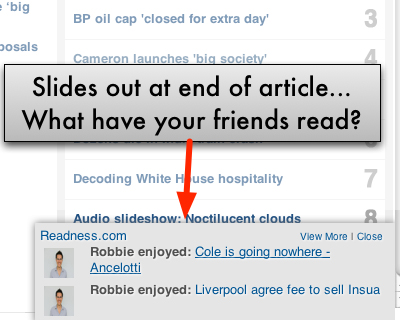
As you’re reading content (eg: nytimes.com articles) around the web, Readness.com will suggest additional content that you’ll enjoy – based on what your friends have recently read, and also what articles are popular that you have yet to read. It uses Facebook Connect to import your friends – but does not write to your wall / spam your friends.
Apture Highlights is a free tool, built from the ground up to let you take the power of Google search, and the richness YouTube, Flickr, Twitter, and Wikipedia with you to any site. Just highlight a phrase on any site to reveal the web’s best content without ever leaving the page. Fast, powerful, and fun.
It will automatically previews pdfs, powerpoint presentations, and other documents in Google Docs Viewer.
With this extension you can easily reopen previously closed tabs. There is no limit on how many tabs can be remembered. It is kind of a mix of the “recently closed” bar on the New Tab page and the History page. It currently supports only the very basic functionality.
With this ext, you can make notes on any web page, any position. when you open that page again, the notes get loaded automatically.
PanicButton makes it easier for you to hide all of your tabs at once just by clicking on a button. They are then saved as bookmarks in a separate folder. After that the PanicButton turns green and shows you how many tabs are currently hidden. Another click on the PanicButton restores all of the tabs you have hidden earlier.
With Session Manager you can quickly save your current browser state and reload it whenever necessary. You can manage multiple sessions, rename or remove them from the session library. Each session remembers the state of the browser at its creation time, i.e the opened tabs and windows. Once a session is opened, the browser is restored to its state.
Convert any website to PDF document with this incredible Web to PDF online converter. It Allows you to view the converted PDF using Google Docs and of course you can download it to your computer.
Whenever you need a quick check or a second opinion, such as before logging into your favorite game, when using your bank account or buying something online, use QuickScan, directly from your browser. BitDefender QuickScan takes full advantage of the “in-the-cloud” scanning service and is capable to detect active malware in less than a minute, taking just a fraction of the system resources needed by a regular virus scan. It’s not a virus cleaning tool.
h this extension you can easily reopen previously closed tabs. There is no limit on how many tabs can be remembered. It is kind of a mix of the "recently closed" bar on the New Tab page and the History page.
ExtentionFm Helps You Create A Playlist Of Your Mp3 Songs On Your Favorite Website
Most audio streaming websites offer the audio in MP3 format. Suppose you come across your favorite artist’s page on a music site; instead of clicking on each song and streaming it individually, it would be more convenient to get a playlist of all MP3 files on the given webpage.
That is precisely what ExtensionFM does. ExtensionFM is a user friendly extension for Google Chrome.
After installing the extension, you find a newly placed icon in Chrome’s address bar.
![]()
Before you go ahead and start using the extension, you will first need to create an account on the ExtensionFM website. This account will help in keeping the playlists saved even if you browse away from the songs page.
Having created the account, click on the extension’s icon the next time you are on a webpage with songs. This will open ExtensionFM mini-window from the icon.

Alongside the icon you will see the number of songs detected on the webpage. From the mini-window you can play the found songs – this will transform Chrome into an audio player. You can optionally add the songs in the playlist to your ExtensionFM account. Your ExtensionFM library can be accessed by clicking on the Home button next to the playing controls.

Your library contains information on each played song, its artist, and the website it was captured from.
ExtensionFM will appeal to all music loving Chrome users.
Add Chrome Like Text Search Functionality to Firefox (Add-on)
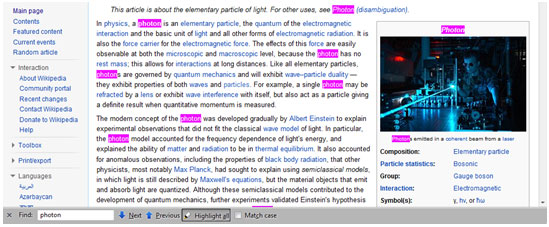
Finding text on a webpage is something that can be helpful in a number of situations. In the web browser Mozilla Firefox you can search for text on a webpage by using the “Ctrl+F” key combination. This pops up a mini-window at the page’s bottom from where you can search for a word or phrase. You can use the “Highlight All” option to highlight your search item wherever it is on the webpage.
Suppose you want to view the context each search item is used in. You would have to jump from one highlighted search item to another. This can be a problem especially if the results are many and spread out far over the webpage.
A solution to this is presented by “Find All.”

Find All is a browser add-on for Firefox. With the add-on installed, the “Highlight All” option changes to “Find All.” This “Find All” option lists all the search results in an easily navigable view which helps you compare the results.

This view also eliminates any special formatting and displays the results in simple text, making the comparison much easier.
You can access the add-on’s options to modify the font size in which the results are displayed.

The options also let you change the highlighting color, choose to alternate the row background color, and display the “Highlight All” option along with the “Find All” option.
For people who use Firefox’s search feature a lot, “Find All” will prove itself to be a very useful tool. Get “Find All” Firefox Add-on.
WWW Is Not A Child-Friendly Zone But Kido’z Makes It Safer Than Ever
Today many jobs require employees to operate computers. If you want your children to success in today’s world of extreme competition, then it is best to have them learn computer usage from an early age. Of course you will need a safe way to do this because children might delete your important files and because the internet is not exactly a child-friendly zone.
A solution to all this is presented by a wonderful tool named KIDO’Z.
KIDO’Z is an installable application based on AIR hence cross-platform – you can run it on Windows, Mac, and Linux. After you download and install KIDO’Z you set up a parent account; while you set up this account you assign KIDOZ a password which will required whenever the settings need changing. The final step is to add your child’s name to the KIDO’Z interface. Having done all this KIDO’Z will be ready to be used by your child.
The browser covers up the entire screen thus things on the desktop and outside the browser will not distract your son / daughter. The main controls of the browser are located at its bottom. The first button is for games.

A number of interactive and enjoyable games are available. All your child has to do is click on them to play them. “Websites” is the next button.

Through this button children can access websites of their favorite cartoon characters by clicking on their thumbnail shortcut.

The “Videos” button brings up a similar thumbnail view.

Over here children can watch their favorite cartoons.
The buttons “Mail” and “Places” contain interactive features which let children better familiarize themselves with the mouse and keyboard.

Overall, KIDO’Z is a great freeware targeted at very young audiences. You can get KIDO’Z from Here.