Contact us for Sponsored Post or to Promote your Services or Products here.
Click here to buy secure, speedy, and reliable Web hosting, Cloud hosting, Agency hosting, VPS hosting, Website builder, Business email, Reach email marketing at 20% discount from our Gold Partner Hostinger. You can also read 12 Top Reasons to Choose Hostinger’s Best Web Hosting.
I find Facebook’s picture viewing interface inconvenient. When I am viewing a friend’s album, I can view the pictures as thumbnails in the main album page. To view a picture’s true size I have to click it. Then I have to go back to the album (photo thumbnails view) and select another image to enlarge. The process can become quite time consuming. But thanks to two browser extension, I no longer have to click back and forth while viewing pictures on Facebook.
The first is Facebook PhotoZoom (there is no space between the words Photo and Zoom).

This is an addon for Mozilla Firefox and can be used while viewing Facebook photos. Its function is a simple one: it shows you the true size of an image thumbnail in Facebook. Whether that thumbnail is in a photo album or the thumbnail of an image shared on your wall or news feed, you simply place our mouse pointer over the thumbnail and view its enlarged version in a hovering view.

The second extension is Facebook Photo Zoom (there is a space between the words Photo and Zoom).

This tool is an extension for Google Chrome and works much in the same way. In addition to enlarging your Facebook photo thumbnails in a hovering window view, the extension places an icon near the bottom right of Facebook i.e. next to the Chat bar. You can toggle Facebook Photo Zoom on / off from this icon.
(Ad)


Hence it is up to you whether to use the hovering window photo enlargement or use Facebook’s original interface.
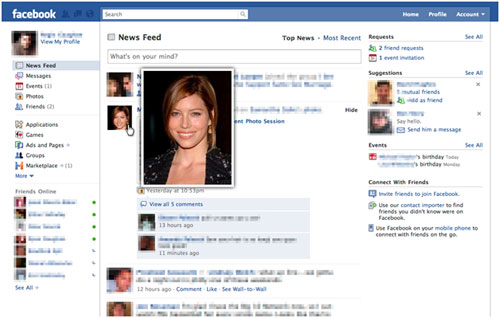
These extension are absolute must have for all Facebook accountholders using Firefox or Chrome. They have certainly saved me the umpteen clicks required to view a photo album. I am positive they will be as helpful to you as they were to me.
Click here for the Firefox Addon and here for the Chrome extension.








![Sweet Home 3D [PC Download]](https://www.smashingapps.com/wp-content/uploads/2023/12/81mqySxP8uL._AC_SX679_1-150x150.jpg)