Archive for June, 2010

Monoslideshow Giveaway (A Flash® Slideshow To View Your Images And Videos In A Web Page)

Monoslideshow is running a contest, where winners will get 10 licenses (worth € 25 each). Well, you guys know what Monoslideshow is. Lets say it once again for n00bs.

Monoslideshow is a Flash® slideshow to view your images and videos in a web page. It can be placed on every website, in whatever size you want and filled with whatever content you like. It’s designed for maximum flexibility, whether you want to have a professional looking portfolio, or a simple image rotator on your website.

monoslideshow-1

Monoslideshow is a single .SWF-file. There’s no need to recompile or edit the slideshow in the Flash® IDE. Instead, all Monoslideshow needs is information that is directly read from a .XML-file. It’s compact, extremely versatile and easy for web developers to integrate in existing websites.

monoslideshow-2

You can view your customization live and build your own XML configuration file using the online demo page: www.monoslideshow.com/demo. It has  20+ Professional photo transitions, Ken Burns effect (pan / zoom), Style interface elements to match your design, Easy navigation between photo albums, Fully resizable, fits every layout, Background music and image sounds, API for Javascript and Actionscript 3, Support for EXIF data in photo captions.

This contest will run from June 30, 2010 to July 9, 2010 and we will select the winners randomly by running MySQL query. Result can be announced any day before July 11, 2010 so keep visiting here or subscribe to our rss feed to get the latest updates. To participate in the contest and win free license of Monoslideshow, All you have to do is just :

1. Just leave a comment.
2. Use valid email ID in the email box.
3. Not necessary, but you can subscribe to our rss feed and follow us on twitter as well. (To track this contest and for future updates)
4. And thats it!

So what are you waiting for now? Let’s participate in the contest and good luck!

SWF & FLV Player

It won’t be promoted… but Made popular 3 min ago

Maybe the title is confusing for all of you but I believe the images below will be more confusing. Right now, I am showing you something very shocking that I noticed on digg.com. There are so many loves and hates moving around related to digg but the snapshots below show that the current stable version of digg still have errors and issues.

The first image below clearly says that the story “$10M X Prize Announced for Solution to Gulf Oil Spill Crisis“  could not succeed when it came in the digg trending story this morning and digg failed it to get on the home page, as per the message says ” Failed! just like nu metal, this trend failed. It won’t be promoted. But it was not the case. So, what’s the case then? see the second image. I am not sure if it does matter but this story was submitted by Jay Adelson who worked as Digg’s CEO for five years and recently left out.

For those who don’t know what is digg trending story, click here to read in their own words.

failed

Yes, in the image below digg says that story made popular 3 minutes ago which is weird, isn’t it? I dont understand that if the story was failed and won’t be promoted then how come it made popular.

made-popular

This case forced me to think if digg algorithm is still alive or we are a part of community which is not credible anymore. Maybe it’s because that trending at digg.com is still in beta but they must consider this seriously. I am hoping Digg.com will not penalized us for bringing this case to the world.

Thanks to Chris who bring this in our knowledge and shared his latest experience with us.

Enable USB Write Protection to Prevent Virus Attacks And Un-Authorize Use

Many flash drive owners complain that their devices get infected with a virus easily. A flash drive virus works by writing itself onto your flash drive. If you could somehow temporarily disable the writing permissions on your drive, your flash drive would be more secure. At the same time, you will be unable to accidentally delete or modify the flash drive’s contents.

In order to achieve this, you can use a utility called “USB Write Protect” which disables writing or modifying on your flash drive.

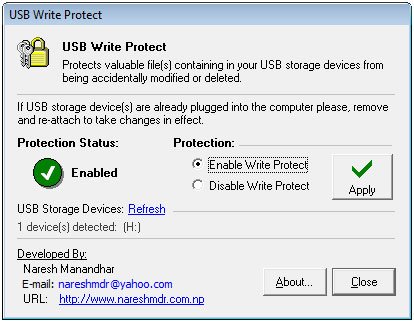
USB Write Protect is tiny Windows utility sized at only 11 KB. You download the archive, extract it, and run the executable in it. This is what the executable looks like while running:

usbwriteprotect

Before you click on the “Apply” button, plug out your flash drive and plug it back in. Then check the “Enable Write Protect” option and click on the “Apply” button. Finally click on the “Close” button.

Now head on over to your flash drive folder in Windows Explorer. If you try creating a new document you will encounter a message telling you that the disk is write protected.

usbwriteprotect1

If you right click on an object already in the flash drive, you will find no “delete” option in the context menu.

usbwriteprotect2

Highlighting a flash drive object and clicking the “delete” button on the keyboard will also not delete the object.

You can place the USB Write Protect executable within your flash drive so that you can use on any computer you plug your drive into. Its function is simple and flawless. Get USB Write Protect.

With Bounce It’s Fun To Share Fast And Visually Accurate Design Ideas

At times sharing the URL of a site simply does not get the job done. Suppose there is a specific part of a website which you have an opinion about; to share this opinion you will first need to separately share the site’s URL, then tell the recipient which part of the site you are referring to, then share your opinion. Needless to say, that process can be quite long – Bounce provides a much shorter way to perform that task.

Bounce is a free and simple to use website that lets you annotate webpages. Annotation is to comment on any area of a webpage. This way when the recipient visits the webpage, he can view your comments on a specific area of the webpage – thus entire process outlined above can be completed simply by sharing a URL.

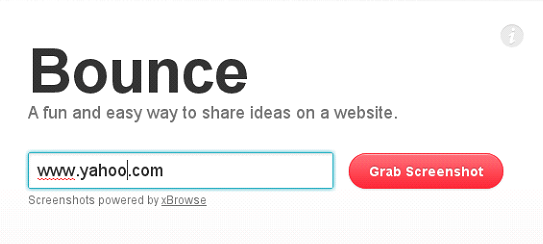
You start by visiting Bounce’s homepage and entering the URL of the site you want to annotate. Let us assume the site is Yahoo!.

bounce

After you submit the link, Bounce will capture a screenshot of the website. On this capture image, you can make comments. The image is shown under an editing panel.

yahoo

You should start commenting by naming the page in the top left.

Title

This step is not necessary, but some users might prefer to type in their name in the middle of the editing pane.

code

When you bring your mouse pointer over to the image, the mouse pointer changes to a crosshair and you can click’n’drag to highlight any area on the webpage. Subsequently a box open beneath this area in which you can leave comments.

trending

There is no restriction on how many red boxes you can create – you can leave as many comments as you want.
To share this annotated webpage, head on to the top right of the site and click on the “Save” button to obtain the URL. From here you can also directly share the URL to your Facebook or Twitter account.

trending

Visiting this URL will show all your red boxes; when the visitor brings his mouse pointer over a to a box, your comment appears beneath it.

Bounce

Congratulations To The Winners Of Desuade Partigen 2

Thanks to all of the participants of contest in which you could Take A Chance To Win Desuade Partigen 2 (Professional Flash Particle Effects In One Click). We ran the MySql random query and selected these commenter to give them Desuade Partigen 2.

Featuring over 120 exclusive preset effects, Partigen 2 is the first and only extension for Flash that let’s you to create complex particle effect systems in just a click. This means you can effortlessly engage and “wow” your audience with stunning effects in just seconds, instead of days. Most importantly, you and your clients save time and money – all while having fun.

Partigen

Partigen features over 120 preset effects, such as: fire, smoke, explosions, sparkles, water, and many more. But what’s the fun in using the same effects as everyone else? Since fun is valued so much at Desuade, not only is tweaking and adjusting every preset easy, but saving your own custom effects is a joy.

Partigen-2

All of Partigen’s effects are rendered in realtime – making your movies come to life with realistic and interactive effects in ways never before possible. Give your audience the incredible experience they deserve, and blow everyone away. Stop the rendering hassle and treat yourself to a delicious cup of instant gratification. Now.

Congratulations to all the winners from SmashingApps.Com. All of the winners will be contacted in few days. If you are not winner at this time so please be patient and keep visiting here or subscribe to our rss feed, you can follow us on twitter because we are coming up with another new great contest in couple of days.

Thanks to  Desuade Partigen 2 for sponsoring this wonderful contest at Smashing Apps.

If you want to conduct any contest at Smashing Apps just contact us and send us all the details.

Now Pilot Handwriting Helps You Send Emails In Your Own Handwriting

Professional font creators have mastered the tools of their trade and know exactly how to bring their font concepts to life. But what if you are a web developer who has only recently entered the arena of font creation. You have not familiarized yourself with many tools yet and it might be a while before you can actually create the font that you are thinking of.

To dodge the traditional font creation tools, you can use a wonderful service named Pilot Handwriting.

pilot

Pilot Handwriting lets you create a font in your handwriting. You achieve this in a few easy steps:

  1. First, you create an account on the site.
  2. Next you print out a template. This template contains empty spaces in front of each font character.
  3. You write in the empty spaces, in your own handwriting, or whatever writing you want the font to be in.
  4. You provide the image of the filled-out paper to the site. You can do this by scanning the image through a scanner, or taking a snapshot through a webcam or digital camera.
  5. Pilot Handwriting recognizes each character and provides you with option to modify each character.
  6. Once done editing, you can save your font with a custom name.
  7. You can use any one of your created fonts to write a letter on the site and email it to the recipient.

pilot1

Unfortunately the letter is the only thing you can do with your created font; the site does not let you download the font you create. But still, sending people e-letters in your own handwriting will appeal to many people.

Pilot Handwriting is a website with a very unique font creation idea. Check out Pilot Handwriting.

The Fun Way To Keep You Busy With 6 Free iPad Apps

This post will keep you busy in a fun way when you are free and looking out to spend your time in more interesting way. Here we are listing down some fun apps for your iPad and other apple devices to enjoy your time. This is the post in which you will know about 6 Fun iPad Apps You May Want To Be Entertained.

You are welcome if you want to share more fun apps for iPad that our readers/viewers may like. Do you want to be the first one to know the latest happenings at  SmashingApps.com just subscribe to our rss feed and you can follow us on twitter as well.

Google Earth

Google Earth

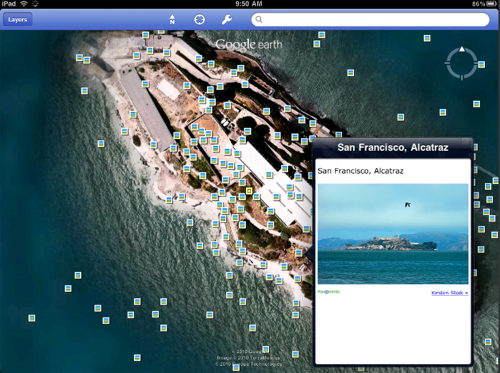
With Google Earth for iPhone, iPad, and iPod touch, you can fly to far corners of the planet with just the swipe of a finger. Explore the same global satellite and aerial imagery available in the desktop version of Google Earth, including high-resolution imagery for over half of the world’s population and a third of the world’s land mass.

The Solitaire

The-Solitaire

The Solitaire game is now available on the iPad. With the exquisite touch screen on the iPad, you can now literally touch your cards and move them as you play the game. iPad is the ideal device for games like Solitaire.

Factzilla

Factzilla

Factzilla is one monster of a factual database that brings you the facts you want, when you want them. You can comment on them, rate them, and share them with friends and family. You can even add your own new facts.

FilterFX

FilterFX

Filter FX is an application that allows the user to enhance their photos using different filter effects. You will love this app if you like using the filters on photoshop, lightroom, camerabag, etc.

textPlus

textPlus

You can do free and unlimited messaging as regular text or app to app, 1 to 1 or in groups, and it’s the only app with Mobile Social Communities.

Doodle Buddy

Doodle-Buddy

Doodle Buddy is the most fun you can have with your finger! Finger paint with your favorite color and drop in playful stamps. Connect with a friend to draw together over the Internet. Anyone can draw with Doodle Buddy–from a hip Grandma to a snotty two year-old kid. If you mess up, you can always undo your last stroke. To start over, simply shake your device.

35 Dazzling Examples Of Video Game Concept Artworks

This post is dedicated to the most favorite time pass activity which is not only kids favorite but is also a favorite pass time activity for many grown-up people. Yes, you got me right; I am talking about Video Games. As we all know very well that the adventure of Video Games is not limited to childhood only rather it has become a huge market. The reason behind that is the fact that video games are the perfect exemples of mash-ups of visual goodness and the entertainment. So without a further ado, here is the list of some inspirational video games concept artworks for you. Enjoy!

You are welcome if you want to share more Artworks that our readers/viewers may like. Do you want to be the first one to know the latest happenings at  smashingApps.com just subscribe to our rss feed and you can follow us on twitter. Click on the images to go from where the images has been taken and learn more about their creators and to appreciate them.

Attack

Brilliant

Fire mage

The Monster on the bridge

Crimson Dynamo Poster

Terminator ultramarines

The GoldenAxe Twins

Defenestrator

Game Concept Art

Battle Among The Stars 09

Game Concept Art

Maximo vs the Army of Zin Forest Carrage

Avatar – The Game

God of war

Resonance of Fate Art Gallery

Vinciblimpbke

Rolal imposterhalfres

Land leviathan

Rolposter

Flamegenievx

Dominance War IV – Moth

Earth

Changes

Ninja Gaiden

For the Horde

Overpainted render

Bell Tower

Terran Marauder Concept

Secret Apprentice

MP2

Game Concept Art

Goblin

Uncharted II – Gompa Garuda

Rusty Hearts

Now Check WorldCup 2010 Game Predictions And Data Statistics With Score Grid

Football fans are currently following each and everything going on with the Football World Cup. Everybody has their eyes on all the matches; while the average football fan might be content with watching the matches and getting their outcomes, hardcore fans need a lot more. And it is for hardcore football fans that Score Grid was created.

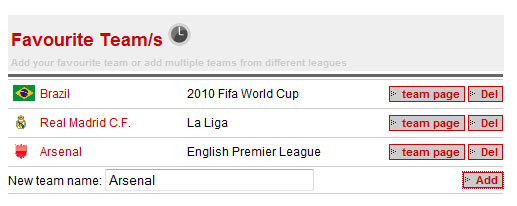
Score Grid is a website that is rich in features yet very simple to use. The site lets football fans learn as much as they can about each football game. You start off by creating an account on the site. The next step is to add your favorite teams. The site is not restricted to the World Cup so you can add international teams as well as club teams. The tournaments they correspond to will be written in front of the team names.

scoregrid

Once you teams have been added, you can click on the ‘team page’ button in front of them to view the team’s details. Here you will find various details such as ranking statistics, background information, and upcoming plus archived matches.

scoregrid1

For any archived match, you can get the option to go its page.

scoregrid2

Click on this link to view more details about that game. The details you see will depend on the game but usually in addition to highlights of the game, the site also shows a breakdown of goals, yellow cards, red cards, corners, free kicks, throw ins, substitutions, off-sides and penalties.

scoregrid3

A in-depth analysis of the game is also shown where the actual track of the ball is mapped.

scoregrid4

scoregrid-595x297

Such analysis is exactly what hardcore football fans and enthusiasts will highly appreciate. Fans can even communicate with each other, make their views public regarding matches, and comment on their favorites. Check out Score Grid

The 7 Most Advanced (And Free To Use) System Security Tools For Windows 7

Who does not have any concern to protect his windows based PC from virus, trojans and other threats but to find a best solution to get rid of online threats is not that easy. You don’t need to worry at all and leave this responsibility on us. You might do not believe but there are many Windows security tools out there that are absolutely free and incredible. Today,  I am sharing 7 Most Advanced (But Free To Use) System Security Tools For Windows 7 with all of you. These tools work great on other windows versions too. So, start reading each entry in the list and see which tool suits your needs best. Remember, we are not listing any anti virus in this post and will compile separate list very soon.

You are welcome if you want to share more free tools that our readers/viewers may like. Do you want to be the first one to know the latest happenings at  smashingApps.com just subscribe to our rss feed and you can follow us on twitter , follow us on Google Buzz and do not forget to become our fan on facebook as well

CCleaner

CCleaner

CCleaner is the number-one tool for cleaning your Windows PC. It protects your privacy online and makes your computer faster and more secure. Easy to use and a small, fast download.

SUPERAntiSpyware

SUPERAntiSpyware

SUPERAntiSpyware Professional features highly advanced Real-Time Protection to ensure protection from installation or re-installation of potential threats as you surf the Internet. Used in conjunction with the First Chance Prevention and  Registry Protection, your computer is protected from thousands of threats that attempt to infect and infiltrate your system at startup or while shutting down your system.

Registrar Registry Manager

Registrar-Registry-Manager

Registrar Registry Manager offers a very complete and safe solution to administrators and power users for maintaining  the registry on both their desktops and remote computers on their network.

Eraser

Eraser

Eraser is an advanced security tool for Windows which allows you to completely remove sensitive data from your hard drive by overwriting it several times with carefully selected patterns.

Malwarebytes’ Anti-Malware

Malwarebytes-Anti-Malware

Malwarebytes’ Anti-Malware can detect and remove malware that even the most well known anti-virus and anti-malware applications fail to detect. Malwarebytes’ Anti-Malware monitors every process and stops malicious processes before they even start. The realtime protection module uses our advanced heuristic scanning technology which monitors your system to keep it safe and secure.

Glary Utilities

Glary-Utilities

Glary Utilities is a freeware with registry and disk cleaning, privacy protection, performance accelerator and amazing multifunctional tools. It can fix dogged registry errors, wipe off clutters, optimize internet speed, safeguard confidential files and maintain maximum performance.

Ad-Aware

Ad-Aware

Ad-Aware Free Anti-Malware features real-time protection, a rootkit removal system, e-mail scanning, automatic updates, and much more — to ensure that you have the power to protect yourself online.