Contact us for Sponsored Post or to Promote your Services or Products here.
Click here to buy secure, speedy, and reliable Web hosting, Cloud hosting, Agency hosting, VPS hosting, Website builder, Business email, Reach email marketing at 20% discount from our Gold Partner Hostinger. You can also read 12 Top Reasons to Choose Hostinger’s Best Web Hosting.
If you are a book lover and love to read then you must know about the free iBooks app for iPad that has a built-in iBookstore with access to thousand of books you can download and begin reading immediately.
iBook on iPad is an amazing way to download and read books. You can browse your library on a beautiful bookshelf, tap a book to open it, flip through pages with a swipe or a tap, and you can also bookmark your favorite passages. You can get free iBooks app from here, just drag the ePub files into your iTunes 9.1 Library and sync your iPad with your computer. The books will appear on your shelf in iBooks.
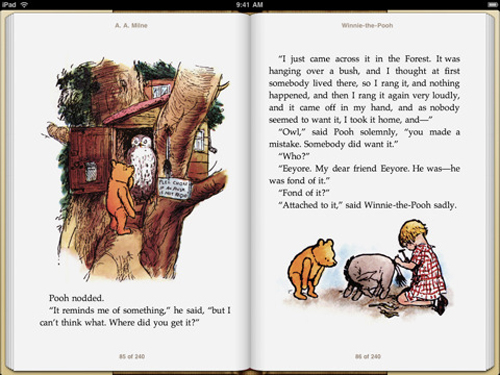


Some Attractive Features:
1. iBooks supports amazing feature like speaking a word on a page, find a word, character, or phrase anywhere in your book with the built-in search feature.
2. Users can quickly find a required page using the page navigator at the bottom of every page.
3. Users can change the font size and pick from five included type faces to make your book more easy to read.
4. Using built-in bookmarking feature you can highlight your favorite passages.
5. Download many of your favorite books from iBookStore and record on your bookshelf or browse them in a list sorted by title, author, or category.
6. Users can read a free sample of any book on the iBookstore before making it a part of your collection.
7. Dont forget to enjoy a complimentary copy of the beautifully illustrated classic, Winnie-thePooh by A. A. Milne.
Requirements to use iBooks:
1. You must have an iPad.
2. Unfortunately, the iBookstore is not available to customers outside the United States.
3. You must have an iTunes Store account to download from the iBookstore.
4. iBooks only supports books published in the ePub electronic book format.
5. To add ePub documents from outside the iBookstore to iBooks, they must be DRM-free and synced to iPad using iTunes 9.1 or later.