Contact us for Sponsored Post or to Promote your Services or Products here.
Click here to buy secure, speedy, and reliable Web hosting, Cloud hosting, Agency hosting, VPS hosting, Website builder, Business email, Reach email marketing at 20% discount from our Gold Partner Hostinger. You can also read 12 Top Reasons to Choose Hostinger’s Best Web Hosting.
Streaming videos online is a great way to kill our time. We often find humorous videos that are bound to cheer us up. Sometimes we stream these videos to view what our favorite band’s latest video looks like; at other time we stream educational video to increase our general knowledge. Whatever the purpose of our video streaming, YouTube is the site to visit.
At times after watching a video on YouTube, users want to download it and store it on their computer for easy access later (and also to transfer it to their phone or portable media player). There are numerous tools to perform this task; their main functioning involves the user entering the YouTube video’s URL in the program, after which the download proceeds.
Usually when we want to download multiple YouTube videos, they are all related. Normally these videos can have their shortcuts on the same page as the video we are viewing. Taking advantage of this fact, the developers of BYTubeD created a new way to obtain YouTube videos.
BYTubeD is a browser addon for Mozilla Firefox. The addon install quickly. Suppose you are watching this video and want to download all the related videos; the links of these video can be seen in the current webpage (in the bottom right pane).

In Firefox, we click on Tools -> BYTubeD.
(Ad)


The addon’s window pops up which contains all links of the YouTube videos available on that webpage.
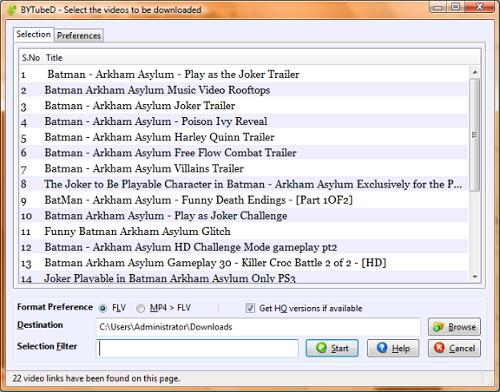
In this popup we can select the videos to download, output video format, and whether or not we want to obtain the high quality version. After choosing our videos we click on the “Start” button to proceed with the download. After displaying us a message of “successful processing” the addon begins the download in Firefox’s own download manager.

I personally found the addon to be quite helpful in batch downloading any type of YouTube videos. I am positive BYTubeD will serve any user as well as it served me.

Umar is a full time blogger who loves discovering and reviewing news and online services that are valuable to his readers. He blogs at www.techcityinc.com