Archive for May, 2010
How To Organize Yourself Using Opera With Agenda
I have just finished writing about an Opera widget which Google users will appreciate. Now, on my path to discover great widgets for Opera, I have found yet another tool that will help anybody who likes to keep a virtual diary.
This tool is an Opera widget appropriately titled Agenda.
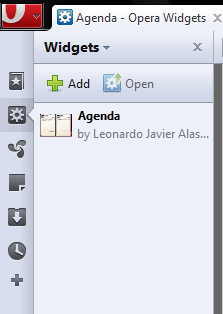
Agenda is our very own virtual diary. We can use it as an event reminder, alarm clock, and to-do list. After installing the widget, we need to open it from the widgets sidebar.

This is what Agenda will look like the first time you open it:

You can see that the form is that of a physical binder, with a page on each side representing today’s dates. We can see the yellow notepads where it is possible to store whatever notes we want to save.

There are sticky notes and can be moved around on the page.

The left page is where we can add events. First we use the calendar to highlight a date.

Today’s date is highlighted blue. Our selected date is the left one of the two rectangles. This date then becomes our page on the left.

Clicking on “Add Event” pops up a window with numerous options.

By default, the event we can add is Note. To add something else to the date, we click on the Note button and view our options.

Our options appear in a sideways menu on top. Starting from the left, these options are Note, Event, Meeting, Birthday, Anniversary, and a Yearly event.
Choosing an event enables the Alarm box.

Speaking of Alarm, we can choose for it ring on our event or an a specific time interval from right now.

A maximum of a 255 character length note can be added to each event. Saving an event adds it to the page on the left (the one we had highlighted).

In front of the time, we can see our note. At the end of the note we see two icons. The first one lets us delete the event and the second one signifies that an alarm is added to the event.
Agenda works in its own window so that you do not need to have Opera open to use Agenda.
Combining all these features of Agenda, we can easily use it as our virtual planner / diary. It will definitely be a useful widget for countless Opera users.
StickyBits: Attach Unlimited Content to Barcodes On Any Product (iPhone + Android)
Computer users share content in multiple ways. In addition to emails, file hosting sites, and social networking websites, there are other innovative ways being created to share stuff with your friends. One such new innovative sharing technique makes use of barcodes on products.
Barcodes have unique patterns to them that can act as a code. This code can be used to store any information and then be provided as a key to access that information. This is what Stickybits takes advantage of.
Stickybits is a free application for iPhones and Android-running smartphones. Imagine uploading a file on the web and giving its URL to your friends so that they can download the file. Stickybits lets users scan or print barcodes to attach information to them. This information can be in any form; you could attach a video to the barcode, a text file, photos, etc. When other people will scan the barcode using their Stickybits app, they will be able to see all that is attached with the code.
According to Developers:
What is stickybits?
stickybits allows people to attach digital content to barcodes. When those barcodes are scanned (via our iPhone or Android apps), you’ll see all the content that has been attached. What makes us unique is that all this is done in a social and fully open read/write way.
What does that exactly mean?
Imagine putting a barcode on your business card that when scanned showed your resume. Or put a stickybits sticker into a birthday card and record a personal video. Then when your friend scans it, they’ll see the video. Take that one step further and have all your friends attach videos to the same card. You’ll also get notified when it gets scanned.
It doesn’t just stop there. Something unique and strange is happening with the barcodes all around you. People are scanning soda cans, cereal boxes, beer bottles, etc. and adding digital content to them. Since each unique product shares a barcode, little communities are popping up around each of these products.

You probably had not thought that barcodes could be used as keys for our information – that is exactly what makes Stickybits so unique. On a box of a cooking ingredient, the barcode could have many recipes attached to it. A user could attach a detailed résumé to a custom barcode and then print that barcode on each of his business cards. These are only few of the endless possibilities of Stickybits.
Click here to visit Stickybits’ website . Get Stickybits for iPhone or Android.
Congratulations To The Winners Of Magic Members WordPress Plugin
Thanks to all of the participants of contest in which you could Take A Chance To Win Single License Of Magic Members WordPress Plugin. We ran the MySql random query and selected these commenter to give them Single License Of Magic Members WordPress Plugin.
Magic Members is a premium WordPress Membership Plugin that turn your WordPress blog into a powerful, fully automated membership site. This WordPress membership plugin, takes your membership site to the next level with the ability to control access to different levels across your membership site. The ability to offer different membership access to different areas, such as a download area, increases value for your membership levels.
In addition to the different levels of membership, you are also able to set different membership billing options with an unlimited amount of subscriptions. Whether you want to charge daily, weekly, monthly or even annually, you will have complete control in how your members pay for their subscriptions. For example, ‘Standard’ memberships may pay monthly, while ‘Premium’ memberships pay annually.
You may expect to pay $2,000 – $3,000 for such an easy to use, full-featured membership application that does not require you to switch to a different system. Magic Members is a fully integrated WordPress membership and subscription plug-in that quickly takes your blog from an ordinary blog to a powerful membership site.
Congratulations to all the winners from SmashingApps.Com. All of the winners will be contacted in few days. If you are not winner at this time so please be patient and keep visiting here or subscribe to our rss feed, you can follow us on twitter because we are coming up with another new great contest in couple of days.
Thanks to Magic Members for sponsoring this wonderful contest at Smashing Apps.
If you want to conduct any contest at Smashing Apps just contact us and send us all the details.
Skype 2.0 Is Here But With Lack Of Full iPad Support
It had been coming all along, but finally, Skype 2.0 for iPhone is here. The new Skype 2.0 has the ability to make calls over 3G networks. However, the down side is that Skype is offering free Skype-to-Skype calls over the 3G network only till August 2010 after which a fee will be charged. Normal Skype-to-Skype calls remain free though.
Other enhancements include improved sound quality using wideband audio (SLIK codec) on iPhone 3GS and 2nd generation iPod Touch. A call quality indicator has also been added to notify users. Also, startup times for Skype have been improved with fast access to Skype dial pad from iPhone home screen.
Despite the improvements, Skype 2.0 has a major drawback: lack of full iPad support. Although full iPad support is expected to arrive soon, it may prevent many from upgrading to Skype 2.0 and wait for the next major update which offers complete iPad support. However, for iPhone and iTouch users, Skype 2.0 is a must have upgrade.

We must say that this release definitely has some prominent updates and we recommend you to subscribe here at Smashingapps so that we can notify you of the next Skype version with full support for iPad.
Absolutely Amazing Concept Art That Make You Say Wow
One of the most unique and common forms of art on the Internet these days is called concept art. Concept art is a form of illustration where main goal is to convey a visual representation of the design before putting it into the final product. In this post, we have collected some eye popping examples of concept art that will surely inspire you and give your imagination a boost. Most of these are created with Photoshop. So let’s have a look at these excellent examples of concept art.
If you want to share more concept artworks so please comment about them below. Do you want to be the first one to know the latest happenings at smashingApps.com just subscribe to our rss feed and you can follow us on twitter. Click on the images to go from where the images has been taken and learn more about their creators and to appreciate them.
Jannisery Concept Illustration
God of War 2 Marketing Illustration
God of War 2 Demo Game Cover Art
How To Draw Simple Sketches In Opera
If you are an Opera user who has not familiarized himself with its widgets, you are missing the best Opera has to offer.
Opera has gone with a completely different direction with its widgets. Unlike Chrome’s extensions or Firefox’s addons that need the browser to function, Opera’s widgets are standalone applications that can be executed without even opening the browser. They can sit neatly on your desktop and can serve a multitude of functions.
One the more fun Opera widgets I recently discovered is Artist’s Sketchbook. It lets you easily draw simple pieces with some great sketching tools.

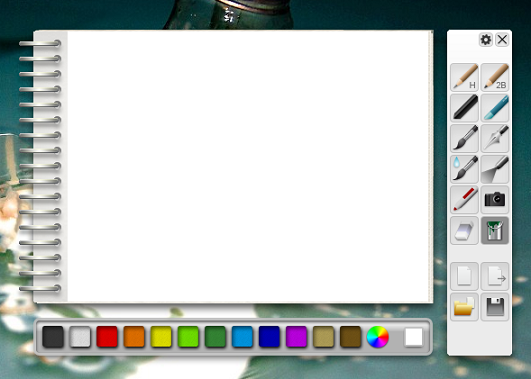
This is what Artist’s Sketchbook looks like when first opened:

Color choosers are on the bottom of the widget. If you want to choose a custom color, you can click on the circular icon top pop up something like this:

This color mixer helps you get any color you want. The right pane lets you choose a sketching tool.

You can choose from an H or 2B pencil or a paintbrush, pen, sprayer, or marker. Options for an eraser, paint bucket, and image pasting are also available in this pane. The last four buttons in the right pane let you save your work.
Options of the widget let you choose the default language and canvas type, along with modifying other options.

With these basic tools, users can create quite impressive works, depending on their artistic ability.

Installation note for Artist’s Sketchbook : After you click on the “Launch” button on Artist’s Sketchbook’s webpage and install it, you can launch it from Opera’s widgets sidebar. Alternatively you can access it from the new shortcut placed either on your desktop or in your Start menu (depending on where your Opera shortcut is).
9 Cool Websites You Need To Bookmark To Manipulate Your Photos
The most fun way to use image manipulation technology is by using it on our own photographs. Morphing our photos can produce some very amusing results which will surely entertain us. Many websites offer image manipulation services. For you all I have gathered a list of 9 such entertaining website that let us have fun with our images. Check out each entry in the list and you will definitely find something that will manipulate photos to achieve amusing results.
If you want to share more entertaining and cool websites to have fun with photos so please comment about them below. Do you want to be the first one to know the latest happenings at smashingApps.com just subscribe to our rss feed and you can follow us on twitter. Click on the images to go from where the images has been taken and learn more about their creators and to appreciate them.
PhotoFunia
PhotoFunia is another effect-adding website to add interesting and humorous effects to our photos. Visit PhotoFunia.
In20Years
In20years is a free to use website. Its purpose is to estimate what a person’s face will look like 20 or 30 years in the future. We can also choose to add the ‘drug addict’ effect for funnier results. Visit In20Years.
GetGrossedOut
GetGrossedOut is another free website, although its aim it quite different from in20years. With GetGrossedOut, visitors can upload their photos for the site to add disgusting effects to them. These disgusting effects are not ‘actually’ disgusting, since they are visibly cartoonish. Still, we can have a lot of fun with our photos. (Our pictures have the site’s logo on them.) Visit GetGrossedOut.
Fotobabble
With Fotobabble, we can upload our images and record audio with them. Each ‘fotobabble’ consists of an uploaded picture and our recorded audio. We can then share the fotobabble’s URL with our friends so they can view and hear what we have to share. Visit Fotobabble.
MagMyPic
MagMyPic will add a magazine-like look to our pictures. We upload our picture and the site puts it on a virtual magazine cover. Results look real and can easily fool our friends. Just remember to upload a high quality photo so it looks even more authentic. Visit MagMyPic.
Citrify
Citrify does not contain many humorous features, although it does let users to add very interesting effects to their photos which (at times) can be hilarious. The image above, for instance, got the “hulk” effect. Visit Citrify.
TiltShift Generator
As the name suggests, this site is a wonderful to add tiltshift effect to our pictures. In case you do not know what this is, tiltshift is the technique to have on a portion of the photo in focus thus drawing the attention there. It can be humorous if we are pointing out the humorous part of a picture by bringing it in focus. Visit TiltShift Generator.
SuperLame Word Balloon Engine
SuperLame Word Balloon Engine provides its visitors with a simple interface to add nice speech bubbles to their images. We can change the font of the text as well as the shape of the speech bubbles. Visit SuperLame Word Balloon Engine.
Wanokoto Labs for Old Images Effect
The last entry in my list is a website in Japanese. The site adds an ‘old’ effect to our photos. I had to make up its name from what I could gather from the URL. But even without knowing the language, figuring out what the site does and how it does it is quite easy. The controls can be recognized through their icons. Visit Old Picture Effect Creator.
10 Great iPhone Apps For Daily Life Usage
Even if you have countless apps already on your iPhone, you are still looking for the next best application out there. That is exactly what makes the iPhone so enjoyable – endless great applications waiting to be discovered. Below you will find a list of 10 great free iPhone applications that I have gathered. All of them are must-have apps to realize your phone’s true potential. Give each one a try.
If you want to share more useful apps for daily life usage so please comment about them below. Do you want to be the first one to know the latest happenings at smashingApps.com just subscribe to our rss feed and you can follow us on twitter. Click on the images to go from where the images has been taken and learn more about their creators and to appreciate them.

Skype is the most popular VoIP client. It lets you make free Skype-to-Skype phone calls. After installing this application on your iPhone you will be able to talk for hours with friends on Skype. The rates to make international calls and send international text messages are also quite economical.

TechCrunch named this application one of the best iPhone apps of 2009. Hey Where Are You serves the important purpose of finding your geographical location. You can also find the location of any other friend or family member who owns an iPhone. This app is a great tool to help you out when you are lost or to find out where your friends are.

Evernote is your personal notepad that stores a lot more than just notes. You can take notes down in the form of text, pictures, and voice messages. The application syncs your data to your computer seamlessly. People who need a tool to note down things they do not want to forget will find Evernote a great solution.

While some cellphones have a built in flashlight, the iPhone does not. A flashlight can be extremely helpful in dark places e.g. when you are trying to find something under the seat of your car. Flashlight is a wonderful iPhone application that fills the screen with white light; resultantly the iPhone acts as a flashlight. You can vary the screen color to get fun effects with your flashlight.

This app for iPhone has tremendous use. Instead of shaking your phone to discover a good Wi-Fi signal, you can Wi-Fi Finder to find many free and paid Wi-Fi hotspots. The app has indexed over 280,000 locations in 140 countries worldwide.

If you transfer your iPhone photos to your computer for editing, then you will definitely find this app to be useful. With Photoshop.com Mobile you can make important edits to your photographs. Common tasks such as Crop and Rotate can be performed through simple gestures.

This app’s introduction describes it perfectly: “TweetMic Lite is a simple and intuitive Twitter client app that allows you to make high-quality audio recordings or “Tweetcasts” and publish them directly to Twitter. There is no limit to how much you can record and you don’t need to sign up for any additional service to start using TweetMic.” Twitter addicts cannot afford to miss this app.

Instead of installing different apps for each game you want to play, you can get All-in-1 Games to get a great little games package. The games include reverse, checkers, chess, tic-tac-toe, and many others. The games are multiplayer ones and are played online.

You can now enjoy the classic game on iPhone. The iPhone version comes with all the original elements of the game and is as enjoyable as ever. A lever at the bottom of the screen is what gives players control over Pac Man’s motion.

Just like Skype offers unlimited calls, Messagey offers unlimited text messaging. Users can text to any number in the US. There are numerous interface customizations that make Messagey a great app to have.
Supercharge Your Google Reader & Read Your Feeds In Style With FeedSquares (Chrome Extension)
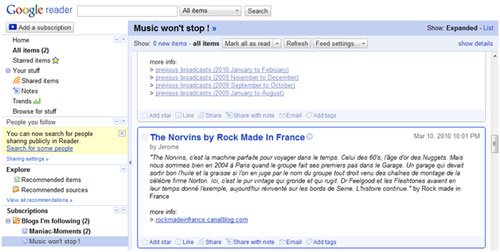
To read updates on the Blogger pages I am following, I use Google Reader. If you are unfamiliar with Reader, it is Google’s service that lets us read any Atom and RSS feed online or offline. Every since its main release in September 2007, it has been tried out many Google users and is now quite popular. This is what the Reader interface normally looks like:

Although I am happy with the convenience that Reader provides (the ability to read all our Atom plus RSS reads on a single dashboard) I feel that Reader’s interface could be revamped and made more visually appealing. One tool that achieves this is FeedSquares.
FeedSquares is a great browser extension for Google Chrome. The first change made by FeedSquare is the addition of a pink icon to Chrome’s address bar.

When this pink icon is clicked, a page like this is opened in a new Chrome tab:

The squares represent each blog / feed we are following or subscribed to (excluding the square titled TOP PICKS, ABOUT US, Rocket in-Bottle, and Friend’s Shared Items). By clicking on any square of a blog / feed, we open its feed beneath these squares (see image below).

The feeds are listed from newest to oldest (the newest is left most). Clicking on any feed opens it quickly in a pop up window right there, above our feed-line.

Blog entries can easily be read in this pop up window. In case we want to head on over to the post’s original link, we can click on its title in the pop up window (marked in the red region in the image above).
When combined with FeedSquares, Google Reader is a wonderful service that provides its users with a great online reading experience. Click here to get FeedSquares for your Chrome.
A Quick Look At What Google Chrome OS Can Do
Google is designing an open source operating system called Google Chrome OS. This OS is exclusively designed for web applications. So, if you spends most of your time on web/internet then this is going to be the fast, simple and more secure computing experience for you. This OS was announced on July 7, 2009 and it is expected to be released during second half of 2010.
On January 25, 2010, Google posted notes, images and a video of a conceptual design showing how a Chrome OS user interface might look on a tablet PC with a 5-10 inch screen. Google Chrome OS is initially intended for secondary devices like netbooks, not a user’s primary PC, and will run on hardware incorporating an x86 or ARM-based processor. While Chrome OS will support hard disk drives, Google has requested that its hardware partners use solid-state drives due to their higher performance and reliability, as well as the lower capacity requirements inherent in an operating system that accesses applications and most user data on remote servers.
Google Chrome Alpha Release
The Chrome OS alpha release includes an applications page, launched by a button in the upper-left corner of the screen. The page links to Google web applications, including Gmail, Google Apps, and YouTube, as well as other applications, including Yahoo! Mail, Pandora, Hulu, Facebook, and Twitter. Chrome OS currently also provides a calculator, clock, battery indicator, and network status indicator. Google will integrate Adobe Flash into Chrome OS.

Security
Not as in traditional operating systems, Google Chrome OS does not trust the applications/programs you run. Every app is stored in a security sandbox which makes it harder for malware and viruses to infect your computer. Chrome OS hardly trusts itself. So, whenever you restarts your computer the operating system verifies the integrity of its code. If your system has been compromised, Chrome OS is designed to fix itself with a reboot. Would you like to know more about Security? watch this.
Speed
Google Labs are taking out every unnecessary process, optimizing many operations and running everything possible in parallel. This means users can go from turning on the computer to surfing the web in a few seconds. Their obsession with speed goes all the way down to the metal. They are specifying reference hardware components to create the fastest experience for Google Chrome OS. You can view the demo of speed here.

Easy and User friendly
It’s all about the web. Every app is a web app. The whole experience takes place within the browser and there are no conventional desktop applications. This means users do not have to deal with installing, managing and updating programs.

Participate
You can download the source code of Google Chrome OS from here. Google Chrome OS will be available for consumers this time next year. Sign up here for updates or if you like building your operating system from source, get involved at chromium.org. You can watch this video to know more about Google Chrome OS.