

Contact us for Sponsored Post or to Promote your Services or Products here.
Click here to buy secure, speedy, and reliable Web hosting, Cloud hosting, Agency hosting, VPS hosting, Website builder, Business email, Reach email marketing at 20% discount from our Gold Partner Hostinger. You can also read 12 Top Reasons to Choose Hostinger’s Best Web Hosting.
Today, we are listing Six Powerful Free Disk Defragmentation Tool. These would be very helpful for you to remedy system sluggishness and crashes caused by disk fragmentation. If you are designer, developer, office worker, manager, supervisor, student, home user, etc but we hope that these are worth checking for all of you. Most of them are not very well known but they are really amazing in respect to their features. Just take a look at them and share your thoughts here.
You are welcome if you want to share more free Disk Defragmentation Tool that our readers/viewers may like. Do you want to be the first one to know the latest happenings at smashingApps.com just subscribe to our rss feed and you can follow us on twitter and do not forget to become our fan on facebook as well.
UltraDefrag 4.0

UltraDefrag is a powerful disk defragmentation tool for Windows. It is the first open source defragmenter with full support of system locked files defragmentation. Actually all files including registry hives and paging file can be processed by UltraDefrag during the Windows boot process. UltraDefrag is fully compatible with Windows NT 4.0, Windows 2000, Windows XP, Windows Server 2003, Windows Vista, Windows Server 2008, Windows 7 and all of the 64-bit editions of Windows.
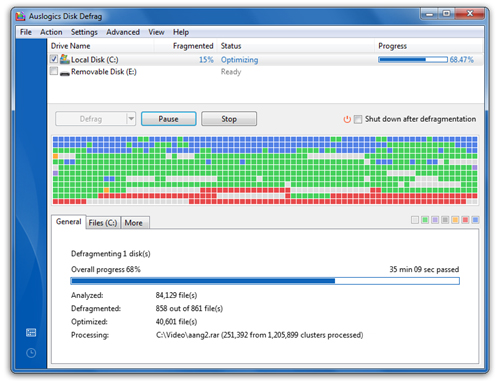
Auslogics Disk Defrag was designed to remedy system sluggishness and crashes caused by disk fragmentation. It will help you get the maximum performance out of your expensive hardware investments. The new version can also consolidate free space and optimize system files placement. Disk Defrag is absolutely free for home users.
(Ad)


You can use Defraggler to defrag your entire hard drive, or individual files. This tool is unique in the industry. This compact and portable Windows application supports NTFS and FAT32 file systems.

PageDefrag uses advanced techniques to provide you what commercial defragmenters cannot: the ability for you to see how fragmented your paging files and Registry hives are, and to defragment them. In addition, it defragments event log files and Windows 2000/XP hibernation files (where system memory is saved when you hibernate a laptop).

MyDefrag is a disk defragmenter and optimizer (a maintenance utility to make your harddisk faster) for Windows 2000, 2003, XP, Vista, 2008, Win7, and for X64. It is freeware, no time limit, fully functional, no advertisements. Fast, low overhead, with many optimization strategies, can handle floppies, USB disks, memory sticks, and anything else that looks like a disk to Windows.

WinContig is an easy-to-use stand-alone defragmentation tool that doesn’t create any installation directories or Registry entries on your computer. Its purpose is to quick defrag files without the need to defrag the whole disk. In addition, WinContig allows you to group files into profiles, and also it accepts a number of optional command-line switches that you can use to control how the program operates.

Greetings! I’m An Jay, and I’ve been running SmashingApps.com since 2007. Over the years, I’ve poured my passion into web design, graphic design, and SEO—helping readers discover the best tools, tips, and techniques to make their online projects shine. I believe in keeping things simple, practical, and results‑driven, and I’m excited to share everything I’ve learned with you.













![Logo Creator [PC Online code]](https://www.smashingapps.com/wp-content/uploads/2024/01/71KrxXpi78L._AC_SY741_1-150x150.jpg)











